
Words: 2148
Time to read: 11 minutes
Last week was not the greatest week I’ve ever had, but as they say, things could always be worse, and since things have smoothed out a little I’ll agree . . . for now. Let me get the “real” issues out of the way first and then I can tell you about a few personal things that haven’t exactly gone my way either.
Newsletter/Email Authentication and adding SPF and DKIM records
I’m subscribed to Holly Darling’s newsletter and she’s an expert in email marketing. I bought her MailerLite tutorial a couple of years go during a Black Friday sale. I haven’t gotten around to watching it *wincing* and with the migration I completed a few weeks ago maybe it won’t help me much now anyway, but it signed me up to her newsletter. In it, she outlined what you need to do to so Gmail and Yahoo will keep delivering your newsletter to your subscribers who use them as their email service provider. Luckily, she also has a blog, and you can read the article here:
https://pages.hollydarlinghq.com/posts/what-the-heck-is-a-dmarc-and-why-you-should-care-1
I knew changes were coming, but I didn’t realize they would be coming quite so soon. Most of these changes need to be completed by February 2024 (which is poor timing if you wanted to migrate to the new MailerLite because you also have to do that by the first of February), and I do not like waiting to do things until the last minute. That just begs for things to go wrong with no time to fix it–and I had plenty go wrong.
Way back when I started blogging, I let WordPress handle my hosting even though I was warned my site wouldn’t have all the bells and whistles that it could have if I found a different host. I didn’t want to mess with GoDaddy, Bluehost, GatorHost, SiteGround or anything else and didn’t need anything fancy. I didn’t start blogging to sell books–thank goodness too, because this blog does not sell books, and that’s fine. People who read this blog want to sell their own books, and I’m happy to help if I can. So, I was a little concerned when all this news started circulating that I was going to have to authenticate my newsletter account. I wasn’t sure if I even could with WordPress, but fortunately, the answer is yes.
I decided to start a newsletter last summer, no, was the summer of 2022 since 2023 is gone now. The first thing I did was pay for an email address linked to my website. Even back then people said not to use a regular email account, and I paid for a G-Suite account. You can email me at vania@vaniamargene.com if you want. I’ll get it eventually (my apologies to Debbie who wrote me some really nice things about A Heartache for Christmas that sat in my spam folder for two weeks). WordPress made that easy to do as well, and I pay $72 dollars a year for it. I looked up all my renewal notices and I pay $187.00 a year to WordPress for this site ($96 for the Explorer plan, $72 for the G-Suite account, and $19 for my domain name), and $66 dollars for my vmrheault.com author site ($48 for the personal plan and $18 for my domain name). It’s no wonder I’ve barely been breaking even doing this author thing. I pay WordPress a decent chunk of change, but websites are necessary and the email I set up to go with my newsletter is a must (and it will be for everyone after February 1). I thought I would have some trouble because I decided to write under a pen name, but I’m not hiding who I am and even give my first name in my welcome letter, so it’s not a big deal my newsletter shows they come from vaniamargene.com. I only set up a separate author website because my 1st person books are very different than my 3rd person books and I don’t promote the books I was writing under my full name . . . though I probably still should.
Anyway, long story not-so-short, I thought I was in for some trouble, but if you also host with WordPress because you were as confused as I was, don’t worry. I can show you were to go.
Click on your profile name:

You’ll get a new menu. Click on manage domains or it might say just one domain. I have two, as I just stated above.

Click on the one you want:
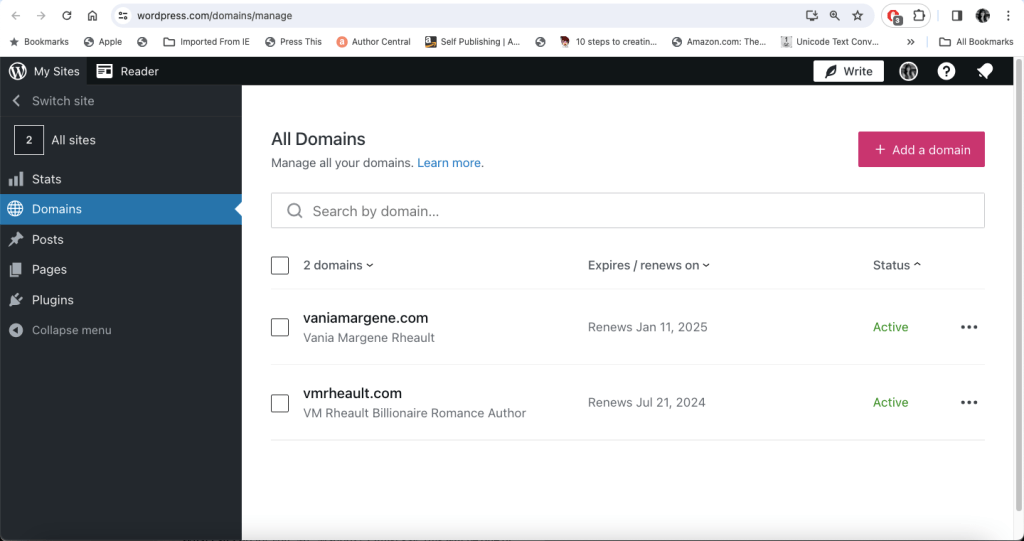
Scroll down to DNS records. Click it to make it expand then click Manage.


This is where you go to enter the information that your newsletter aggregator will give you. Click add a record and that opens up a new menu where you can chose the type and that will allow you to enter the name and value. I honestly don’t want to go any further than that to capture screenshots because when I was adding the information MailerLite was telling me to enter, I messed something up and took my whole site down for over 24 hours and didn’t even realize it. I was really lucky that WordPress’s chat was available and a Happiness Engineer knew exactly what I did wrong and helped me fix it in only 10 minutes, but I missed out on over 200 hits while it was down. I apologize to anyone who was trying to find the instructions on how to make a full book cover wrap in Canva (I know it’s all you guys love me for haha).
The good news is that DNS menu is going to look similar no matter where you host your website. The information your newsletter aggregator might be a bit different, but just copy it from them and paste it where it should go in your website’s DNS records.
Here is the MailerLite DNS tutorial.
Next you’ll want to add the DMARC, and what’s really cool is that DMARC is the same for everyone. I copied what Holly put into her domain and you can copy what I put in mine: TXT is the type, _dmarc is the name, and v-DMARC1: p=none; is the value. MailerLite also has a tutorial for this, but if you did the SPF and the DKIM, then this will be more of the same.
I didn’t do it the way they did, but what I did worked and I’m not going to go back and change it.

If you want to check your DMARC and see if you pass, you can use this free site: https://dmarcian.com/dmarc-inspector/

Holly goes through this in her video that she shares in her blog article, and she tells you how you can know if what you did worked by sending yourself a test newsletter email.
This is what my content looked like before I did the authentication and the DMARC:
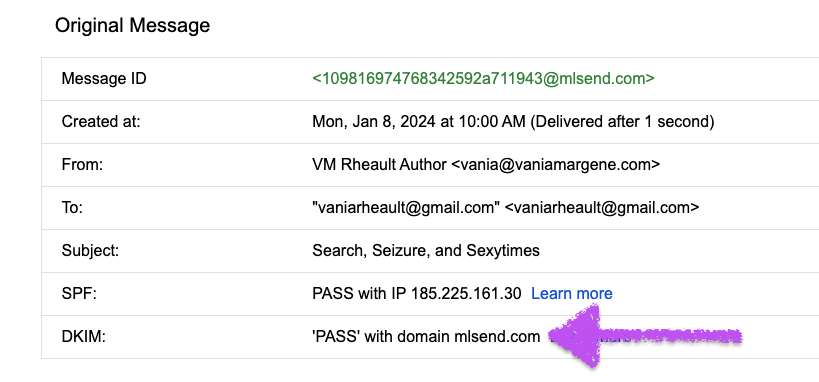

What all this does is tell someone’s email platform where your email is coming from and you want it to say your website, not your newsletter aggregator.
My test email came to me all right and my website is back up and doing okay now. I won’t know 100% for sure if everything is fine until this blog post posts correctly, my next campaign is sent and opened, and February comes and goes and doesn’t cause any trouble.
It’s really difficult to stay in compliance with all of these things and I’ve seen authors who have just given up having a newsletter. I can understand that, especially after tallying up all the money I put into WordPress alone. I probably don’t need more than a personal package for this site but I upgraded when I thought I needed more. Saving $50.00 a year I guess isn’t that big of a deal, but I’ll consider it if I ever get to the point where I have to pay for MailerLite. So far I’m under 1,000 subscribers and likely will stay that way since my Bookfunnel integration went down the drain with the MailerLite migration to the new platform. Though, I’m saving money not running ads to my reader magnet anymore, and that money can go toward ads to the books I’m actually selling.
This wasn’t meant to be a detailed tutorial because there are so many different website hosts out there and so many newsletter aggregators too. I feel like everyone is scrambling to get this done and hosts and newsletter support are familiar with everyone’s troubles. Reach out to your support if you need to. I don’t send many emails but I want to stay in compliance so that the emails I do send are delivered properly.
If you run a newsletter and want to test the spammy-ness of it, this is a fun website. Send a test email to it and see what your score is. https://www.mail-tester.com/
Promos
Because I downgraded my Bookfunnel account, I promptly spent the money on a BargainBooksy through Written Word Media. I’m advertising Give & Take, the first real promo I’ve done for that book and the trilogy since I redid the covers and edited the insides. I dropped the price of book one to .99 and I’ve been selling a few here and there. I’m running a Facebook ad to it, and I’ve sold 29 ebooks since the first of the year. I’ve also had 5907 page reads which equals out to about 15 books. Hopefully the BargainBooksy will kick that into gear and I can finally move my trilogy. It really is a shame I dropped the ball with the covers when I released them but I didn’t know the insides were so messy, so giving them an overhaul was the right choice. If you don’t remember what my covers were like before, here’s the comparison:
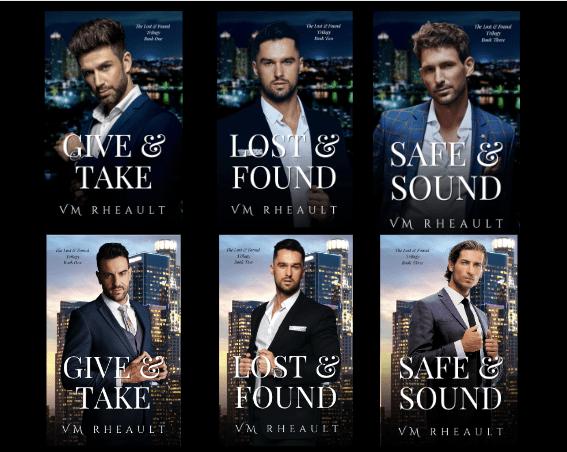
I’ll never get that first year back, but the insides weren’t my fault. I grew as a writer and spotted the flaws after the fact. That’s all you can really do, and as an indie, I have the freedom to fix the mistakes that were made. Now that I know what my tics are, I can write better books moving forward.
King’s Crossing Series Update
Not much new to report there. I’ve been distracted with newsletter changes and glitches, not feeling the best, and my son started a new job and I’ve taken on the role of unpaid taxi driver (he gets anxiety behind the wheel and doesn’t have his driver’s license). I’m working on Book 3, rewriting sentences, smoothing out scenes, adding words, deleting sentences. I think what I’ve learned in going back and redoing the trilogy and now this series is that taking time away from your WIP is very helpful. You can see more clearly what’s missing. I’m only on chapter eight of twenty-four, and I’ve already added 3k words. I’ll probably double that by the time I’m done. But it sounds richer, the scenes don’t sound as choppy. I’ve spent three years with these characters and I’m adding more emotional depth. This is slow going, but I’m pleased with how they’re sounding so far. I’m also playing with covers, but I’ll do a separate post about that later.
Personal Adventures
Last Monday I woke up to my back bumper ripped halfway off my car. I don’t know if someone hit it or tried to pull it off, but either way, they caused over 2k worth of damage. I just paid it off, literally, a month prior, so this was not the way I was hoping to celebrate. Luckily, I pay for full coverage and the car is drivable until I can get into the body shop and have it repaired. On top of the migration issues I was having then still not feeling all that great, I didn’t need this on my plate. Fortunately, I was able to get into the Mayo Clinic in Rochester, MN sooner than I thought, and I only have to wait three weeks to hopefully get some answers. My deductible would have paid for that trip, but it is what it is. Things happen. It could have been worse, and I’m thankful I can still at least drive it. My sister also experienced some car issues, and I had to pick her up and take her home after the tow truck towed her car to the dealership for engine trouble. 2024 hasn’t been kind, but I’m trying to keep my spirits up.
That’s all I have for this week, but at 2,100 words, I suppose that’s enough. I just hope that all I did for my newsletter compliance will suffice and that I don’t have to do anything else with my newsletter for a long time. My promo for Give & Take runs on Thursday, the 18th, and if you want to see what it looks like, you can subscribe to the BargainBooksy newsletter. They’ll drop you emails telling you what the bargain books are for the day.
I’m tired, and even a cup of coffee won’t fix it.
Until next time!
Discover more from Vania Margene Rheault
Subscribe to get the latest posts sent to your email.

 Vania Margene Rheault
Great job on the tutorial for the DMARC record. Mine was pretty easy, thank goodness. An email to my domain/server provider with the info and they did it for me within minutes. Good luck on your BB promo! I’ll make a post to promote the sale on my FB promo page tomorrow. I’ve been considering doing one after not doing any of them last year. But with new covers, I guess it’s time to plunk some money on NL promos. So sorry to hear about about your bumper and I hope the Mayo clinic will have some answers for you.
This is Liz, btw, since I’m apparently signed in on my other account and I’m too lazy to switch.
LikeLiked by 1 person
Hi, Liz! I hope you’re doing well. I read your 2023 recap and it sounds like you had great year, and all your covers are gorgeous! Definitely do some promo to get them out there! Here’s to a prosperous and productive 2024!
LikeLike
Thanks so much for this, Vania!
After putting it off for ages, I’m going to sit down and get this done at the weekend.
Thanks again for the advice. 🙂
LikeLiked by 1 person
You’re welcome. I hope the process is smooth for you!
LikeLike