
There are a lot of resources out there, some free, a lot paid, and you can lose track of where they are and forget them if you ever need them. I thought I would put together a short list of the little out-of-the-way resources that you might want to bookmark in case you ever want to use them. (As as always, there are no affiliate links in this post.)
The first one is one that I use a lot, and it’s a site by Creativindie’s Derek Murphy (https://www.creativindie.com/). The 3D Cover Creator doesn’t need special software to use–all you have to do is upload your book’s cover, and spine, depending on the mockup you choose, download to a PNG for the transparent background, and you have a mockup for all your social media graphics. https://diybookcovers.com/3Dmockups/
What I really like about this site is during the design process, it’s a cool way to test if your book cover is going to look good. This is a graphic I made for Instagram when my Christmas novel came out.

The next resource I like to tell authors about is by Dave Chesson and his team at Kindlepreneur. I love the QR code generator. It’s absolutely free and you can add it to bookmarks and any other marketing paraphernalia you create. I love VistaPrint’s quality and their prices are decent. Add a QR code pointing potential customers to your website or Amazon author page. You can even add a logo to the middle. For lack of anything better, I added my imprint logo to this one and it points to my pen name’s author website.

Another free resource Dave and his team provides is a barcode generator. I don’t use this because I just let KDP and IngramSpark add the barcode to my books for me, but if you wanted your price embedded into the code the way Barnes and Noble requires you to do if you want your books in their stores, this is a free and not very confusing way for you to do that. Create it and add it to your book’s cover before uploading and publishing your book. Here’s a barcode I created for one of my books, but I’ll just delete it as I won’t need it. You can find the barcode generator here: https://kindlepreneur.com/isbn-bar-code-generator/

Kindlepreneur has a lot of great resources on their website. Check out all they have to offer and sign up for their newsletter. https://kindlepreneur.com/
The next resource I use quite a bit when I’m looking for comparison authors for my books is https://www.literature-map.com/. The only con about using it is it doesn’t bring up indie authors unless they are bestsellers or have been picked up be a publisher like Amazon’s Montlake. Type in the name of an author that you want comps to and watch them populate. I put in Jodi Ellen Malpas, as she’s one of my comp authors.

This is a great tool for keywords for ads, finding your target audience, or just looking for something to read in your genre.
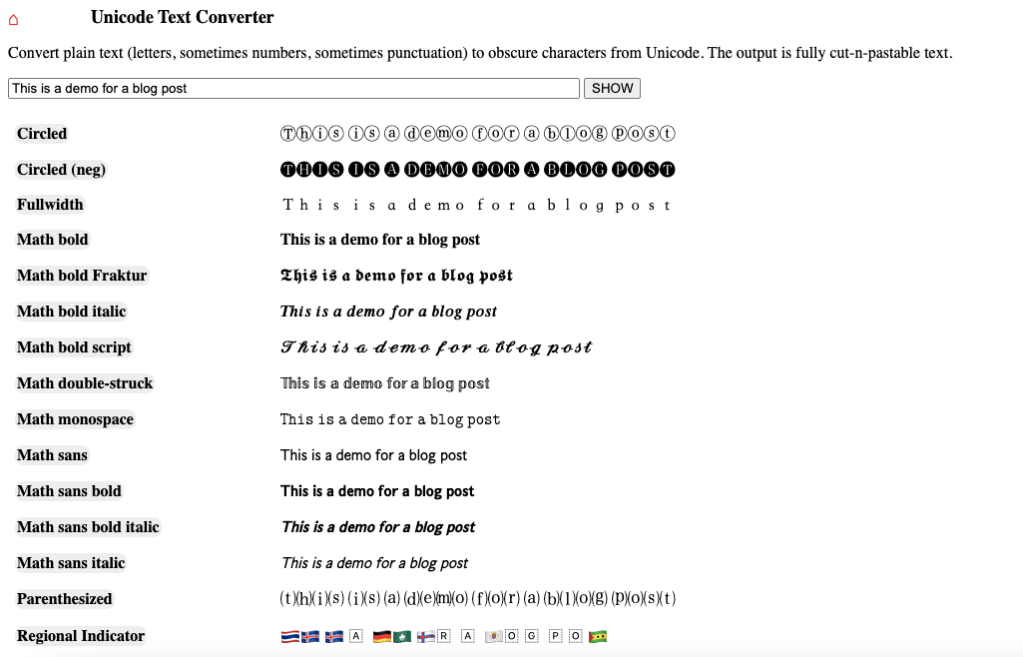
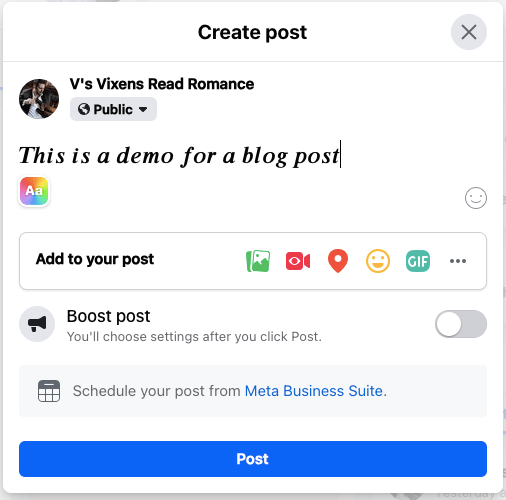
One of the last things I use almost on a daily basis is the Unicode Text Converter. https://qaz.wtf/u/convert.cgi?text=t If you’ve ever wondered how to bold and or italicize Facebook post text or Twitter tweets or Instagram text, this is how. Enter the text you want and click SHOW. Simply copy the style you want and paste where you want it to post.
These are little things that I use a lot that I thought you would like to know about, too. I don’t have much else for this week. My personal drama has seemed to have died down, and I’m happy about that. I finally finished editing the third book in my series and started on number four. I’m still stumbling upon a few scenes where I rushed, but I’ve always liked this couple just a little bit better and reading these last three won’t feel like such a chore. I still don’t have my car back from the auto body shop, but once I do, I feel better about that, too. On Wednesday my daughter, sister, and I are going to dinner and then to watch Titanic at the theatre. My daughter is 18 and has never seen it before, so I’m excited to see what she thinks. I said at least she can see where all the memes come from.
One last thing–I made a February calendar of social media prompts. I thought I would share it and you can save it if you need something to help you post next month. I bumped up the DPI so you can print it too, if that something you do, but I think the sizing is kind of odd. I’m going to try to stick to it since I was the one who made it. My Facebook author page is nothing but tumbleweeds, and I’d like to bump up my following there and get comfortable posting. I hope you all have a good week!
Until next time.

Discover more from Vania Margene Rheault
Subscribe to get the latest posts sent to your email.

 Vania Margene Rheault
I always enjoy reading your blog, and this is a great resource. Thank you!
LikeLiked by 1 person
Thank you, Melissa! I appreciate that very much! Have a great week!
LikeLike
Thank you! I’m sharing this with other author friends of mine. I also love all that Dave Chesson is doing for our indie authors.
LikeLiked by 1 person
Dave is so great! I love all he does for us. 🙂 I hope you found this post useful!
LikeLike
Omg, I had like 17 Titanic posters on my bedroom wall (from a book I had bought), and I had such a huge crush on Leo! I must have had like every magazine he was on the cover of. I finally got rid of them last year. hahaha! Thanks for the resources! I like the book cover mockup thing. I’ll have to check that out. -Melody
LikeLiked by 1 person
You’re welcome. The cover mockup site is worth its weight in gold. I use it all the time!
LikeLike