#Smutchat Self-publishing giveaway!

Thanks for participating in #smutchat tonight! I hope you had fun learning about the self-publishing industry!

The giveaway tonight is How to Self-Publish for Under $100 by Cinquanta Cox-Smith.

publish under 100 dollars

Self-publishing can be expensive–pick and choose wisely!

Thanks for playing! Have a lovely evening!

a Rafflecopter giveaway

Things I Learned So Far This Summer About Writing:

I’ve had an interesting summer so far. Here are some of the highlights:

Don’t fight with CreateSpace.
I didn’t have the knowledge to bend CreateSpace to my will.

witch-2501446_1920
This doesn’t mean that I never will, but I had to back down on things I wanted in favor of time and simplicity. Does that mean I won’t try again? Nope. I’m tenacious like that. But I may have more patience with a project that hasn’t been staring at me in the face for a year.

I can’t wait to try Amazon Ads!
I’m reading Mastering Amazon Ads by Brian D. Meeks. He’s hilarious and makes trying the ads sound profitable and so much fun. He discusses using them in a way that does not make them sound costly or scary at all. Unfortunately, you cannot use AMS (Amazon Marketing Services)  for erotica so I won’t be able to use them for Summer Secrets. But watch out when I release my Tower City Romance trilogy!

I get bored easily.
This may sound blasphemous to writers who are so in love with their characters they never want to let them go. Not me. I’m 7,500 words into the third (and last) Tower City Romance book and I just want it done already. It could be because the first in the trilogy was a NaNoWriMo project I’ve spent two years fixing. So these characters have been with me for a while. Regardless, I’m ready for new characters, new plots, and new adventures.

tower city logo


My #smutchat participants were tired of chatting about the writing craft.
Last Thursday I had the best chat ever. We talked about building your writer’s platform and it was a big hit. It was my most popular chat though I am still having trouble persuading people to enter the drawing for the writing resource. I may need to do a poll and see if an e-reader version would be a better bet. Maybe people don’t value a paperback as much as I do, or maybe people are hesitant to give me their mailing address. Nevertheless, it was a great chat, and I am so grateful everyone had fun.

whatsapp-interface-1660652_1280Summer is 66% over, and I am right where I want to be writing-wise.
I finished Summer Secrets, and I’m on track to publish my Tower City Romance trilogy in the fall. Maybe not all three–but releasing them even a month apart gives me more time than I need to finish the last and start the stand-alone I want to write and release very early next year.

The sun shining outside isn’t the only thing looking bright.

pretty-woman-1509956_1920

Tell me how your summer’s been going!

CreateSpace Adventures Continue

Monday I received my proofs from CreateSpace. For the past week I’ve been going through the first one (Novellas 1 – 3) editing them, looking for typos, and checking formatting. It’s taking a long time, and today I resubmitted the first one again. I found some typos (probably not all of them, but c’est la vie) found where some ellipses marks were broken, a fragment that should have been deleted. That kind of thing. There was also a novella that was spaced at 1.5 when the rest was single spaced, so I fixed that and lost about ten pages. I had to redo the page setup and adjust the spine to reflect the page loss. girl-792039_1920

But I am making progress, and I’ll be very excited when I’m finished reading these and submitting these for the last time.

It does make me wonder if I’ll ever get faster. If I’ll ever be able to write a book, read through it once, submit it, give the proof a quick once-over, and hit approve. This is only my second go-around so I shouldn’t be too hard on myself.

And I’m proud of myself that I’m not rushing through this. It’s cool to hold my books, but when someone else holds them, I want them to be as perfect as I can make them.

The month is slipping away and I was hoping for an August 1st release. If the proofs can come back without needing any tweaks, I might be able to do it.

Wish me luck.

What to Think About When Writing and Publishing a Series

There is a lot to consider when writing and publishing a series. I wrote a novella series called Summer Secrets. The collection consists of six novellas—the shortest being 25,000 words, the longest 32,000. I wrote them one right after the next without a break. The novellas each feature a couple and they are chronological—the next book picks up right where the last leaves off. I made a lot of decisions while I was writing them and one decision I had to make right away was how I was going to publish these. Did I want to paperback each novella? How much money did I want to spend on them? (I pay for photos for my covers and my own ISBN numbers.) Maybe I just wanted to publish them through Kindle Direct Publishing. When should I publish? Creating a cover on Canva.com and uploading it and hitting publish on KDP would take less than 24 hours.

I had to think if this was the way to go. Plenty of authors do it. Release, write the next, release, etc. but this strategy requires some thought. How long will it take to write the next book? How long do you want your readers to have to wait if they are eager for the next book? How will you use the time between books to market and build anticipation? What’s your publishing plan?

It takes about a month for me to write a novella, so I was faced with these questions not too long after I decided to write my series.

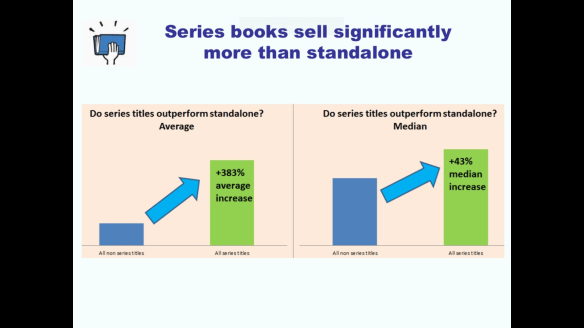
There’s no doubt that when you’re writing and publishing (in romance in particular), a series is the way to go. Smashwords released their 2017 survey that said books in a romance series sold way better than standalone books. That’s reason enough to think about writing a series. But Smashwords doesn’t tell you the best way to publish them. (Though they did favor setting up a pre-order for the first one, and pricing it for free. I’ll link to the study at the end of the blog.)
2017-07-17 (2)

Let’s list some pros and cons between waiting between books and releasing your series at once.

Pro: You can build anticipation for the next book through promos online.
If you have fans and can reach them through social media and email list, this may work very well for you.

Con: If you wait too long to release the next, your fans will forget about you.
This may not happen if you can reach your fans. But if you’re just starting out like I am, you may not want to run the risk of readers forgetting about you or waiting until the series is complete.

Pro: If you have one or two books published, you can take a break.

Con: That “rest” can turn into months—or years—because you realize you’re tired of writing them and don’t want to finish, or you get involved in a different story and you never go back to your series.

Pro: You can fix consistency issues before you publish your books. Or if you’ve written yourself into a corner, you can fix it because your books aren’t “out there” yet.

Con: You have to have a ton of patience, because how great is it to finish a book and hit publish?

Pro: Your books will have the same “feel.” Your voice will be consistent if you write and publish them at once. (We’re constantly developing and fine-tuning our voice and craft. If you wait months or years between books, they may sound different as you cultivate your skill.)

Con: Editing takes a long time, and you’re going to bog yourself, or your editor, down, if you give them your whole series at one time.  My editor took a while to get through all six novellas. It added a lot of time to my publishing schedule. There’s no doubt she could have gotten through them a lot faster had I given them to her one by one.

Pro: If you give them to your editor all at once, you’ve given them to her/him in their best possible shape. I know waiting and editing them more before I turned them over gave me time to make changes with my consistency, etc. It’s better I fix mistakes myself than pay an editor. It’s just respectful anyway to give your editor your best possible work.

Con: If your book doesn’t sell, you won’t know why. It may be because the rest isn’t released yet, or maybe because you didn’t do any promotions. Maybe it’s just because you’re a new author and you don’t have an audience yet. You can’t let this get you down and discourage you from writing and/or releasing the next book. That would be a downer to you and to the people who did buy your first book.

In the end, I did decide to publish them all at once. I split them in half to paperback them—novellas 1-3 in book one, and novellas 4-6 in book two. I felt like this was a good option because I definitely wanted to offer a paperback—I always will for all my books. But holy cow, there was no way I wanted to format and create covers for six novellas, and CreateSpace would have made me set their prices too high (for novellas) for anyone to buy, anyway. I’m going to release them the same way on the e-reader as well. It was important to me that my readers read them in order. In some series it’s okay if you read them out of order because they only deal with the same people; the plot of one book doesn’t necessarily depend on the next. A reader needs to my novellas in order or they won’t make sense. Publishing them bound together was a way to make sure this happened.

While the trilogy I’m writing right now won’t depend on each other for the plot, I’m still thinking of releasing them all at the same time. Number one is done, two is being edited by me, and three I’ve just started writing. Because Summer Secrets isn’t out yet, I feel I have some wiggle room. I’ll release my novellas, enjoy that release for a while and then publish my trilogy. Before I publish my trilogy though, I would like to have another book almost done—I have a standalone I would like to write and be ready to publish a few months after my trilogy is released. (Oh my God am I drooling to write new material!) It would be great for me if I could continue to release something every three to four months. By this time next year, I would love to have a decent backlist built up.

Everyone’s publishing plans are different and I encourage you to think ahead to what you want to do with your books and your writing career.

Here is the Smashwords Survey.
Another article on how to publish a series is here.

Let me know what you think.

Until next time!

The Right Attitude to Move On

I work in a call center typing for the deaf. There are lots of them out there, so I don’t think I’m going to out my work location. If you put together where I live with what I do and zero in on me, then you have way too much time on your hands and should be writing, not stalking me. But this post isn’t about where I work; it’s about knowing what you’re doing. See, my call center manager worked her way up. She was the secretary, then the HR manager, then she was hired to be the manager, but she never did what we did. She didn’t know how to process calls. Do you know how much respect we gave her when she walked around the call floor making sure we were processing our calls correctly? That’s right, none. If we had a call processing issue or had a question, she couldn’t help. She had to call the floor supervisor over for assistance. When a brand new trainee in their first hour of their first shift ever knows more about the job than the manager, something’s wrong.

If you’ve read my other posts, you know I’ve had trouble with CreateSpace accepting my files. I was trying to be fancy, and I’ll just full out admit that didn’t work out. I’ve never hidden what I don’t know–pretending you know it all closes you off to learning what you don’t, and that won’t help.

reading-1246520_1920You’re never too old to learn something new.

I stripped my file of everything I was trying to do and swapped the font with the original one in the CreateSpace template. Hey, guess what, that was accepted. No kidding, right?

When I tweeted about my problem, several people supported me, some even tried to troubleshoot my problems. And this hit home for me because it just reinforced something I already knew but I hate admitting–there will always be someone out there who knows more than you. 

Self-publishing is an ever-changing industry and what you know today you probably won’t know tomorrow. That’s just the way it is. But by doing things yourself, muddling through with the knowledge you do have will help you learn more and more.

I was talking to Thomas Jast, the subject of my interview I posted yesterday, and he said with IngramSpark, if you do it this way and this way, the sky’s the limit. He didn’t see me because we were on chat, but I rolled my eyes. I would imagine that holds true for everything you ever try to do. If you have the knowledge and the know-how, the sky’s the limit. I’m sure if I knew more than I do, I could have forced CreateSpace to accept what I wanted.

But I don’t.

Do I have the determination to figure it out?  Maybe. It depends on your priorities–do you want to master CreateSpace or do you want to write? I think I would rather put out a book that looks good (maybe a little boring, but it still looks good) than waste hours of my time trying to figure something out. I mean, software is complicated–just because you pay for and download PhotoShop doesn’t mean you’re going to know how to use it. I could download all the software I need to make an interior and cover CreateSpace will accept no matter what I do to it, but is there a means to an end doing that? Probably not since I don’t aspire to do this for anyone else.

sprout-1147803_1920Determination can take you places.

I received emails from CreateSpace this morning. My interior files and cover were accepted. They still had to tweak both covers–they said my spine text was too big so they centered it and made it smaller. They keep saying I have images smaller than 300 DPI, which is frustrating because I know it’s not true. (This is something I learned last year when I published 1700.)

Surprisingly, even with all my issues with CreateSpace (caused by my own stubbornness) converting my files to Kindle was just as bad. It took many adjustments to make the Kindle file look good in their online viewer. But hey, guess what, I did it.


colorful-1289308_1920Give the lady a gold star!


Today I’ll be ordering my proofs. I’m going to trust CreateSpace knows what they’re doing–it’s obvious they know more than me–and I’m going to hope that my proofs come out so I don’t have to fix them anymore.

So the story about my manager at my work? I guess the moral of this little post is to take pride in your work, take pride in what you do, take pride in doing things for yourself. Sure I could have hired someone at Fiverr to format and convert my books for me. It would have saved me a lot of headache and time, oh so much time. But would I have gotten the same sense of pride when I hold my books in my hands? Maybe. I don’t know. But I do know when I hit publish on those books, I’ll know that I did all the work myself, that from cover to cover is me, and no one else. There’s pride in that.

I want to be a prolific writer. I want to crank out books people love to read. I never want to lose joy and pride in publishing a book. I never want what I do to become so ho-hum I could take it or leave it.  I love writing, and even with the problems I’ve encountered, I love the designing and publishing aspect of it as well.

Always ask for help. Read books and blog posts. There’s no shame in asking for help–one day you could pay it forward.

But be careful where you’ll hold firm, and what you’re willing to compromise on. I would rather have my book published and have it look decent than try to push through all the bells and whistles and have it come out looking less than its best.

The ultimate goal for me is to put out these books and move on. I already have the next book in my head needing to be put on the page.

How about you?

young-woman-2268348_1920Keep on keeping on.


(Pictures from http://www.pixabay.com)

Adventures with CreateSpace

Publishing your own books isn’t easy. After you write it and pay to have it edited, or self-edit the best you can, you still have to format the insides, write front and back matter, write the blurb, and design the cover. And after you’ve managed to do that, you still have to submit it, and if you’ve got it wrong–well.

rawr

It’s enough to make you pull your hair out. I’ve been working on Summer Secrets since last August. I’m not kidding. It’s when I opened the file and started with that first sentence. It feels like forever, though some writer friends kindly remind me that they’ve been writing their current WIPs for years. I feel for them, I really do, because there’s nothing I want more than to push these books into the world and never look back.

But alas, I cannot because CreateSpace, to borrow the words of my friend Brickley, is a temperamental hag, and what I’m doing isn’t good enough for her.

Don’t get me wrong, that’s a good thing. It’s a great thing because of course I want to publish my best work, and I want it to look its best, too. But I’m beginning to lose hope that I’ll ever be able to publish a book without some issues. Well, this is only my second try, and some things have changed since I published 1700 last year, so I should cut myself some slack. Publishing will always be a learning curve, and yep, I’m learning.

First off is my font. CreateSpace didn’t like the font I laboriously searched for. It’s not embeddable. That doesn’t mean I can’t use it (always look for a site that says their fonts are free for commercial use or pay because my first choice was $35.00, and let’s face it, publishing a book costs enough as it is), but CreateSpace gave me warnings up the wahoo. Interestingly enough, in the email I received saying my cover had been rejected, they mentioned my interior file was fine. The email and the interior viewer said two different things, so the only thing I can do is wait for the proof.

My cover was rejected?!

confused cat

You caught that, huh? Yeah, let me tell you it was a surprise. I knew I had the measurements for the page set up just right. I triple-checked the numbers. The only thing I could think of when they said I didn’t leave room for bleed, (though I know I did because my measurements were spot-on with what they said they needed) was that my font on the cover was too close to the edges. I can’t show you because I’m not revealing my cover yet, but I fixed it, lowering my font size and bringing in the margins on the blurb. I did the same thing to my title and my name. I’m hoping this fixes it. If it doesn’t, I’m going to have to call.

No one said publishing was boring!

excited cat

I’ll let you know how it turns out.

Until next time!

Which Came First? The Chicken or the Egg?

This is going to be a touchy post. Not uncomfortable touchy-feely like your creepy neighbor, more touchy-feely like you’ll probably get mad. At me, at my thoughts about the indie-publishing industry, whatever.

Indie writers are famous (infamous?) for not liking being told what to do. They don’t like being told to write every day, they don’t like being told not to genre-hop, they don’t like being told write to market. No head-hopping, no weird 1st person to 3rd person shifts in the middle of a novel, no using their artistic license to do what they want.

And that’s really great–up to a point. Yes, write what you love. For sure. Use 100 POVs in a novella because you think they fit, do that crazy cover because you want to stand out. Do whatever the hell you want because it’s your book, you’re self-publishing it, and you don’t have to answer to anyone.

There’s disdain for the traditional publishing industry. I know there is because I’ve felt it myself. When I attended the Minnesota Writer’s conference I went to a workshop on how to self-publish your novel. That she ran her own self-publishing firm seemed a conflict of interest to me, but anyway, her firm hired out everything. She hired out the editing, the proofing, the formatting, the cover. They did it all for you for a hefty tune of $5,000-$10,000. I could hear dreams shattering around me like fragile champagne glasses thrown against a stone fireplace mantle. (Romantic, yes?) Having already published 1700 for free (I only paid for my ISBN number) I sat there shaking my head.

But between then and now I had a realization. She wasn’t trying to rip anyone off. On the contrary, what she was actually trying to get across was that when you self-publish, especially when you self-publish, you are in charge of the quality of your book.  You are in charge of how good the story is, you are in charge of how eye-catching the cover is. You are in charge to make sure the inside of your book is not a hot mess. The speaker of that workshop discouraged a lot of people from ever trying to self-publish because they didn’t know where else to look for information. They didn’t realize that you could self-publish for free (or for cheaper than $5,000!).

retro-1157709_1920

It’s too bad because the only thing she was trying to press upon the attendees of her workshop was that a certain standard is expected when a reader opens a book.

Traditional publishing is under a lot of fire lately for not being flexible and not changing their ways to adapt to what the publishing industry is turning into. I agree that to keep up with the output of indie authors they are going to step up their game and do things differently. But while distribution and output may change, the point is, quality is something a reader can always expect from a traditionally published book.  And whether you want to believe it or not, a reader is going to want that same quality from your book, too.

Oh, I know, you’ve found typos in books. I read a book recently and a whole speech tag was missing in a sentence. I don’t know how it slipped by an editor, but it did. There have always been typos. And there will be more as the publishing industry has to tighten their bootstraps and make budget cuts. But for every little mistake that slips by in a trad-pubbed book, there things a reader can expect to get from a book they bought from a big publisher:

  1. A story that makes sense in terms of plot, characters, and POV.
  2. A cover that looks nice that will hint at what the book is about.
  3. A blurb that also makes sense and makes a potential customer want to read the book.
  4. Formatting inside that doesn’t distract from the reading experience.

An author who is traditionally-published doesn’t have to worry about that stuff, and unless they go hybrid and self-publish as well as have their books trad-published, they won’t have to.

But you will. Not knowing isn’t a valid reason. If you want people to read your book, and read the next one you write, and the next, you have to take ownership of your work. It isn’t unheard of for indie-authors to revamp their first books as they publish more and learn more. I redid the cover for 1700, fixed typos, and fixed some formatting errors.

Anyway, the point I’m getting at with this post is that you are responsible for the quality of your book. Going rogue in the name of artistic license may feel good at the time, but how good is it going to feel if it ultimately means giving up sales and maybe even sullying your reputation as a writer?

The best way to know how to format your book is to look at one. Check one out at the library, or go to the bookstore and look through several in your genre. When I wrote my front matter for 1700, I took the book I was reading and copied it. You’ll notice in a trad-pubbed book the margins are justified, there are pages numbers, the book’s title and author name in the headers. There aren’t any spaces between paragraphs (this is a big pet peeve of mine).

There’s no doubt that the publishing industry is changing. But like anything that changes, you want things to get better, not worse.

Tell me what you think! Am I being too picky?

Other articles on self-publishing quality:

http://www.writing-world.com/publish/lulu.shtml

http://www.writing-world.com/publish/format.shtml

https://self-publishingschool.com/5-book-formatting-mistakes-to-avoid/

https://forums.createspace.com/en/community/thread/1434?start=0&tstart=0


Don’t Rush to Publish!

Probably the best advice I can give you about publishing is not to rush.

I’ve always promoted doing as much as you can yourself—especially since your first book is pretty much a loss until you write more and have more books available for purchase. When it’s when it’s your only book available, you’ll never get back what you put into it. (Unless you have a tangible way to measure pride and satisfaction.)

Combining the fact that this is your first book with doing it all on your own is dangerous. You’ll never be sure if your book bombed because you’re an unknown author and this is your first book, or if it’s because your book sucks. Publishing a superior product rather than a POS will take some of the guesswork out of the question.

You want to put your best work out there, so when you have more books available you don’t have to waste time fixing it. Being it is so easy to update files in Kindle Direct Publishing, you may get into the habit of updating your files and covers all the time. It’s a waste and you’ll never move forward. Fixing your files in CreateSpace is easy too, but your book isn’t available until your files are approved, and CreateSpace’s approval time is longer than KDP’s. People still can buy your Kindle book while the new file is being approved, but it will be your old file.

Here are some tips to not rush:

Cover

Never publish your first attempt at making a cover. Make many covers. Many, many, many. Try different pictures, fonts, and color themes. Take your best two or three and turn them into a contest on Facebook or Twitter. Enter all the names of the people who chose the one you decided to use into a drawing and give a signed copy of your book to the winner. Ask for lots of feedback. There are plenty of people online who are willing to give you an honest opinion.

Research your genre, watch picture manipulation videos to learn how to do what you want. If your idea is too much for you to do on your own, or you just can’t get your vision from your head onto the computer, ask for help.  Don’t publish your first attempt. Keep it clean, keep it professional. One day you may change your cover to bump up sales, or because your skills have improved, or because you found a better picture. All I’m saying is, don’t make it a habit. You’re supposed to be writing more books.

Formatting/Book Interior

The inside of your book needn’t change much. As you grow your library you may want to add those books to a list in the front or back matter letting your reader know they are available. Maybe you’ll want to fix typos, but don’t get caught up with this. You’ll never stop editing, and I feel it’s disrespectful to the people who previously bought your book before your fixes.

CreateSpace takes 12-24 hours to approve files, and your book is not available during the approval process. You can lose sales going into it to fix to too many times.

KDP takes five hours, but don’t use this as an excuse to fix every little thing. Plus you want your paperback and Kindle files to match. Publishing your book as close to perfect as possible will save you lots of time in the long run.

Blurb

Changing your book’s description is simple enough, but if you offer a paperback you’ll want your product information to match the blurb on the back of your book. Again, CS has to approve any changes and this takes time. Blurb writing is difficult, every writer loathes it. I find it easier to write blurbs for others than for my own books. Research how to write one and get plenty of feedback from people who both have and have not read your book. The people who have read it can tell you if it’s accurate. The people who have not read your book can tell you if the blurb makes them want to read it.

Editing

I’ve written a lot about editing in my publishing series, and in two prior blog posts. Editing is the worst because of all the waiting, waiting, waiting. For other people. To read your work. You’re waiting on someone (or hopefully many someones) to read your work and you can’t say anything or you’ll seem rude. If you pay someone, hopefully, you come to some kind of a time agreement. If your friends are doing you a favor, you need to be patient. I’ve edited for people who have published before I was done. Please don’t do that—especially if they keep you updated and they are finding things. It’s rude, and frankly, it hurt my feelings. What I advise you to do is forget about publishing it. Work on something new. Work on your cover—can you make it better? Work on your website, or write a few blog posts and schedule them out so you’re ahead. Try to get into a blog tour, or ask some of your friends who run blogs to interview you. Beta-read or edit for someone else. There are plenty of ways to fill your time and still feel like you are moving forward career-wise.

Be patient.

Don’t rush into publishing. It will save you a lot of time down the road, and a lot of regrets, because you’ll never now how many sales you lost because of a poor cover, or your first 20% in the Look Inside feature has typos in it and a potential reader didn’t want to take a chance on the rest of your book.

It took a year or more to write your book. Waiting a bit longer won’t hurt.

What’s your biggest publishing regret?

Kindle Cover

That’s great, you say, but paperbacks don’t sell, the cover looks too complicated, and I don’t want to do that right now; I would just prefer to publish on Kindle and be done with it. What do I need for a cover then?

If you’re not interested in doing CreateSpace, then you’ll need to do the cover, yes, and it will just be the front, or rather, the picture customers will see on Amazon. You’ll still need to write the blurb for the product information, but you won’t have to worry about it being put on the back of a paperback.

Open a Word document, make a text box of your chosen trim size, being 5×8, 6×9, whatever. I advise you to do it this way in case you decide down the road to offer a paperback after all, then all you will need to add is the spine and back cover and adjust the page layout (remember all that math . . . yeah . . . ).

When you’re done, saving it in a photo format can be a bit tricky, however, if you’re doing it in Word because there’s no option to save as a jpeg, jpg, or a tiff file, the only files being accepted by Kindle Direct Publishing (KDP). They don’t take a PDF like CS does.

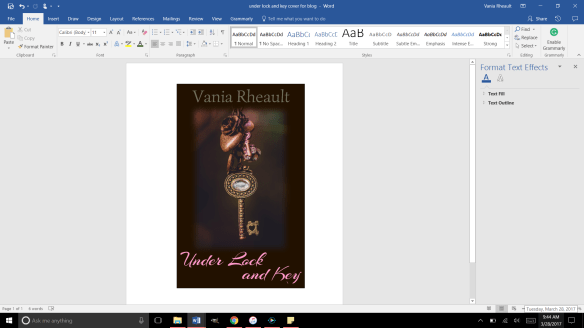
What I did when I made the cover for Under Lock and Key, was after I made the cover, I used the Snipping Tool and “snipped it” and saved it as a jpeg. After I did that, I ran it through GIMP and made sure it was 300 dpi. Always make sure your images are 300 dpi or dots per inch, so your picture is clear online.

Cover basics are the same for Kindle: you want your cover to look pleasing, your name and title clear as a small thumbprint for a potential reader to see.

I made a quick one for my e-reader story using a photo I here found so I didn’t have to pay money for a blog post.

2017-03-28

This is a screen shot of the cover I made in Word. There is a lot wrong with it. The title isn’t legible that small in that font, and my name is too dark to be seen. But I’ll leave it this way since this is only an example. Plus the bottom of the Y is cut off (it seems like I like doing that) so you would want to adjust that text box. 😛

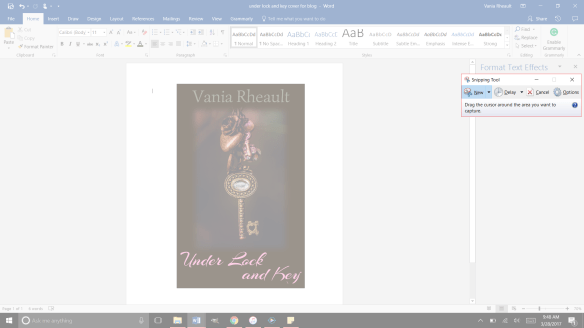
Now use the Snipping Tool: 2017-03-28 (2)

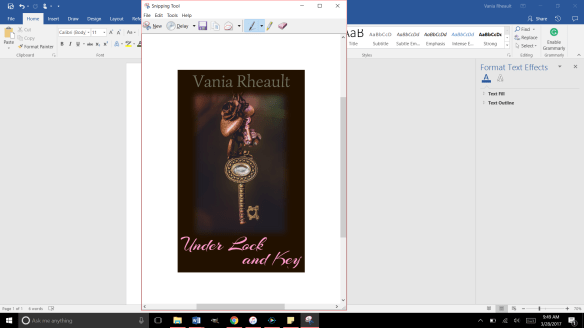
And be as precise as you can. If you get some of the white in there, you can crop it out with GIMP when you check it for dpi:

2017-03-28 (3)

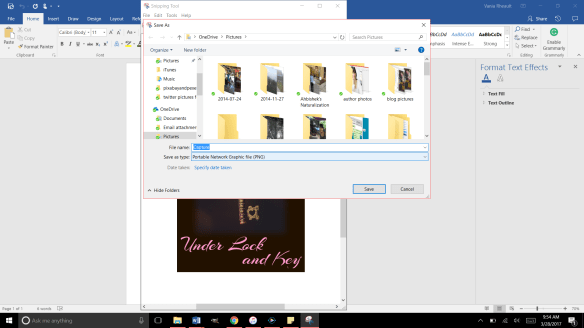
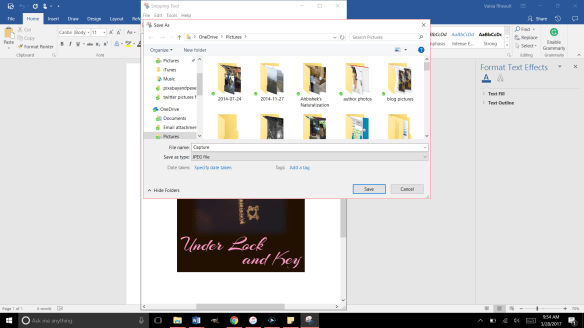
Save it as a JPEG file in the Save As Type:

2017-03-28 (4)

Right now it’s going to save as a PNG, so you need to change it to JPEG using the down arrow on the right:

2017-03-28 (5)

That will save it in the file you need. Now you can upload it into GIMP and crop it if you need to, if you accidently snipped some white, and make sure it’s 300 dpi. That’s all you need to do for a cover for your Kindle:

Make it in Word
Snip It
Save it as a JPEG
Run it through GIMP.
Export it under the Save AS so the change in dpi sticks

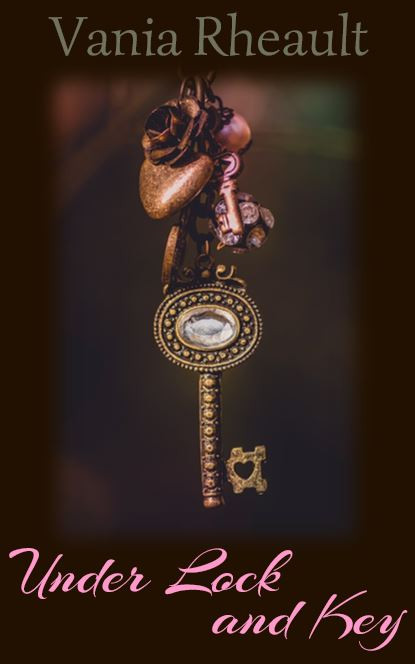
My picture was only 72 dpi, so I changed it to 300. I exported it to save the changes and this is it:

gimp picture

And that’s all you need. It’s a lot less involved than doing a book cover, and there are a lot of authors who only offer an e-reader option for this reason. Under Lock and Key is a short story, so I didn’t do a paperback for it. But I like paperbacks, and I will probably always offer them to my readers if I can. It might be an expense because I do purchase my own ISBN numbers, but it’s a personal choice.

You can make your cover as simple or as involved as you want. You can buy a template, hire an artist, whatever you choose to do.

When you offer both paperback and Kindle, the thumbnail that shows up is for your Kindle. It’s easy to make a new cover, for the Kindle, but if you’re going to do that you have to decide if you’re going to change the cover in CreateSpace. You don’t to make your readers angry thinking they’re going to get your new cover but they get a completely different one in paperback because you didn’t change it in CreateSpace. I like to keep all my things the same. When I redid the cover for 1700, I changed both. I think it’s courteous that way. I don’t want my readers not to trust me for any reason.

I think that’s it for Kindle Covers. I only need to tell you how to format your Kindle file, and that’s up next!

Until next time!

CreateSpace Recap

I started this publishing series eight months ago. Sorry about that. But in that time I’ve published a book (two novellas together), wrote 150,000 more words (in the form of 6 novellas that will be published together), and fixed 1700’s typos inside and the cover. I have also started fixing my 2015 NaNo project just so I can say it’s done and move on.

When I started this series, it was my intention to tell you how to publish a quality paperback cheaply and easily.  I think in this recap you’ll see I did that. Even now, I am so tired of hearing that you need to pay for this, pay for that, to publish a quality book.

Indie publishing went from, “It’s not a real way to publish” to “It is a real way if you pay for everything.” No one can afford to pay for the ISBN number, the editing, the formatting, the file conversions. And believe me, there are people who will do it all for you. For a price. But the sad part is if you are willing to take a few minutes (okay, hours), read a few books,  you don’t need to pay for anything.

Let the recap of eight months begin.

  1. You wrote a book! Congratulations. Let it sit for a few weeks, even a few months, write something else, read it again. Have a few people read it. Ask them to look for plot holes, flat characters, scenes that don’t move the story along. If you use Word, download Grammarly. It’s a decent checker for things I miss or wouldn’t think to look for. Buy the Hemingway App for more help ($20.00 is a decent investment). Use anything you can get your hands on to make your work as clear and as typo-free as possible.
  2. Grab a trad-pubbed book and copy the front and back matter. You need the copyright page, the acknowledgments. The title page. Dedication page. The author page. You’re in charge of all it.
  3. Get your author picture taken. I want to see you sitting in a cafe with a cup of coffee in your hands, smiling. Because you just wrote a book, and you’re going to publish it, and you are proud of it, and you’re going to own it, dammit! Have your best friend take it and buy her a cup of coffee for her trouble.
  4. Buy your ISBN or don’t. At the beginning, I leaned toward buying your own, protect your work and all that. But if you’re not sure what your publishing plan is, (like one a year, if that) take the free one CreateSpace gives you. No harm done.
  5. Choose the size of your book. If you’re writing smut you’re not going to be able to choose the smut-sized trim sold in Walmart. But choose the size you want, the color (cream or white) pages you want.
  6. Based on that, download the free template from CreateSpace so you can format the inside of your book. CreateSpace wants you to have an easy experience, a good experience, so you keep using them. The template is easy. Download it, copy and paste your manuscript into it. You don’t need to copy the template exactly. Their template comes with a Table of Contents I do not use. Change the font if you want, maybe the size. And please make a couple different copies of your MS. If something goes horribly wrong, well, that would bad. Play around with the template before you copy and paste your MS into it. See what you can change and what will mess up if you touch it.
  7. Make your template for your cover. If you make changes to the number of pages in your MS, you’ll need to recalculate the spine width and change the paper layout dimensions. I forgot to do that when messing around with 1700. I changed the spine text box but not the paper layout. That’s probably why I had some of my spine color wrapped on my front cover.
  8. Write your blurb. Maybe you already did this. Have one of your beta readers read it, make sure it sounds good. I gave you some resources how to write a good one. It takes a little bit of help, though, so don’t be afraid to ask for it.
  9. I wrote about your cover a lot. Remember, if you don’t like the thought of doing your own cover, don’t. Use the CreateSpace Cover Creator, or buy a cover that’s already done. Hire someone. This series was to help you do it as cheaply as possible. People *do* judge a book by its cover, so if this is something you don’t want to tackle, I don’t blame you. There’s a lot of choices out there.
  10. CS  takes a PDF of your cover (in the Save As option on Word, PDF is a choice). Submit that, submit your interior, and you’re done. They say 24 hours, but it only takes them 12 to get back to you and tell you if it’s approved or not. Remember the flattening warning you’re going to get. That’s okay. Order the proof, check it over. When I got my second proof for 1700 I read it like I was reading anyone and looked for typos. Spend some time on it, because the proof is exactly what people will be getting when they order it. It takes about 5-10 days to get the proof in the mail. If you want your paperback and the Kindle to be live at the same time, don’t go through the Kindle stuff until your paperback is ready to go. Kindle only takes 5 hours to approve your files. You can have them live on the same day. I had trouble with CS so my Kindle version was live for a couple weeks before my paperback was available. That’s up to you and how you want to do it.


And that’s it. I recommend Chris McMullen’s book and you can find it here. He explains a lot of the technical stuff with the template and he goes into Word a lot more than I do. There’s a lot of tutorials and YouTube videos out there. When I started eight months ago, I didn’t know as much as I do now. Indie publishing is a continual learning process because things change. I’ve learned to read only things that were written in 2016 or even more recently because old information may not help.

If you need any more help, drop me a question. I’m sure you can Google the answer probably faster than I can answer it, but I’ll be going through this whole thing in a couple more months when Summer Secrets is ready to be published. I’ve come a long way with doing covers in Word, and I’m confident that with the patience I’ve learned, the tricks I’ve taught myself playing with the CS interior template, and the tutorials I’ve watched about picture manipulation, the process will go smoothly. And I hope yours does too.


Congratulation-Banners-black-small-1