Making Time to Beta Read and/or Edit

I beta read and I edit for my friends. When I beta read, sometimes that turns into light editing—I’ll point out typos, etc., if/when I find them, and I think the authors appreciate that. Sometimes I get asked to do a full edit, and sometimes the author isn’t clear, and I end up doing a full edit, anyway. Doing an edit is almost easier than only beta reading because my eyes immediately start searching for mistakes.

canstockphoto89558

This is true when I read anything. Reading for pleasure is almost non-existent because I automatically start editing and revising. “I would have written it this way. . .” While this can be good practice, trying to turn it off to enjoy a book is almost impossible. It doesn’t help when I feel justified when I do find something wrong.

But I like to beta read and edit because it sharpens my own skills as a writer. If I see repetition, telling instead of showing, words being used in the incorrect context, head hopping, it makes me more sensitive to it and I spot it more easily in my own work.

Stephen King says you don’t have time to be a writer if you don’t have time to be a reader, and this is true. You learn by reading other people, and you also expand your vocabulary. You improve your grammar and punctuation when you see it used correctly and if you think it isn’t being used correctly, you can look it up. Fact-checking helps you and the person you’re editing/beta reading for.

stephen king reading

It isn’t easy to make time to beta read—we have so little time as it is, writers like to use that time to write.

I’ve often likened writing to other occupations: you don’t have a business without product to sell, you wouldn’t want your child to go to school with a teacher who wasn’t always updating her skills, you wouldn’t go to a doctor who wasn’t constantly going to workshops, seminars, and publishing in medical journals.

glasses-272399_1920

You can’t write books without reading other people’s work or fine-tune your voice without reading editing books and how-to books about the craft of writing. No organization is making you do those things; a company isn’t going to give you tuition reimbursement. You are your own boss and it’s up to you to keep learning for yourself.

Beta reading is fun, and it’s helpful, and someday you’ll need a beta reader. What goes around comes around, so try to make time when you can.

Tips on how to beta read:

  1. Sometimes you’ll start beta reading a book that doesn’t suit you. Figure out why it doesn’t before you say anything. If it’s not your preferred genre, speak up before you agree.
  2. If it is your genre, make notes as you read. What feels off? Is the beginning slow, are the characters flat? This is why you’re beta reading—to give useful feedback. Don’t be vague—the beginning lacked pizzazz. How was it boring? Maybe the action picked up in chapter two.  Did the author start the book in the wrong place?
  3. As you read to the middle look at the characters. Are they still interesting? Are they battling an inner conflict? Are they struggling? A saggy middle is something many authors, including myself, have an issue with.
  4. Look for inconsistencies. Are the characters’ physical attributes the same throughout the book? If they have a pet, do they disappear half way through the book because the author forgot to include it?
  5. How is the dialogue? Does it flow? Do what the characters talk about further the story?
  6. Do any scenes seem to bog the story down?
  7. When you reach the end, think of the story as a whole. Are there any plot holes? Any minor characters that could have been developed or any of their storylines that don’t make sense? (Ask if there is a sequel in the works if this is the case, sometimes the foreshadowing won’t make sense. But foreshadowing should only make the reader curious to read the next book, not make the reader wonder if the author dropped the ball.) Does the ending give you a satisfied feeling? Does it feel rushed? Do the characters complete their internal journey, face their fears,  finally get what they want?

Ideally, the author you’re beta reading for will give you ample time to read the book before publishing and tell you a reasonable deadline. Sometimes, if they’ve finished editing it and the piece is ready to be published, the author won’t wait.

This can put you in a bad position if you’re finding typos—you won’t get a chance to give your feedback to your author. If you’re given a deadline try to stick to it. But the urges to hit “publish” are strong, and if your author goes ahead and publishes without waiting for you, try not to feel hurt or resentful. You can still finish beta reading and forward on the mistakes you found. Perhaps s/he fixed them without telling you.

Sometimes you might be expected to leave a review. Ask first to be sure—especially if you didn’t care for the book. You may want to skip leaving a review rather than leave a poor one because this book is will be new and no review will be better than a bad one.

Anyway, beta reading or editing for people is win-win. It helps you become a better writer, and it helps the person you’re reading for.

blond-1866951_1920

We need to help each other be better writers, one chapter at a time.

Vania Blog Signature

Staying Positive Online

Every day we do a little something to build our platform: send a Tweet, write a blog post, post an update on a Facebook Author Page. As authors, we need to stay relevant; we need to produce content to stay visible. We want people to find us and our books, and that won’t happen if you neglect a blog or don’t update your social media. The more you post, the more visible you are—that’s how it goes.

binoculars-995779_1920

But it’s difficult to produce content, and it’s just as difficult to remain upbeat and cheerful all the time. Sometimes you need to let out a little negativity, a little frustration. The chapter you just wrote is shitty—let’s tweet that out there for some sympathy. You tell your fans on FB that you’re having a bad day. You dropped a jar of pickles on your foot and you post your black and blue toe on Instagram. Sometimes those things aren’t bad, but your fans, the people who read your books, don’t want to hear it all the time. Twitter is a great place to pout because misery loves company; when I’ve had a bad day, there’s always someone there who can relate. But I don’t want to be known as Twitter’s Debbie Downer and neither do you.

angry-2191104_1920

This goes for other things on the internet as well. There’s a lot of controversy about whether or not to leave “honest” reviews on places like Amazon and Goodreads. This isn’t controversy as a whole—a reader who reads a ton of books every year and reviews them can say whatever s/he wants. They are readers and consume books as readers only.

But.

We are writers as well as readers, and that can be a problem because every review you leave is added to the foundation of your author platform. This question comes up a lot: Do you post honest reviews? Most authors will tell you that no, they don’t leave poor reviews—it’s not their place. Especially if the book they’ve read is an indie book. Some authors will say no because they don’t want people to do the same to their books. Some don’t just because they don’t want to post any negativity online. I tend to agree with the authors who say this simply because I try to keep my online presence as positive and as cheerful as I possibly can. I’m a contemporary romance writer. I’m supposed to be in love with life, right?

When I first was introduced to the indie world, I read a lot of indie—and I quickly became discouraged.  Poorly formatted books, books that needed an editor, books that were boring—I discovered why indie publishing has a bad reputation. I read some good ones too, don’t get me wrong, but the books that weren’t that great—I didn’t review.  Because let’s be honest, I was new the game, (still feel like I am most days) and who in the hell was I to criticize a book? It’s not like I’m selling a hundred books a day (though I aim to change that sooner rather than later.) But even then, while my success may justify a negative review, do I want to throw that kind of negativity out there?

Unless part of your platform building is being known as a reviewer who will give an honest review no matter whose toes you step on, then I would suggest not giving unsolicited advice in the form of a review. I’ve given advice to my friends who ask in private messages. I’ve beta read for friends. I’ve edited for free. Doing that, one on one, can do more for your platform than giving a book a bad review. Throw good karma into the online universe, and good karma will come back to you.

mark-adriane-259950

But I believe that advice is good for every situation, not just book reviews. One night at Olive Garden the waiter forgot to put our order in. My sister and I were going to a movie, so we didn’t have time to wait for him to fix his mistake. We had to make due with our drinks and the salad and appetizer we ordered. Did I bash Olive Garden online? Did I tweet to them to get better service in their restaurants?  No. Well, I posted on my personal Facebook profile that if you wanted to actually eat the food you ordered, eat elsewhere, but I made it into a joke and I did not post any harsh words related to the event. That night we were kind to the waiter, and we left. (The chocolate martini I drank probably helped.)

When the movie theater gave us stale popcorn, did I post about it? No. (Luckily that occured on separate evenings, otherwise that would have been a bummer of a night.)

Sometimes I get down just like everyone else, and I do tweet to ask for advice or a cheerful word, but I do not make those posts the mainstay of my platform, just like I don’t use my blog to bitch about the publishing industry or my lack of sales.

I share my frustration with and about the indie community: I want our reputation to turn around. I want people to think quality when they think of an indie book. I want people to want to buy indie over a traditionally-published book. So I will post advice, I will write about things I wish indie authors would do (take the 8 point space between paragraphs out of your manuscripts please, and can you full-justify your file even if Mark Coker tells you not to?). But I would never post a book review and say this author needed an editor, or the formatting was so screwed up I couldn’t read it and too bad I wasted 13.99, you shouldn’t either.

Stay positive online, put a smile on someone’s face, be a friend, be a contributing, productive writer in the indie world, help where you can, offer advice when asked.

positive-725842_1920

In the words of my oh-so-wise mother-in-law, “Don’t crap where you eat.”

What do you think? Let me know!  Vania Blog Signature


(Thank you to pixabay.com and unsplash.com for the photos.)


Have You Heard of Kindle Scout? I Haven’t Either

I was going to write a blog post on a very important question–when you are published by an Amazon imprint are you considered Traditionally Published? Because these imprints won’t take just anyone–you have to submit just like you would an agent or a publishing house. But is that the only difference between being published by an Amazon imprint or hitting publish on KDP?

That’s a great question but one we’re not going to explore here. I found something else during my research: Kindle Scout.

kindle scout

What is that, you ask? Good question because I didn’t know what it was either. Chris McMullen’s blog post about Amazon Imprints popped up when I was doing some research on imprints and I came upon another publishing option Amazon offers.

Kindle Scout is a book competition open to writers in qualifying countries. The book must be 50,000+ words and never been published anywhere before. It’s similar to self-publishing in that you have to submit your own cover, (I’m assuming you can hire someone) do your own editing (again maybe hire someone), blurb, and formatting. It is then vetted by Amazon staff and if it is chosen, it is entered into the competition.

What happens after that is up to you, as it’s called a competition for a reason. You’re supposed to drive all your friends, family, and fans to the Kindle Scout website where they are to vote for your book. After the nomination process, once again your book is vetted by Amazon staff. Which is a sneaky way of saying, even if your book received a million votes, Amazon Scout still may not choose it. I guess that’s a safety loophole for them.

If your book is chosen, Amazon will pay you a $1500.00 advance and 50% royalties after you earn out.

The whole process takes 45 days.

I summarized the whole process, so anyone who is considering this should look at their submission guidelines carefully.

Here are a couple other blog posts about it:

Jane Friedman had a guest blogger on her website who used it as a book launch. (If your book isn’t chosen Amazon gives your book back to you after the 45 day period is over and you do with it what you want.)  I think that is a great idea, and her blog post is here.  (Thanks to Gareth S. Young, you can find him here, for the heads up on that article.)

Another great blog article, courtesy of Gareth, is by Victoria Strauss, who is a Watch Dog contributor on Alli, (Alliance of Independent Authors) and she gave it a tentative stamp of approval, and you can read it here.

Overall, it doesn’t sound like a bad program. You can go on the website and browse the books that are entered and see for yourself what kind of competition you would have.

Good luck!


The Shocking Revelation of Editing

When I write, I can tear through a manuscript pretty quickly. I have more free time as a mother of two who works full time should, and being I can write at my job if I know what I’m writing, I can put words down at a fairly acceptable pace. You would think I could crank out books, and believe me, that is one of my main goals as a writer.

But what holds me up is all the %#!*&$# editing I end up doing. I have to edit a lot because yeah, I’m still learning my craft, (I’ve complained before I feel like I’m skidding my wheels and this is a big reason why) and there’s not a lot I can do to speed that up besides doing what I’m doing. I’m learning not to head-hop, I’m learning how many points of view work in a book. I’m learning to write without all my naughty words. All of these things will help me put out a book that will reduce the amount of editing that I need before I can publish.

notebook-1064660_1920

When I have to edit my book, I take a lot of selfies too.

One of the things that took me by surprise was that amount of time it took adding the “set it aside” time everyone recommends before reading it again. I completely understand this, and I do it myself. I’m doing it now, putting aside one manuscript while I write the next, and when I’m done writing it I’ll go back to the first. But doing this takes so much time. Who wants to take so much time? Here you have a completed manuscript, then you read it, and read it again, and even again, fixing things as you go, if you’re lucky to find them, because let’s face it, by the time you read it that many times you know what it says by heart and it could turn to Greek and you wouldn’t even notice. And now you’re supposed to set it aside for a week, a month, whatever. What are you supposed to do? All you want is to publish the darn thing.

After you think you can’t do any more with it, then come the beta readers,  and if they find stuff you missed, you’re at it again. Then maybe you send it to an editor or a proofreader, and then you have to fix those things, too.

It’s nutso and when someone would tell me they’ve been working on their book for two or three or four years, I would just be, forget that I’m not doing that. But guess what? I’m doing it because I have to.

I won’t always have to.

I’m getting better. I’m learning which POVs work best, I’m learning to not head-hop, I’m learning not to write using my naughty word list.

One day I’ll get there, and a 77,000 word novel won’t take me two years to publish because I’ll have all the lessons I’ve learned already in my head as I write a new book, and I won’t have to go back and fix all those mistakes I didn’t know I was making in the first place. My career is just beginning; one day I’ll know what I’m doing.

And that day can’t come soon enough.

More articles on letting your WIP sit so you can read it with fresh eyes:

http://www.hillarydepiano.com/2011/12/i-just-finished-a-novel-what-do-i-do-next-let-it-sit/

http://annerallen.com/finished-your-first-novel-what-to-do-now/


Don’t Rush to Publish!

Probably the best advice I can give you about publishing is not to rush.

I’ve always promoted doing as much as you can yourself—especially since your first book is pretty much a loss until you write more and have more books available for purchase. When it’s when it’s your only book available, you’ll never get back what you put into it. (Unless you have a tangible way to measure pride and satisfaction.)

Combining the fact that this is your first book with doing it all on your own is dangerous. You’ll never be sure if your book bombed because you’re an unknown author and this is your first book, or if it’s because your book sucks. Publishing a superior product rather than a POS will take some of the guesswork out of the question.

You want to put your best work out there, so when you have more books available you don’t have to waste time fixing it. Being it is so easy to update files in Kindle Direct Publishing, you may get into the habit of updating your files and covers all the time. It’s a waste and you’ll never move forward. Fixing your files in CreateSpace is easy too, but your book isn’t available until your files are approved, and CreateSpace’s approval time is longer than KDP’s. People still can buy your Kindle book while the new file is being approved, but it will be your old file.

Here are some tips to not rush:

Cover

Never publish your first attempt at making a cover. Make many covers. Many, many, many. Try different pictures, fonts, and color themes. Take your best two or three and turn them into a contest on Facebook or Twitter. Enter all the names of the people who chose the one you decided to use into a drawing and give a signed copy of your book to the winner. Ask for lots of feedback. There are plenty of people online who are willing to give you an honest opinion.

Research your genre, watch picture manipulation videos to learn how to do what you want. If your idea is too much for you to do on your own, or you just can’t get your vision from your head onto the computer, ask for help.  Don’t publish your first attempt. Keep it clean, keep it professional. One day you may change your cover to bump up sales, or because your skills have improved, or because you found a better picture. All I’m saying is, don’t make it a habit. You’re supposed to be writing more books.

Formatting/Book Interior

The inside of your book needn’t change much. As you grow your library you may want to add those books to a list in the front or back matter letting your reader know they are available. Maybe you’ll want to fix typos, but don’t get caught up with this. You’ll never stop editing, and I feel it’s disrespectful to the people who previously bought your book before your fixes.

CreateSpace takes 12-24 hours to approve files, and your book is not available during the approval process. You can lose sales going into it to fix to too many times.

KDP takes five hours, but don’t use this as an excuse to fix every little thing. Plus you want your paperback and Kindle files to match. Publishing your book as close to perfect as possible will save you lots of time in the long run.

Blurb

Changing your book’s description is simple enough, but if you offer a paperback you’ll want your product information to match the blurb on the back of your book. Again, CS has to approve any changes and this takes time. Blurb writing is difficult, every writer loathes it. I find it easier to write blurbs for others than for my own books. Research how to write one and get plenty of feedback from people who both have and have not read your book. The people who have read it can tell you if it’s accurate. The people who have not read your book can tell you if the blurb makes them want to read it.

Editing

I’ve written a lot about editing in my publishing series, and in two prior blog posts. Editing is the worst because of all the waiting, waiting, waiting. For other people. To read your work. You’re waiting on someone (or hopefully many someones) to read your work and you can’t say anything or you’ll seem rude. If you pay someone, hopefully, you come to some kind of a time agreement. If your friends are doing you a favor, you need to be patient. I’ve edited for people who have published before I was done. Please don’t do that—especially if they keep you updated and they are finding things. It’s rude, and frankly, it hurt my feelings. What I advise you to do is forget about publishing it. Work on something new. Work on your cover—can you make it better? Work on your website, or write a few blog posts and schedule them out so you’re ahead. Try to get into a blog tour, or ask some of your friends who run blogs to interview you. Beta-read or edit for someone else. There are plenty of ways to fill your time and still feel like you are moving forward career-wise.

Be patient.

Don’t rush into publishing. It will save you a lot of time down the road, and a lot of regrets, because you’ll never now how many sales you lost because of a poor cover, or your first 20% in the Look Inside feature has typos in it and a potential reader didn’t want to take a chance on the rest of your book.

It took a year or more to write your book. Waiting a bit longer won’t hurt.

What’s your biggest publishing regret?

Do You Really Need an Editor? Er . . . Yes?

Orna Ross, from the Alliance of Independent Authors, said in a podcast I listened to the other day, and I paraphrase: “Stephen King has an editor. Why would an indie think s/he didn’t need an editor? It’s the biggest mistake an indie author can make.” Or something along those lines. She, with others associated with Alli, have a lot of informational podcasts. You can watch their videos on YouTube, or find them in your podcast app on your smartphone.

I’m an indie author, and I had a few issues with this. First of all, Stephen King doesn’t pay for his own editor. Not out of his own pocket, and certainly not at a loss like most of us just starting out. Secondly, when he puts out a book, a million people read it, and it more than likely will get turned into a movie. Thirdly, because we are one the outside, we don’t know how much of the editor’s advice Mr. King actually takes. Does he take plot advice? When he’s told one of his characters is reading flat, does he fix that character, or does he tell his editor to shove it?

Comparing us to Stephen King didn’t help her make her point.

Or did it?

Indie authors are in need of an editor more than probably anyone. Especially if that book is their first. Or even their second, or their third.

There are different editors out there; they range in duties from helping you plot before you even write your book (that would be more like a writing coach, but developmental editors have their say in your plot) to simply proofreading it before publication.  These types of editors cost hundreds of dollars, and if you’re told you need even more than one of these kinds of editors, it can be intimidating.

I’ve always advocated that an indie author do as much as they can on their own. This isn’t just about being cheap–it’s good business. You are not only an independent author when you write a book, you need to be a self-publisher if you want people to read it. You need to know what you’re doing so you can make good choices for your business. Especially if you’re planning on doing this for the long haul.

(And you can forget about special treatment from a publishing house if you want to get traditionally published. They ask your book be as close to publishable as possible to cut editing costs. It’s not unheard of to hire an editor to edit your manuscript before you query.)

The bottom line is you need someone else to look at your stuff before you publish it. We all learn something new about writing on a daily basis, so your writing will never come out perfectly, and I don’t believe a writer can spot all their own issues. (We all learn, we never stop, so maybe Stephen King does listen to his editor.) That’s where an editor comes in.

That’s not to say you can’t substitute. If you are in a writing group, your critique partner could stand in for a developmental editor.

Maybe your friend who has an English degree and can diagram a sentence with her eyes closed can read your manuscript and look for such things such as subject/verb agreement, faulty sentence structure, and correct word usage.

Maybe your best friend is a prolific reader and can read for typos.

If you can take the criticism as how it’s supposed to be meant,  not an attack on your writing, but rather an honest attempt to help you improve your work, you can learn a lot from the editors and “editors” in your life.

When you compare writing a book to having a baby–nothing could be truer. You don’t birth a baby on your own. You have an OB doctor, nurses, a doula perhaps, your partner, your mother to give you support. You don’t have a baby alone, and you don’t write and publish a book alone, either.

As for actually paying an editor, a real one who knows what they are doing, that is a decision left entirely between you and your pocketbook.

I use a paid editor, but she doesn’t do it as her day job. She’s a fabulous writer, and she’s a fabulous editor. I’ve learned a lot from her feedback, and my writing has improved a lot over the past year. But she’s busy with her own projects and a full-time job, so I’m doubting she’s going to stick with me and my writing career as she is trying to get her own off the ground. I’ll need to find someone else to edit the contemporary romance series I’m going to be publishing in the coming months.

I’ve learned a lot from beta readers and my editor. I’ve also started to read self-editing books to help me recognize my mistakes and cut unnecessary words. I’ve started outlining so my plots are tighter and there’s less chance of plot-holes. I’ve started doing character workups so I can get to know my characters before I write about them. This saves me from writing flat characters.

You are writing a book–a lot of what an editor can and will do for you, you can take into your own hands as you actively learn your craft.

An editor can help you put your best work into the world.

And that’s what we all want.

You can read a great article about editing here.

Kindle Cover

That’s great, you say, but paperbacks don’t sell, the cover looks too complicated, and I don’t want to do that right now; I would just prefer to publish on Kindle and be done with it. What do I need for a cover then?

If you’re not interested in doing CreateSpace, then you’ll need to do the cover, yes, and it will just be the front, or rather, the picture customers will see on Amazon. You’ll still need to write the blurb for the product information, but you won’t have to worry about it being put on the back of a paperback.

Open a Word document, make a text box of your chosen trim size, being 5×8, 6×9, whatever. I advise you to do it this way in case you decide down the road to offer a paperback after all, then all you will need to add is the spine and back cover and adjust the page layout (remember all that math . . . yeah . . . ).

When you’re done, saving it in a photo format can be a bit tricky, however, if you’re doing it in Word because there’s no option to save as a jpeg, jpg, or a tiff file, the only files being accepted by Kindle Direct Publishing (KDP). They don’t take a PDF like CS does.

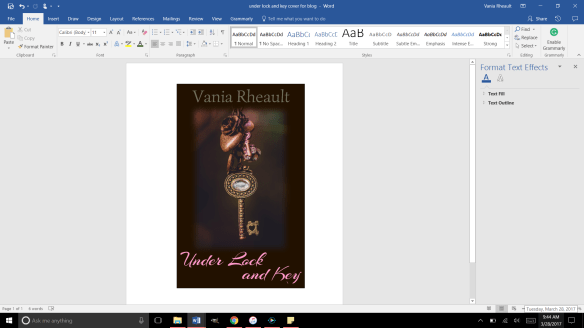
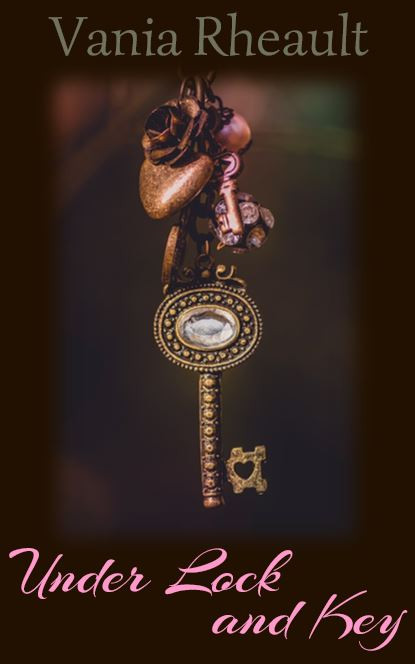
What I did when I made the cover for Under Lock and Key, was after I made the cover, I used the Snipping Tool and “snipped it” and saved it as a jpeg. After I did that, I ran it through GIMP and made sure it was 300 dpi. Always make sure your images are 300 dpi or dots per inch, so your picture is clear online.

Cover basics are the same for Kindle: you want your cover to look pleasing, your name and title clear as a small thumbprint for a potential reader to see.

I made a quick one for my e-reader story using a photo I here found so I didn’t have to pay money for a blog post.

2017-03-28

This is a screen shot of the cover I made in Word. There is a lot wrong with it. The title isn’t legible that small in that font, and my name is too dark to be seen. But I’ll leave it this way since this is only an example. Plus the bottom of the Y is cut off (it seems like I like doing that) so you would want to adjust that text box. 😛

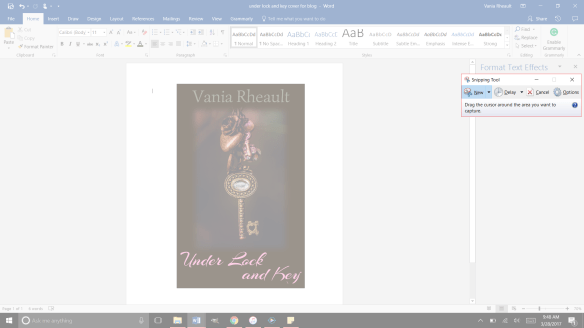
Now use the Snipping Tool: 2017-03-28 (2)

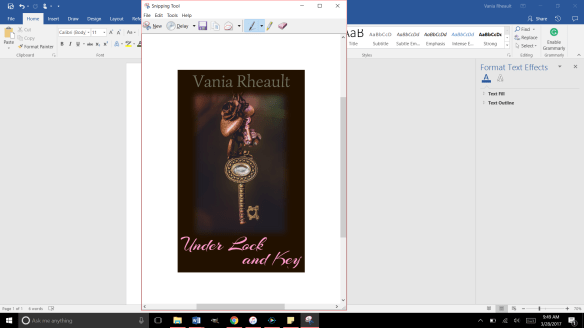
And be as precise as you can. If you get some of the white in there, you can crop it out with GIMP when you check it for dpi:

2017-03-28 (3)

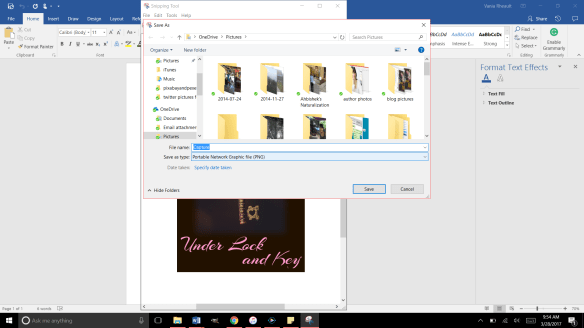
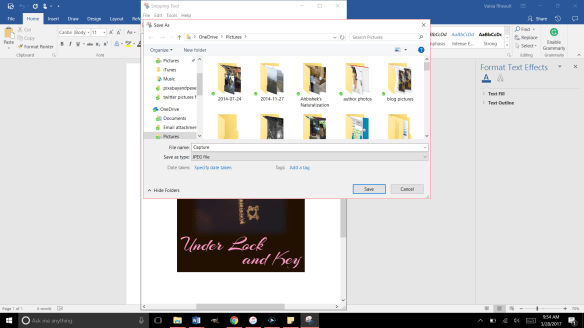
Save it as a JPEG file in the Save As Type:

2017-03-28 (4)

Right now it’s going to save as a PNG, so you need to change it to JPEG using the down arrow on the right:

2017-03-28 (5)

That will save it in the file you need. Now you can upload it into GIMP and crop it if you need to, if you accidently snipped some white, and make sure it’s 300 dpi. That’s all you need to do for a cover for your Kindle:

Make it in Word
Snip It
Save it as a JPEG
Run it through GIMP.
Export it under the Save AS so the change in dpi sticks

My picture was only 72 dpi, so I changed it to 300. I exported it to save the changes and this is it:

gimp picture

And that’s all you need. It’s a lot less involved than doing a book cover, and there are a lot of authors who only offer an e-reader option for this reason. Under Lock and Key is a short story, so I didn’t do a paperback for it. But I like paperbacks, and I will probably always offer them to my readers if I can. It might be an expense because I do purchase my own ISBN numbers, but it’s a personal choice.

You can make your cover as simple or as involved as you want. You can buy a template, hire an artist, whatever you choose to do.

When you offer both paperback and Kindle, the thumbnail that shows up is for your Kindle. It’s easy to make a new cover, for the Kindle, but if you’re going to do that you have to decide if you’re going to change the cover in CreateSpace. You don’t to make your readers angry thinking they’re going to get your new cover but they get a completely different one in paperback because you didn’t change it in CreateSpace. I like to keep all my things the same. When I redid the cover for 1700, I changed both. I think it’s courteous that way. I don’t want my readers not to trust me for any reason.

I think that’s it for Kindle Covers. I only need to tell you how to format your Kindle file, and that’s up next!

Until next time!

CreateSpace Recap

I started this publishing series eight months ago. Sorry about that. But in that time I’ve published a book (two novellas together), wrote 150,000 more words (in the form of 6 novellas that will be published together), and fixed 1700’s typos inside and the cover. I have also started fixing my 2015 NaNo project just so I can say it’s done and move on.

When I started this series, it was my intention to tell you how to publish a quality paperback cheaply and easily.  I think in this recap you’ll see I did that. Even now, I am so tired of hearing that you need to pay for this, pay for that, to publish a quality book.

Indie publishing went from, “It’s not a real way to publish” to “It is a real way if you pay for everything.” No one can afford to pay for the ISBN number, the editing, the formatting, the file conversions. And believe me, there are people who will do it all for you. For a price. But the sad part is if you are willing to take a few minutes (okay, hours), read a few books,  you don’t need to pay for anything.

Let the recap of eight months begin.

  1. You wrote a book! Congratulations. Let it sit for a few weeks, even a few months, write something else, read it again. Have a few people read it. Ask them to look for plot holes, flat characters, scenes that don’t move the story along. If you use Word, download Grammarly. It’s a decent checker for things I miss or wouldn’t think to look for. Buy the Hemingway App for more help ($20.00 is a decent investment). Use anything you can get your hands on to make your work as clear and as typo-free as possible.
  2. Grab a trad-pubbed book and copy the front and back matter. You need the copyright page, the acknowledgments. The title page. Dedication page. The author page. You’re in charge of all it.
  3. Get your author picture taken. I want to see you sitting in a cafe with a cup of coffee in your hands, smiling. Because you just wrote a book, and you’re going to publish it, and you are proud of it, and you’re going to own it, dammit! Have your best friend take it and buy her a cup of coffee for her trouble.
  4. Buy your ISBN or don’t. At the beginning, I leaned toward buying your own, protect your work and all that. But if you’re not sure what your publishing plan is, (like one a year, if that) take the free one CreateSpace gives you. No harm done.
  5. Choose the size of your book. If you’re writing smut you’re not going to be able to choose the smut-sized trim sold in Walmart. But choose the size you want, the color (cream or white) pages you want.
  6. Based on that, download the free template from CreateSpace so you can format the inside of your book. CreateSpace wants you to have an easy experience, a good experience, so you keep using them. The template is easy. Download it, copy and paste your manuscript into it. You don’t need to copy the template exactly. Their template comes with a Table of Contents I do not use. Change the font if you want, maybe the size. And please make a couple different copies of your MS. If something goes horribly wrong, well, that would bad. Play around with the template before you copy and paste your MS into it. See what you can change and what will mess up if you touch it.
  7. Make your template for your cover. If you make changes to the number of pages in your MS, you’ll need to recalculate the spine width and change the paper layout dimensions. I forgot to do that when messing around with 1700. I changed the spine text box but not the paper layout. That’s probably why I had some of my spine color wrapped on my front cover.
  8. Write your blurb. Maybe you already did this. Have one of your beta readers read it, make sure it sounds good. I gave you some resources how to write a good one. It takes a little bit of help, though, so don’t be afraid to ask for it.
  9. I wrote about your cover a lot. Remember, if you don’t like the thought of doing your own cover, don’t. Use the CreateSpace Cover Creator, or buy a cover that’s already done. Hire someone. This series was to help you do it as cheaply as possible. People *do* judge a book by its cover, so if this is something you don’t want to tackle, I don’t blame you. There’s a lot of choices out there.
  10. CS  takes a PDF of your cover (in the Save As option on Word, PDF is a choice). Submit that, submit your interior, and you’re done. They say 24 hours, but it only takes them 12 to get back to you and tell you if it’s approved or not. Remember the flattening warning you’re going to get. That’s okay. Order the proof, check it over. When I got my second proof for 1700 I read it like I was reading anyone and looked for typos. Spend some time on it, because the proof is exactly what people will be getting when they order it. It takes about 5-10 days to get the proof in the mail. If you want your paperback and the Kindle to be live at the same time, don’t go through the Kindle stuff until your paperback is ready to go. Kindle only takes 5 hours to approve your files. You can have them live on the same day. I had trouble with CS so my Kindle version was live for a couple weeks before my paperback was available. That’s up to you and how you want to do it.


And that’s it. I recommend Chris McMullen’s book and you can find it here. He explains a lot of the technical stuff with the template and he goes into Word a lot more than I do. There’s a lot of tutorials and YouTube videos out there. When I started eight months ago, I didn’t know as much as I do now. Indie publishing is a continual learning process because things change. I’ve learned to read only things that were written in 2016 or even more recently because old information may not help.

If you need any more help, drop me a question. I’m sure you can Google the answer probably faster than I can answer it, but I’ll be going through this whole thing in a couple more months when Summer Secrets is ready to be published. I’ve come a long way with doing covers in Word, and I’m confident that with the patience I’ve learned, the tricks I’ve taught myself playing with the CS interior template, and the tutorials I’ve watched about picture manipulation, the process will go smoothly. And I hope yours does too.


Congratulation-Banners-black-small-1

Promises, Promises

At the beginning of this publishing series, I promised you could make a nice cover with a picture and some words. I got a little fancy with the cover we just went over, and if you’re reading this all the way through and got discouraged, I apologize. I’ll show you how to make a nice cover now, just a picture and some words. That’s it. I promise.

Start out with a new Word document. Go back to the formula for the paper set up. If your book is going to be 5×8 with cream paper, your page set up calculations will be:

Inches: 5 + 5 + spine + .25 (bleed) = what you need.

A 334-page book with cream pages will have a spine of .835 inches. (334 x 0.0025).

5 + 5 + .835 + .25 = 11.085

Height is always easier because you’re not doubling anything. So the height for the page set up would be 8 inches plus .25 for bleed.

8 + .25 = 8.25

The paper layout will look like this:

paper layout

Word rounded down, and I’m not sure how that affects our calculations. I would guess it’s insignificant or Word wouldn’t do it.

Follow the rest of the directions in the blog post where I typed out the list of steps.

You’ll have your handy template that looks like this:

blog cover template

This template is for a 5×8 trim size with cream colored pages. Number of pages, 334. (A nice, long book. :)) (FYI, You’ll always have an even number of pages because a page has two sides.)

The problem with the picture I like is that it’s square, not rectangle, so when I put it into the template, it stretches. Stretchy is not the same as stabby; sometimes stabby can be a good thing.

stretchy

If you don’t mind she looks a bit stretched out or you swear you can’t tell, that’s your prerogative. I’m sure down the road it will bother you, so you might as well do it right the first time. I guess I don’t need to tell you, to avoid this you can always find a rectangle picture. There are plenty out there and CanStock will even filter square pictures out in your searches.

Using the Crop feature, I cropped it using the Aspect Ratio, portrait 2:3.

crop

Fix the dimensions of the picture so it fits into the 5×8 box.

crop1

It brought them closer, but that’s okay.

So this is what I have so far:

back cover done1

I downloaded a new font. I used the same picture on the back, but flipped it and lightened it. I did forget to mention in the last post that you probably want to put the price above the ISBN box. That way if you do happen to have a book sale of some kind, you can have the price on there, and if you put it on discount, customers can see that it is.

back cover done2

If you think the cover picture is too bold for the white spine and the back cover,  you can lighten up the cover edges a bit like this:

back cover done3

You can do what you want with the blank space by the ISBN box. Maybe your author picture, maybe your imprint picture. Whatever. But I did what I promised you from the beginning, I gave you a lovely cover with just one picture, no fancy picture effects you need to learn how to do. Oh, wait, take all the lines off. I swear, there is always something.

back cover done4

And don’t worry about the cursor. That will go away when you save it as a PDF to submit it to CS. Also, remember not to freak out if this is all you have and you want the Kindle cover too. CS will offer it to you, and you can download it.

I think this is it for covers. I’ll post a recap of everything I’ve talked about then I’ll tell you how to format your file for Kindle.

Thanks for reading!


Your Book’s Spine

There’s not much you have to do with your spine. Remember, if you are publishing a novella, after formatting, your manuscript must be 100 pages or more. This is where the 5×8 trim size (the smallest size CreateSpace has to offer) comes in handy. You can also maybe bump up the font size in your manuscript if spine text is that important to you. But don’t go too big, you’re not publishing a Large Print edition.

Let’s look at the cover and template again:

blog-spineee

You kind of want the front cover, the spine, and the back cover to blend together. We don’t have a lot of colors to work with here, so I would probably leave the spine white and use the same fonts I used on the cover and keep them black.

title-1 Draw a text box in the text box. Don’t make it bigger than you need; smaller text boxes are easier to work with.

Experiment with the font and the size. You can manually enter in the font size and work with the numbers even if the font size is not available in the drop down selection.  You can see here that my name is not centered on the spine, but I chose the biggest font size that would fit.
title-2Move the text box so your name is centered on the spine:

The text box overlap doesn’t matter, we’ll fix that. The most important thing is that the letters are clear and big and as centered as you can make them. If your hand is shaky, or your mouse is temperamental, use your direction keys on your keyboard to move the box around.

title-3

Take off the edges by making sure the text box is selected and selecting No Outline in the Shape Outline option in the Shape Styles menu.

The white box is still visible on the cover so you need to select Shape Fill and select No Fill to make the box clear. This option is above the Shape Outline option we used to make the lines disappear.

shape-outline

You can see my name isn’t centered, it’s a little high, but the text box is gone. Move the text box around so you can center your name the best you can. CreateSpace won’t fix any issues you have. On my first attempt on The Corner of 1700, the bottom of the C was missing because I didn’t adjust the text box when I made the font bigger. Anyway, move the text box.

title-4-not-centered

That looks pretty damn near perfect.  There’s no rule that says your name has to go on the top and the title on the bottom. Do what you want, just make sure the text is in the right direction. Take a look at traditionally published books and do you the best you can. Fiddle with the colors if you want, play with font and size.

title-5-centered

Do the same with the title.

spine-1

I use an imprint and like to put it on my spine. Insert a text box.

imprint-spine

Use the Shape Fill to insert the picture, then use the No Shape Outline to get rid of the text box lines.
imprint-spine-2

You’ll get a warning from CreateSpace if this image isn’t 300 dpi. Mine printed fine at the 79 dpi because it’s so small, but you might as well make sure it’s 300 dpi in GIMP in case you want to use it anywhere else.

So far, this is what we have. It looks pretty good, and I think the title and author name are centered and as big as I can make them. If your book is thicker, you could even put the couple’s picture at the top; I’ve seen that done before, and I’m sure you have too. But the thinner the book the less room you have. That isn’t an excuse to plump up your book for no reason. CreateSpace charges you for printing costs, which means a higher price for your book the thicker it is.

cover-and-spine

We’ll look at the back cover next. I think you’ll find the worst part about the back cover is writing the blurb!

Until next time, keep experimenting!