I tried four different times and started four different blog posts and nothing sounded right.
I came up with something Saturday night that was actually pretty unhinged and not like me at all. My gut told me not to publish it, and at the last minute, listened to my intuition (writing this on Sunday night at 9pm). Don’t need you all to think I’m losing my mind.
For now, if you’re publishing this summer and need some help, I have a few tutorials that will point you in the right direction:
That’s all I got, but it feels safer than what I was going to publish. I’ve felt good, just maybe trying to find some balance with living life now that I’m feeling better and where writing fits into all that with how the publishing industry is. I certainly don’t want to say anything I’ll regret.
Anyway, have a good week, and hopefully I can come up with something better next time.
I’ve heard from more than one person that they are kind of intimidated by IS, usually because they’ve heard horror stories of other people using it, or more accurately, trying to use it. Honestly, yeah, the platform can be a bit glitchy, but it’s nothing so scary that I would stop putting my books on it. I realized Faking Forever isn’t up on IngramSpark, though I did publish it last summer, I think, so I can use that title as a tutorial. I’ll screenshot my process and hopefully it will take some of the mystery out of the platform.
There are a couple of things I want to tell you before we get started, and these really aren’t anything I would expect a new author to know.
The first is ISBNs. You need one of your own to publish on IngramSpark IF you are also going to publish separately on KDP, and you should publish direct whenever you can. Amazon won’t take an ISBN issued by IngramSpark, and the same is true vice versa. If you’re in the States and buy from Bowker, you can use the same ISBN both places.
Second. Now, some people have said that you CAN’T use the same ISBN both places because either one place or the other will tell you the ISBN is already in use and you can’t use it. I get around this by publishing to KDP first using an ISBN I buy from Bowker, and then I wait for a couple of months for that ISBN to “click in.” Then when I publish on IngramSpark, they’ll skip Amazon because my book is already listed there. I don’t know where I heard this from, but I have done it this way for over 10 books and I have never gotten an error from either platform saying my ISBN is in use. You’ll have to decide if you want to wait those couple of months. Paperback sales aren’t a big deal to me so I don’t mind having my paperbacks only on Amazon for a while if it’s going to make the process smoother. Long story short: your paperback book should only have one ISBN attached to it.
In the first point, I said go direct whenever you can, and you should do that for a few reasons. The first is that Amazon doesn’t play well with others, so if you use IngramSpark to distribute to Amazon, Amazon can (and will) mark your book out of stock, which is a pain to fix. I would rather be writing my next book than policing my buy-page. Another is an author was complaining because she let IngramSpark distribute to Amazon, and she lost her buy-button, which means she’s not the primary choice for the sale. That’s bad because it looks like you’re not the seller. You can’t stop third-party sellers from buying your book and reselling it, but you always want to be the primary seller. The last point is you don’t want to pay IngramSpark to distribute and then pay Amazon for selling it. There is very little by way of royalties as it is, so just cut out the middleman and publish to KDP directly.
One last thing–your cover will be different than the one you use to upload to KDP. IngramSpark uses a different weight of paper which makes the spines thinner. If you use something like Canva, this is easy–just duplicate your KDP cover, download the IngramSpark template, and adjust spine text size and re-center your title and author name on the front cover. I go over this in my full paperback wrap tutorial. Those will need to be adjusted because due to the thinner spine, your front cover is “bigger” if that makes sense. If you’re using a cover designer, they should already know this, and if they don’t… [insert grimacing emoji here].
Draft2Digital uses IngramSpark’s POD to print. I helped a friend not long ago and one tip I learned is that D2D doesn’t like the barcode box on the back of a paperback cover, and you can, in fact, skip putting the white box on all three platforms. They’ll add the barcode for you, or use a barcode generator like Dave Chesson’s and add it yourself. But that was a handy tip we learned, and if you don’t want to supply your own barcode, leave the white box off completely and let them add it for you… unless you want Barnes and Noble to carry your book. Then you have to embed the price into your barcode. If you do that, you can’t change the price of your book unless you change the barcode too. IngramSpark wants the price on your cover to match what you’re selling your book for. If you want/need to increase the price, keep that in mind. I have stopped putting the price on my books and let both KDP and IngramSpark supply my barcodes. Much easier that way, but I don’t care about Barnes and Noble stocking my book, either. That’s a choice you’re going to have to make.
Here is the cover to Faking Forever that I’m going to be using:
And if you’re curious, this is how it looks with the IS template on top of it:
You’ll notice that the template has a barcode already included, but I never use it. It’s too big of a pain to cut it out and add it to the cover. I build over it and call it a day.
Once you have your formatted interior file, your cover sorted, and you know what you’re going to do with your ISBN and where and when you’re going to publish your book, you’re ready to upload to IngramSpark.
The first thing you have to do is create an account if you don’t have one. Go to www.ingramspark.com and click create account. It’s been a very long time since I’ve done that, but it’s more than just being able to upload your book. You have to have your banking information ready so you can have your royalties deposited and any fees deducted. If I remember correctly, they may ask you for a tax ID number or an EIN but I don’t have an LLC and just used my SSN. I’m in the States, so I don’t know how it works in other countries. I’m not going to give business advice, so beyond showing you how to upload your book, all the other choices that you have to make you’ll need to research on your own.
Once you’ve created an account, your home screen should look like this:
Click on Titles on the left hand side in the menu.
Then click on Add Title.
Some people use IngramSpark to distribute their ebooks and their print books. I wouldn’t use them for ebooks–if you’re going wide, Draft2Digital is probably the better choice, and as always, with print and ebooks, go direct whenever you can. You’ll always earn more royalties. Click whichever one you want, but for this blog post I clicked on Print Book Only.
Are all your files ready? You’ll need your interior and your cover that was adjusted/made using the IngramSpark template. But you’ll also need your ISBN, your blurb, and your categories and keywords. If you’re ready, Click Yes, all my files are ready.
They really wanna make sure you have what you need, so click the boxes that confirm you have your paperback cover wrap and your formatted interior file.
Then click on what you want to do. I do want to print, distribute, and sell my book. Click it to highlight it and then press Continue.
This is where you start filling out your book’s information. Put in your title, the language, which for me is always English, add your ISBN number or take the free one. Click that you own your copyright, and that you’re not trying to publish public domain work. When you click that you own your copyright, a warning box pops up:
They started adding this box a couple of years ago, and if you click Yes, that your book includes names of famous people or brands, IngramSpark won’t let you publish. I don’t know why they implemented this because we all know it’s okay to say your characters ate lunch at Dairy Queen, or that your male character’s favorite brand of shoes is Nike. It’s pretty much understood that as long as you’re not saying anything derogatory about a brand, it’s fine to mention them. My characters, for whatever reason, love Apple products, and they’re always using their iPhones. So, I’m not saying to lie, but I am saying that if you check the box that you do mention McDonald’s or that your characters go shopping at Walmart, IngramSpark will tell you to amend your book and resubmit. I’ll let you make the choice. I don’t remember what Faking Forever has in it. My characters live in a fake Minnesota city and I think for the most part everything I mentioned brand-wise was made up. But, you do you, and I’ll do me, and for the sake of this blogpost, I’m going to click No and keep going.
The last question in this section is about AI, and I never use it. I do my own covers using stock that’s not AI generated, and I write my own books. If you use AI in any way, you’ll have to fill out what they ask. I’m not even going to bother to click on Yes and find out what they want. I’ll never use AI and don’t care.
In this next section, you fill out your author name. I don’t have any other contributors, like maybe if you were a children’s author and needed to list an illustrator.
You’ll also see here that my imprint, Coffee & Kisses Press popped up. That’s because when you buy ISBNs from Bowker, you’re able to create an imprint for yourself. Back when I first started publishing, I created my imprint, and my ex-fiancé and my son designed the logo for it. I’ve been publishing under Coffee & Kisses Press for years and years but I don’t have any plans to publish anyone else at this time. I help a lot of people but never for money or a share of their royalties. Jane Friedman has a good article about creating your own imprint if you’re interested in the pros and cons. https://janefriedman.com/why-self-publishing-authors-should-consider-establishing-their-own-imprint/ Also when you create your own imprint, your imprint will be the publisher on Amazon and other product pages. Here is the information on Amazon for Faking Forever:
My ranking is bad. I guess I better up my marketing game.
This is my product information for Rescue Me on Walmart.com.
You can read and research all day about imprints, but I’ll stop there and continue on.
Subjects are your categories. Mine are usually Contemporary Romance and Billionaire, but they have a Rockstar category too, which I used when I published my last trilogy. Click on Find Subjects and search for your category/genre. I recommend using the search bar and typing in what you want. If you only scroll, sometimes you can miss what you’re looking for.
Click and highlight what you want and click Add Subjects.
Select Audience is next, and if you’re writing genre fiction for adults, that’s Trade/Adult General.
The next field is where your blurb goes. I usually just copy and paste it from my Amazon product page.
The keywords are similar to the seven fields on KDP you fill out when you publish on Amazon. The ones I fill out on KDP are a little different because I add KU/ Kindle Unlimited to some of the fields for discoverability, and you don’t need that for paperbacks on IngramSpark. When you’re done, scroll down and click Continue.
The next section is Print Information. You should already know the trim size of your book since you have your formatted interior file and your cover. If you’ve already published on KDP, all this information should match what you put on that platform. Things like trim size and color of the pages are attached to your ISBN, so make the same selections you did on KDP.
Colored pages are only for things like cookbooks or children’s books. There’s a higher cost to printing color, and I was even seeing some talk the other day that IngramSpark is going to start charging you more if your book has black pages. Beautifully formatted books are having a moment, but all that ink… even if you’re printing in black and white it’s going to cost you money. I don’t get too crazy with my interiors. I’m just not excited about paperbacks in general, so the last thing I really care about is black pages that have white text. As I’ve said, that’s your personal choice, but everything costs so be prepared to up your price to have even the slightest royalty per book.
This is part of what can trip up some authors who upload their books. I chose black and white pages, and cream because I also print my fiction books on cream paper. I don’t know if Amazon gives you a choice to print on Groundwood, but if you can’t over there, you can’t here because remember, the color of your pages is attached to the ISBN and you can’t change unless you unpublish.
I chose paperback here, but do you see the Perfect Bound option? Even if it’s the only option there, you still have to click on it and turn it green. Some authors get tripped up by that, so be sure to click on it.
I always choose a matte cover. I’ve seen glossy covers that peel and I don’t like them. Covers can be changed and upon a quick Google search I’m confident to say that if you want to change from glossy to matte or vice versa, you can as the type of cover isn’t attached to the ISBN.
I don’t know what Duplex Enabled means, and since there’s not an asterisk by it, I’ll skip it. Number of pages–you can look at your interior file (you should already know this because either you or your cover designer needed this information) or I snag mine off my Amazon product page.
Print pricing is next, and there’s a lot to say on topic, but on the same token, nothing at all. What you choose for pricing, discounts, and if you’re going to allow returns is going to be a personal choice based on what you want for your business and how much you want to make per copy per sale.
I don’t offer paperbacks to make money, and I don’t even print through IngramSpark to be in bookstores. Honestly, I have no idea why I print through IngramSpark. Faking Forever is $12.99, and I do a 35-40% discount and I don’t allow returns. That’s what I do, but you’ll have to research for yourself. I choose a 35% in the countries I can because that’s what Robin Cutler (who created the indie side of IngramSpark many years ago) recommended, and I never stopped. Here are my fields filled out. You can see I dropped Australia’s price as low as I could. Actually, I could have made one cent if I chose to sell my book for $15.99 instead of $16.99. Book prices there are crazy, and I’m happy for the .55 if it means someone there can afford to buy my book.
Go ahead and click that you agree on all the little asterisks and then go down to Printing Options. For those options, I only click on the Enable Look Inside feature. I figure since a reader can read 10% of your book on Amazon, I might as well give readers the same opportunity elsewhere. You can do large print, but KDP blocked my attempts as duplicate content so the only way I would do Large Print now is if I printed only to sell off my website. I would like to, some day, but I won’t be doing it any time soon. The right-to-left content is self-explanatory, so skip that, too.
The last on this page is the Print Release Date. If you waited, this could have been a few months ago, so if you don’t remember, grab the date off your product page on Amazon.
When you’re done filling all that out, click Continue. It’s hidden here by the Support icon.
This is where you upload your files. You can either Drag and Drop, or Upload. This is also where the glitches happen, and we can see if IngramSpark is going to give me a hard time today. I don’t have a preference either way, drag and drop vs. uploading, and I’ve done it both ways.
It looks like today they decided to be glitch-free, and you can see the dates and times of the uploads. I know from experience that if it doesn’t show dates and times, your files haven’t uploaded properly. You can try logging out and logging back in (save and exit first), clearing your cookies/cache, trying a different browser (Chrome vs. Safari, for example) or using an incognito window. I’ve tried all of those when IngramSpark has been a bear to work with and usually one of those will push the process along. I almost wish IngramSpark would have given me a hard time so you could see what it’s like, but then again, I shouldn’t be asking for trouble.
The email upload link at the bottom is for a cover designer or your formatter if they have your files. You don’t want to give them access to your whole account since you put your banking information into your profile, so use the email link if you had help putting your book together. Click Continue (that’s hidden under the Support icon).
The next page verifies your information. This can actually take a few minutes, so don’t panic if it makes you wait.
Click Continue.
Confirm your book’s information and click the little square in the upper right.
Then you want to click on Complete Submission. This will also make you wait for a couple of seconds.
I haven’t submitted to IngramSpark for a bit, so this congratulations screen is new to me. Once you’ve submitted your book, they’ll email you as to whether you need to fix anything or if the eproof they send you can be approved. Because I always publish on KDP first and put my books through a rigorous proofing-the-proof process, I don’t order a physical proof through IngramSpark. Once the eproof (PDF) comes, I might scroll through it just to check out the cover, but honestly, I just approve it and move on.
There aren’t many times I submit a book where I don’t have to fix the cover in some way. Sometimes I don’t make the text on the spine small enough, or I don’t move the title and author name over, or whatever. If I’m dealing with a gradient, sometimes I don’t have it moved over enough so that’s flush with the spine. They’ll tell you in the email they send you what needs to be fixed, and then you just do what they say and resubmit the file. I’ll probably look over the eproof when I get it just to be sure I didn’t screw up somehow because I was distracted writing this blog post while I was filling everything out and submitting.
But that’s really all you need to do to publish with IngramSpark. The ISBN stuff is a hassle, and waiting for a couple of months after you publish to KDP first is annoying, but I use my ISBN both places and have never had an issue so I’m not going to fix what isn’t broken.
I hope this post was helpful and waylaid some of the fear. Like anything once you do it, the easier it becomes.
I wrote out this post long enough in advance that IngramSpark approved my files and they sent me an email saying I can approve the proof. This took about three days.
On Threads, someone was saying they were waiting weeks, but what can happen is you don’t get an email and your title needs to be fixed somehow. I’ll show you where you go to see the actual status of your book if you don’t get an email after a week of waiting.
Once you get your email, click Approve EProof.
IngramSpark will make you log in, so do that.
They’ll direct you to this screen:
Click on the title of your book.
Scroll down until you see the green bar that says Download Proof for your ISBN.
I save it using the title so I can find it later if I want it.
Open it up, and you’ll see they sent you the entire book. This certainly doesn’t take the place of looking at a paperback copy of a KDP proof, and if you do want to order a paperback proof, you should. I never do, and before I published this book to KDP, I think I ordered a proof about four times. IngramSpark’s printing isn’t that much different, and if it passed the IngramSpark submission process, then I know it will be okay.
You can also see here that they did add the barcode for me, and they placed it where KDP puts theirs.
I scrolled through, and I notice I could have updated my Also By in the back of my book. I think fixing that and resubmitting will be too much hassle, and I’ll let it slide.
Once you know you’re happy with the proof, scroll down the page more.
This where you approve or your title. If you decide to make changes, click the appropriate selection. I clicked the first because my book is okay to distribute. Scroll down more and click Continue.
They’ll ask you if you want to promote your book. There’s a fee there, and I think the last I clicked it was $250.00. Apparently they’ll promote your book in the bookseller’s catalogue, and I did this for All of Nothing and didn’t see any ROI. But like all business decisions, it’s up to you. I’m going to click No.
When you click No, you’ll be sent this this screen:
But in my experience, processing doesn’t take long–at least, not on the dashboard part of it. It can take a few days for your book to start popping up in the marketplaces. Since (again) I don’t care about that stuff, I don’t look, so don’t quote me on how long it takes.
If you click on Titles on the left, you can see that Faking Forever is already available.
Titles and Titles Pending is also where you can look to find out your book’s status if you’re waiting for an email after you’ve submitted your book. A while back I resubmitted covers for my duet, and I messed up Addicted to Her. I didn’t get an email saying that I needed to fix anything, but I didn’t get an email saying that my book was ready for approval, either. If you’ve been waiting for email after submission and it didn’t land in your spam, always go to your dashboard and check on the title in question. That will give you the most up-to-date information. If your cover needs tweaking, it will tell you there. There are always ways around waiting–information is usually available if you know where to look.
Part of the reason I don’t order an author copy first is because I never see the option. I have no idea where to click to find a proof before publication. I must miss it every time, but for the life of me, I never see it. But, like I said, I’ve already seen a KDP proof a million times, so I’m okay not ordering one from IngramSpark. If you really want to see the quality, you can order an author copy for yourself, but I’m hearing IS has the same problems as KDP. Their printers are overworked and underpaid, and covers can be messed up, or your cover may be right, but there’s a completely different book inside. Some boxes have a mix of books–one erotica author, I think on Threads, said she got a box full of Bibles. All can I really think when it comes to this kind of thing is that the indie publishing industry is bursting, and POD–machines and workers–can’t keep up. So, if you’re ordering stock for an event, do it months and months in advance, not only to give the printers time to print and shippers time to ship, but also to give yourself enough time to reorder if your shipment’s damaged in any way. I know you have to be super organized to plan that far ahead, but it will save you a lot of headaches in the long run, I promise you that.
Since I was able to walk you through the approval process too, I think that concludes the IngramSpark tutorial. I hope it was helpful, and as always, there are no affiliate links in this post.
Happy Monday! I don’t share many pics of myself, but this one was taken at the hotel in Minneapolis while we were decompressing after a day of shopping at the Mall of America. I literally have bedhead, haha. I hope the Thanksgiving weekend treated all of you to good food, fun family times, and some quiet relaxation for yourselves before the frenzied weeks of Christmas kick in.
Despite how busy my November has been, I’ve been able to get a few things done. My Lost & Found trilogy has been reedited and the covers have been updated (that was a lot of work and I’m glad it’s over). I haven’t taken the time to run ads to it yet, so I don’t have any data to share as to how the covers made a difference in sales. People actually have to know of a novel’s existence before they can buy it and right now the only way I do that is with ads. I can share now more on social media because I’m proud of the covers and before I didn’t really want anyone to see them. It’s difficult to market a book you’re not proud of and at least now I know the covers are the best they can be.
Ad cost over the next four weeks during the holiday season won’t be that great, and I won’t start any new ads until after the holidays. Everyone is going to be running ads to their products. I’ll keep the ads I have now going (keeping an eye on the cost-per-click), but I’ve heard CPC goes up around this time of year, and I don’t need to contribute to that.
I was a little curious as to how my rockstars were doing read-through wise, so I did some math to calculate. I’m not going to say how much they’ve made since their release (and with the numbers I share, please don’t try. So much varies with KU and sales, not to mention countries). I struggle between wanting to help fledging authors feel better about lower sales and showing my readers all that I have talked about and implemented over the years really did help me find readers and level up without flashing numbers. When you write a nonfiction blog it’s important you know what you’re doing, or at least if you’re going to experiment you’re honest that you’re experimenting and willing to share the results, but you can’t say “do this” without proof it works. No one would listen to me if I did that, and my blog would be worthless and meaningless. I’m not one of those smarmy marketing gurus that lands in your inbox, and I’m not trying to sell anything, but I do give advice and it is nice without taking screenshots of my KDP sales dashboard to be able to prove that my advice has a little weight behind it.
So, I took a few minutes to look up my stats. Twisted Alibis, in total, has sold 252 books. That’s with KENP page reads turned into full “books,” ebooks, and print sales. Twisted Lullabies has sold a total of 147 books, and that is with all the formats. Twisted Lies has sold 119 books, and that includes all the formats. I did the math and if you divide Twisted Lullabies’ sales (147) by Twisted Alibis’ sales (252) you get 58.3%. That means 58.3% of readers who read book one of my trilogy went on to read book two. I did more math and calculated that 80.9% of readers who read book two went on to read book three (119 divided by 147), and I was really really happy with those numbers. Especially since I’ve been told book two’s characters were hard to connect with and it wasn’t a classic, “boy meets girl, they fall in love, they break up, get back together, and get married” kind of romance. It’s not, really, but I believe there is room for all different types of tropes and stories and characters. I’m glad book two, despite the negative feedback, is enough for people to go on to book three, and I really hope book three nails the ending and gives my readers the closure they deserve after investing time to read 300,000 of my words. If you want to read more about read-through, how to calculate it, and why it’s important, you can read an article here by Mallory Cooper for Kindlepreneur.
What’s next for me? Right now I’m pleasure-reading/editing book two of my duet. I fell into a weird cadence overusing “while” “before” “after” and “when.” I don’t know why, and I don’t know how, unless I read a book while writing those that did the same thing. I don’t particularly like it, and there was one paragraph where I used five “whens” and it sounded like crap. I love the stories, though, so I’m pleasure-reading as much as I am fixing the sentences. It’s not a huge, anxiety-inducing priority to edit these books as my trilogy was, so I’m taking my time and still doing other non-writing things while I’m doing that. Mostly that has to do with the trip I was on for my daughter’s birthday, Thanksgiving I cooked for, and this week, tree-trimming and celebrating my birthday. I also want to spend more time on social media promoting my Christmas novel (I have five weeks to push it until no one cares), and I’ll do that while casually finishing reading book two and replacing all those files once it’s done. It’s not a big deal, and editing those books gives me a chance to update my Also By pages–I’ve written a lot more books since publishing my duet.
Otherwise I don’t have much else. I was going to take December off, but you all know me and I couldn’t take time off my books without feeling listless and, let’s face it, sad. I wouldn’t have much else to do, but I am going to read while I get my series ready because I want to start my research and plan/plot what I’m going to write next. I can’t write what I want if I don’t read and make notes of tropes and reader expectations (skipping from billionaire to rockstars to mafia), and honestly, some of these I picked up on TikTok and I want to know if they deserve all the hype. But, one thing at a time, and I want to delve into my series first, see how much work they need. I haven’t read them in a long time, and now that I’m aware of my writing tics and my new favorite garbage words, I can edit them with a fresh eye and publish them knowing I did the best I could. I need to take a deep breath and go slowly. We’re looking at a half a million words and that won’t be easy, even if they are, by my guess, 75% ready to be published. I’ve been talking about these for so long, many of you probably think they’re a myth and they aren’t really written at all. They are very real, and it will be a relief to get them polished and on preorder. I’ve held them back long enough.
Oh, and I did manage change out my Lost & Found trilogy files on IngramSpark, and I put my rockstars on there, too. I don’t use expanded distribution on KDP, preferring to use Ingram on the off chance I’m asked to do a signing and they want to order their own stock rather than me bringing in author copies. I always thought it was tacky anyway, asking bookstores to sell Amazon copies when Amazon is a bookstore’s biggest competitor. Have a little class and use Ingram for their distribution. I do both. Amazon doesn’t play well with others, so I publish there first, wait for the books and ISBN to “settle” for a few months (three or four), and then when Ingram publishes, they skip Amazon because my books are already there. It’s a system that has worked for me for 20 books, and if it’s not broken, I’m not going to try to fix it or do something else. I only messed up one of the six covers I submitted, and that by far is my best record yet. I must be getting used to how picky they are. Also, I recouped my Alli membership fee. One of the benefits of being a member is free IS file replacement. You can upload new titles for free, but if you make changes to existing books (I think it’s more than 60 days after publication) you still have to pay the fee for file replacement. That’s $25 for the interior and $25 for the cover ($50 for both). Being that I replaced both for all three books, my membership paid for itself and then some. Membership is $119 dollars and replacing all my files in my billionaire trilogy would have cost me $150. That alone was worth it, but I like being a member for peace of mind. You never know when you’re going to need an advocate to reach out to Amazon on your behalf. Anyway, so I was glad to get that done, and now my rockstar paperbacks are available everywhere. I don’t sell many, like I said, it’s mostly in case I’m ever invited to a book signing and they want to order their own copies. I do a 40% wholesale discount and don’t allow returns. I’ve heard some horror stories about dealing with IS, but I have never had an issue with getting hit with a huge return bill. There’s a first time for everything, so read up on what is best practice and make decisions for yourself and what’s good for your book business.
That’s all I have for this week. I hope you all have a fantastic one!
I wish I had more to write about this week, but the problem is, I just haven’t been into listening to podcasts or reading the non-fiction books that have accumulated in my TBR pile. If it’s not happening on Twitter then I probably don’t know much about it which is sad, but the state of my life at the moment.
King’s Crossing I’m knee deep editing my King’s Crossing series and it’s slow going because all the “takes” and “makes” I thought I managed to get rid of before I formatted them and ordered the proofs. Well, I didn’t do as good as job as I thought. I probably got tired, and I can’t blame myself because holy God, there are a lot. If I didn’t have that to worry about, I think these books would actually sound pretty good. No typos, at least, still getting rid of some repetitive words, but after editing the first two books of my trilogy, I can definitely tell these are the first books I wrote writing in first person. I fell into a bad rhythm and editing it out, even after several passes, has been a lot of work. Still, seeing them in book form has been very helpful, and I’m confident after this final pass, they will be good enough to publish. I’m only on book two, and there are a lot of sentences I marked that I have to rewrite, but the story is good. The consistency (so far) is solid, and I’m very happy with that. I’m also happy with the logo I created using a DepositPhotos vector I found:
Made with a vector from DepositPhotos in Canva
The “Book One” changes obviously, but after several failed attempts to create a logo with an X myself, I was so happy to have stumbled upon an X with a crown already made. I seriously love it!
Booksprout I went ahead and put Rescue Me on Booksprout. I did it over Labor Day weekend, which probably wasn’t the best time, but so far I’ve given away 24 out of the 25 copies they make available. The paperback is already on Amazon, no sales, of course, but that’s okay. I’ll put the ebook up on October 1 like I planned and hope there will be a few reviews when I do. I’ll offer a few copies to my newsletter, though last month I had 7 people unsubscribe. I don’t know yet if they are good subscribers or not. From what I’ve heard, the open rate is decent (40%) but I ran a giveaway and only one person entered. After hosting giveaways on here with little participation, that’s actually not surprising, but it’s too bad because it’s a really great prize! What I need to do is think about running my ad on Facebook again for my reader magnet and see if I can’t get some more subscribers, and also look into Bookfunnel promos since I’m already paying for that. If you want a copy of Rescue Me, a one-night stand, steamy billionaire romance with an HEA, then grab a copy. It’s offered through Bookfunnel and I limited it to the first 20 people who download. You don’t have to give me your email. https://dl.bookfunnel.com/z92k8x1a92. Here’s the blurb. I got a little help from S. J. Cairns, and I think it sounds pretty good:
Sam When my wife passed away, I buried my life with her. For two years, I lived like I was already dead. Until one night, when I meet Lily. Lying in her arms, I’m reminded of what hope feels like. But sometimes what could have been is stronger than what could be, and I have a difficult time letting my wife’s memory go. As I get to know Lily, I realize it isn’t only my past standing in our way, and what I’ll have to do to stop hers from destroying her future may very well destroy mine instead.
Lily Billionaire Samuel Sharpe is beaten down and weary, and when we meet in a hotel bar, there’s no way I can say no when he asks me upstairs. After a violent divorce, I’m struggling to find a fresh start, and a one night stand with the man who would turn out to be my boss isn’t part of the plan. My ex-husband broke me, and until I met Sam, I didn’t think anyone could put me back together again. I should have known my past wouldn’t leave me alone, and I can’t ask Sam to rescue me. Compared to his wife’s memory, I’m not worth saving.
Hardbacks With some persuading, I created hardcover versions for the two books in my duet. It didn’t take that long, and with some help from JP Garland, I was able to position the elements on the cover correctly, as the template is a bit different. I’ll write about it in full when I get my proof copies so I can post a picture. I placed the order today and it said they won’t come until the beginning of October, but I won’t forget.
IngramSpark I approved my duet paperbacks on IngramSpark this morning. It took a little back and forth on the second book with the cover as they kept saying my spine was wrapping onto the front, but when I adjusted it, it still wasn’t correct. I overcorrected then they said my spine was too narrow, but that seemed to knock me out of a loop and when I moved my elements back to where they were before, the cover was accepted. I don’t use the Expanded Distribution option on KDP as I feel IngramSpark is more professional if I want to have my books in bookstores or if one day I ever drudge up the courage to ask the indie bookstore in downtown Fargo to carry my books. I’m always amused when authors bring in their author copies from Amazon, like they don’t understand that Amazon is every bookstore’s competitor and booksellers really don’t want the KDP POD stamp in the backs of the books they’re selling. It’s just proof to me that indies need to keep an eye on their own business and do things the professional way so they look like they know what they’re doing. Publishing is a business, after all, and booksellers don’t have to waste time with an indie who isn’t professional. There are plenty of authors who are.
That really is about all. Since my mind is a one-way track, I’ll be focusing on proofing the proofs of my series. I won’t be able to think about anything else until that’s done, but with as quickly as it’s going, I should be able to have them finished by the middle of October. Entering in the fixes takes longer than reading the proofs because for some reason, seeing a sentence that needs to be rewritten…i can’t wrap my mind around writing it in a different way. It’s just roadblock I need to overcome because of course there’s a different way to rewrite a sentence. There’s a million different ways to rewrite a sentence. After that’s completed, I will put all my attention on my trilogy because I want to get those out in January, and I have to still finalize covers and write my blurbs. With all that going on, I’m itching to get back to writing, but depending on how all the above goes, I may not be writing new material until next year. It’s just how my mind works. I’ve decided to go with it instead of fighting it. Besides, I like getting one project done and moving to the next. I feel more productive than having three or four things going on at once.
I hope you all have a good week! There’s not much of 2022 left. Do you have any goals you want to reach before then?
This blog post was updated on June 4th, 2025 to reflect Canva’s recent glow-up and I used a new cover as I didn’t end up using the cover I demonstrated with in the previous post.
Quick note: I use Canva Pro, and some of the features I talk about are not available in their free plan. Before Canva added those features, I taught myself a few things in GIMP, a free version of Photoshop. (Find it here: https://www.gimp.org/downloads/) It will be up to you to learn the things you don’t know. And as always, there are no affiliate links in this post.
Because of the changes KDP made to their template generator and the updates Canva added to their software, the blog post I wrote a few years ago now on how to use Canva to create a full wrap paperback cover is basically obsolete. The good news is KDP took away the need to do any math, and I think that will make a lot of people happy. Oh, and the CMYK vs. RGB issue if you want to publish on IngramSpark is gone as well, since Canva (on the Pro Plan) added the option to download your PDF in either.
While there are some things that still pertain to doing your cover in Canva such as making sure your stock photos are 300 dpi so your cover isn’t pixelated, there is a lot that has changed, too, so let’s dive in.
Before you start, you’ll want to make sure you have a formatted manuscript. This includes all your front matter and back matter, your dedication page, acknowledgments, about the author, etc. If you do it yourself with Word, Vellum or Atticus, InDesign or other, you can make changes whenever you want (and you probably will). KDP gives you a 10 page grace, so don’t go crazy. If you hire out, you’ll need the total number of pages of the formatted manuscript that you’ll upload into KDP or IngramSpark and the trim size you’ve chosen for your book.
Once you have that, you can download the cover template that will show you the bleed areas to stay away from when creating your cover. Go to https://kdp.amazon.com/cover-calculator and enter in all the information they want.
1. Paperback or hardback That’s your choice, and the the instructions on how to do the cover are the same. I’ve made hardcover editions and after a while took them down. They didn’t sell and it didn’t seem worth it to keep them on my product page. Going forward, I won’t offer hardcovers–to me, they aren’t worth the time or expense of the ISBN number.
2. Because you’re not creating a coffee table book or a cook book that requires colored pages (those projects are beyond the scope of this blog post) choose a black and white interior.
3. Cream pages for fiction, white for non-fiction is usually the norm. Your page color is attached to your ISBN number, so you can’t change your mind after you publish.
4. Page turn direction is left to right.
5. I choose inches.
6. Choose your trim size. Trim size is also attached to your ISBN so you can’t change the size of your book unless you republish. If you have a very long book, you may want to go with 6×9 due to printing costs in KDP, especially since not long ago they said they needed to increase their prices. Look at what other authors in your genre are doing. Amazon makes it easy to find the product information of any paperback book. I used to go with 5×8, but under my new pen name I’m going with 5.5×8.5 for all my books. You’ll need to tell your interior formatter which size you’re going with as well.
7. Enter the page count. This determines the thickness of your spine. (Press Enter if the yellow button doesn’t light up.)
8. Click Calculate Dimensions.
With the new way KDP offers you the template, all you need for the canvas size in Canva are the numbers for the full cover. The width is 12.045 and the height is 8.75. Before, you used to have to do the math (adding the front and back covers and spine and bleed) to figure out this number, but not anymore.
Click download template on the lower left. It will come in a ZIP file. Open the file and save the PNG under a name you’ll remember so you can find it to upload it into Canva.
The template will have all the information you entered into the template creator and will remind you of the canvas size: 12.045 (width) x 8.75 (height).
In Canva, on the home page, you’ll want click Create and choose Custom Size:
There, you’ll enter in the numbers that the KDP template gave you:
Click Create New Design.
When you do that, you will have the exact sized canvas you need to fit the template you downloaded.
Upload the PNG of the template and add it to the canvas.
Adjust it like you would any picture or element you use in Canva.
And really, it’s that easy. No more math. No more guessing the canvas size. This is the template for a standalone I’m releasing later this year. I’m using a 5.5×8.5 trim size, the pages of the book are 318 and I print on cream paper.
In my other blog post, I took you through the steps on how to use the template, and I can do that here. I’ll use the cover for my September 2025 release, Loss and Damages.
The stock photo I used is very zoomed in and cropped. I added the original stock photo so you can see that you can manipulate a stock photo to twist it to suit your needs.
Original:
This image is zoomed in so I only get the brick wall.
Using the transparency, you can see the bleed lines I’ll need to stay away from when adding text. It’s why I build on top of the template, but you can always guess, and then using transparency, put the template on top of your finished cover and see if you stayed away. That’s a lot of adjusting if you’re not used to making covers, especially text sizing on the spine, but you’ll do what works for you.
Next I darken the image and add the guy. I pay for Pro, so I’m not sure what features are available in the free plan but I think the background remover is worth the price alone. DepositPhotos, where I buy all my stock, also has added a background remover, and if you have a “busy” photo, sometimes it makes a difference if you use both.
I removed his background and played with the brightness and contrast until I like how he looks against the new background. I also used Magic Edit to change the little part of his white shirt to black because it interfered with the placement of the title. Whatever your views of AI are, assisted or generative, it will be up to you if you want to use those tools or not. If you don’t want to use Magic Edit, you can use GIMP and the Clone tool to cover up anything you don’t want showing. Canva is limited, even using their tools, and I still use GIMP on some book covers as well. Especially on people’s heads because the background remover doesn’t always remove the background mixed in with pieces of hair.
I like how he looks now, but I need something that would make the title font and my author name pop and cover up the sliver of brick wall between his legs. So I found a black gradient element and put it at the bottom. (You’ll need to rotate this one so the solid part is at the bottom of the cover.)
Now I have space for the title and my author name. Canva Pro offers a lot of font options, too, and while I try to buy my own just for my own peace of mind, sometimes I do use theirs, but I always give attribution on my copyright page at the front of my books.
This is why I build on top of the template. So I can see where to place the text so it’s a safe distance from the bleed marks.
The font I’m using is Brown Carolina Sans for LOSS and DAMAGES and Candara Beauty Script Regular for the AND in the middle. When I rebranded for this pen name I decided on Cinzel Decorative for my author name. (Editing tip: If the font isn’t looking the way you want, check the kerning under the advanced formatting tab when the text is selected.)
I would also use the transparency option on the gradient so you can see where your name is in relation to the bleed line. You can see I adjusted his size and the black gradient covers up where his legs are cut off.
When you add a gradient or you’re not using the same stock photo for the back and front, you want to be aware of the line between the spine and front cover. If you don’t line up your elements exactly right, they can bleed over or leave a gap between the spine and front cover.
How it looks so far:
When you’re doing the spine text, you can zoom in to see the bleed lines clearly.
Print on Demand is iffy at best, and I’m cutting it close with AND. I’ll make that a bit smaller to give the printers some wiggle room. There’s always someone online complaining their spine text isn’t centered, but I’ve given up worrying about it. It’s nothing you can control. Just give the printer enough space to mess up so your text doesn’t bleed onto the back or front cover.
Add your name and imprint to the spine if you want and then do the blurb or whatever else you’re going to put on the back cover. I’ve only added my author photo with my bio one time. You can skip putting the barcode white box on the back. KDP will add it for you if you leave that space blank.
Keeping the transparency low on the background lets you see that the text for the blurb isn’t too close to the edges.
You’ll want to tweak it, but when you change the transparency to zero you can see how it will look when all the pieces are in place.
In the bottom left of the back cover, I call that the crap corner. I’ve always had a hard time figuring out what to put there because there’s not a lot of room for anything, and with the barcode in place, the corner just looks empty. I’ve started putting my author website there for lack of anything better and I think it works okay. Like I said, I leave the barcode box blank. Both KDP and IngramSpark will add it if you don’t buy or make your own barcode. Dave Chesson of Kindlepreneur has a free barcode creator if you want to create your own barcode. You can find it here. Barcode Creator. (Okay, I lied. I added it so you can see what it looks like. Search elements for square. You can adjust the size and color. Use transparency to fit it over the yellow box on the template.)
One of the updates that surprised me was when Canva added the choice (for Pro Plan) to download in RBG or CMYK. IngramSpark prefers the CMYK and KDP, I don’t think, cares. I’ve always uploaded an RBG because that’s all Canva has offered in the past. Flatten your PDF.
This takes some of the worry off using IngramSpark because I hated seeing their error messages even though I knew what I was doing was okay. My covers always came out fine (POD mistakes aside) so I never worried about it either way, but it’s nice to have the choice.
You can use this cover for IngramSpark, too, but make the text on the spine smaller. Their spines are narrower because of the kind of paper they use. IngramSpark also has a cover template generator, and if you want to make sure you’re in the bleed lines, you can download it and lay it on top your cover. Using your transparency, you can adjust the font and then delete it when you’re done. (I linked to the Lightning Source template generator because the one from IngramSpark was taking too long to be emailed. They are the same template though. It just seems that Lightning Source’s website is more dependable.)
As you can see, I would want to adjust the title on the spine because it’s narrower than KDP’s template. Adjust the text on the entire cover so it’s still centered (there isn’t much difference but you’d probably notice when you print them), and you’re done with covers for both templates and platforms. Labeling them helps me not to mix them up.
**If you are going to print and/or distribute through Draft2Digital, they use IngramSpark’s POD machines so use the IS version of your cover. Also, leave off the barcode square. I did a few covers for a friend who uses them and they do not want the white box. They’ll kick the cover back to you.
Here’s what the finished product looks like. The cover looks a hazy, but that’s because I took a picture in a sunlit room and my phone’s camera was dirty. I don’t think the colors need adjusting in real life, but I can move the black gradient to the left though, closer to the spine. Other than that, I think it looks pretty good.
I think I covered everything there is to know with the updates. If you have a cover from a designer and you need to resize it, entering the numbers and generating your own template into Canva is easy. (Get their permission first.) Another update Canva Pro added is you’re able to upload PDFs, not just PNGs, JPGs, and JPEGs. Sometimes I do that to make the ebook cover. I blogged about how to do that, and you can read it here. https://vaniamargene.com/2024/09/09/how-to-turn-your-books-cover-full-wrap-pdf-into-an-ebook-cover/
Atticus is a new interior formatting software created by Dave Chesson and his team at Kindlepreneur. Atticus is available for all computers, not only for Mac like Vellum is. You can find Atticus here. If you have a Mac and want to play with Vellum, you can try it for free. They’ll charge you only if you want to generate files. Find Vellum here. If you don’t have the cash for either, but still want to do it yourself, KDP also supplies interior templates with bleeds and gutters and front matter in place. Download the template with sample content. Delete theirs and copy and past your own into the template. You can find info about the interior templates here. (That is actually how I formatted my books before I bought Vellum.)
Developing your eye takes time and practice. Looking at Canva templates and the top 100 in your genre on Amazon can teach you a lot. You can look up Canva Templates here. I also look at premade covers for inspiration.
Lately my blog posts have been a hodgepodge of little things to make up a whole post. It’s tough when you don’t have a lot going on, and sometimes I feel like my blog posts are the blind leading the blind. I don’t have much to offer in way of advice, particularly because I haven’t found anything that is working for me sales-wise.
Anyway, like everyone else, I’m glad the election is over, though I”m sure we’re far from finding peace. Hopefully that won’t deter readers from reading like it has over the past few weeks. I can’t tell you the number of authors who have complained about sinking sales. It is what it is. I’m in the hole with my ads this month and I paused all of them and created a few new ones to target holiday romance for my series. What’s really nice is that Amazon now lets you run ads to your series page which allows a reader to pick up all the books with one click.
We’ll see how that goes. I haven’t done the math to look at read-through for all my books, but I can do that now, out of curiosity. The last book was published in May of this year, so I only have five month’s of data too interpret. Using the read-through instructions and formula by Malorie Cooper on Dave Chesson’s Kindlepreneur website, read-through is dividing the copies of the second book sold by the copies of the first book sold. You have to do a little math if you’re in KU.
Remember, the number of KU pages read divided by the number of KENPC pages in your book will tell you how many books those page reads equal to.
Doing the math, I have sold 214 of the first book in my series between June 1st 2020 and October 31st. That total includes both sales and KU pages read.
I have sold 97 books (together with sales and KU pages read) of book two.
That’s a read-through of 40%. 40% of my readers who read book one went on to read book two.
A profitable series will have a strong read-through for all the books, and we can calculate read-through of book two to three doing the same math:
Book two’s sales and KU page reads was 97 books. Book three has a total of 76 books sold. (Together with sales and KU reads.) That makes read-through (76/97=) 78%
And read-through from book 3 to book 4 using all the same formulas: 88% read-through. Meaning 88% of people who read book three will finish the series and read book four.
According to Mal Cooper, my 40% read-through from book one to book two could indicate a problem. I already know from reviews that the reception of my male main character is lacklustre at best. As I’ve said in the past, a physically damaged character is neither sexy nor romantic. Besides trying to market the book as a beauty and the beast retelling, there’s not much I can really do. His injuries make the whole book. It’s nothing I can go and change to encourage read-through. My sales from book one to two will just have to be a lesson in the future. It’s also a reminder if you’re going to invest time in a series, you need to hit it out of the park or the other books won’t matter. Your book one won’t be good enough to entice readers to read them.
I will keep an eye on my ads, make sure they stay profitable. With the holiday season approaching, if I can grab a couple sales and come out ahead, it will be worth advertising.
photo taken from their website
In other news, IngramSpark has decided to give ISBNs away if you publish through them, like Kindle Direct Publishing has done all along. The only problem with that is if you publish on Amazon and use their free ISBNs, you can’t turn around and use those on Ingram. Then you take the free ISBNs from Ingram and all of a sudden your book is listed under many numbers, and that doesn’t sound good to me.
I realize buying ISBNs in the States is a big pain, not to mention very costly, but when people say you need to invest in your business, this is what they’re talking about. You need to protect your work. I buy my ISBNs from Bowker and use the same paperback ISBN on both Amazon and Ingram. That way my paperback is listed under one number. The one I paid for that belongs to me. That’s important to me. I also use an ISBN number for each of my ebooks. Some will say that’s a waste of money because Amazon will assign your book to an ASIN number, but then if you’re wide, you can’t use that ASIN number as that belongs in only Amazon’s system. So there again, you have different identifying numbers for every ebook platform you publish on.
You can have Ingram distribute to Amazon, but I’ve heard of people having trouble with their books being available (listed “out of stock” instead) and you don’t have access to your KDP dashboard and you can’t run ads if Ingram supplies your books to KDP. It’s always better to go direct where you can. It might take a little hassle, but then, we went indie to stay in control, didn’t we?
I’m 20k into my new project, about a man tasked to finding a husband for his boss’s daughter in exchange for a portion of the company he helped build. It’s going well, though I feel like no matter how much planning I’ve done with this book, I’m pantsing it. Maybe I’m just tired or maybe I’m still not used to writing in first person present, but it’s coming along, and if I keep up the slightly faster pace than a NaNo participant, I should be done with it by the end of the month. We’ll have to see if that happens. I have a lot coming up in the next couple of weeks, namely a longer work schedule, Thanksgiving, a couple of birthdays and possible jury duty. I write when I can, though, so if not by the end of the month, by the middle of December, for sure. Here’s a sneak peak of a sliver of a scene I wrote the other day. There is potential for spin-off books, but I still have my 6 book series I need to polish to release next year. I’m grateful there is so much to write about.
created with Canva Pro. Photo purchased on depositphotos.com
That’s going to be all for today! I hope you have a productive week! Good luck to those participating in NaNo!
Happy Thursday! It’s a rainy day here and I thought the picture was apt. I’m not having as much fun as they are, but that’s okay. Rainy days are good for writing, or in this case, catching you up on all that I’ve been doing.
I’m going to start with a something that has been bothering me a lot in the past couple days. All the writing groups on Facebook can provide an endless stream of fodder for any blogger, and the other day I took particular offense to one post. I won’t mention the group because I don’t to get kicked out, and I don’t want to mention the poster because maybe she didn’t know what she was doing (though I’m sure she did). At any rate, she posted something to the effect of, “Whew! I wrote two books this month! Now it’s time to relax and celebrate!”
Of course she got the obligatory congratulations, and there were some people who were a little down, because, hey, that announcement really sounds like something good. Who doesn’t want to be able to write two books a month?
The problem is, and I’m sure you know where I’m going with this is, what really is a “book?” How many words is that? You know me and my big mouth and my nosiness couldn’t leave it be and I asked her how many words she’d managed to write in a month’s time.
You know what? She didn’t answer me. It could be that she missed it. It could be she never checked that post again, because the whole point was to a brag in the guise of, “If I can do it, you can do it, too!” Or it could be she didn’t want to admit that she wrote two novellas that were about 25,000 words a piece.
Even if she did do that, it’s an accomplishment and I don’t want to take that away from her. But I think it shows complete lack of courtesy for the writers and authors in that group who struggle just to write a couple thousand words a week. Be proud of yourself, share your victories, but come on, be honest about it too. You’ll get more appreciation that way.
This is why comparisonitis is a bad thing. You don’t know the real story. You don’t know what is really being accomplished. It could be she “wrote” 100,000 words–in dictation, and hired someone to transcribe it all. That sounds pretty cool, too, but not how the majority of us write. Be careful who you compare yourselves to. Get the real story, then mine their experiences for the real-life tips that can help you achieve your own level of success.
I took the feedback from comments on a different blog post, and I found a different photo for The Years Between Us. I think there were a few photographers who uploaded new stock photos on depositphotos.com because I had never seen this couple before, but they hit the nail on the head when it came to my characters.
After I changed out the cover and ordered a proof to make sure it looked good in print, too, I started running some ads using keywords from Publisher Rocket. The ads haven’t turned on yet, so I’m getting some impressions but not many. As I said in a previous blog post, a new cover, a fresh editing sweep, and a new blurb is the best I can do for this book. It could just be that I didn’t hit the mark, and it will never sell. That’s something I’m going to have to come to terms with, but at least I can say I gave this book my all.
I’m not going to write it off just yet. I can bid very low and continuously run ads to it, as impressions are free and running ads as long as they don’t cost you money without return never hurts. I’ll keep you posted.
I am using COVID-19 and the #stayathome order to still go back and get some messy housekeeping done.
Yesterday I went on IngramsSpark and uploaded new insides and uploaded new covers for some of my books. I have this thing where my books need to be the same everywhere, and even though dealing with IngramSpark can be a pain, and I did three out of six books. I’ll wait to make sure they go through then do the other three. They do not have the online previewer that KDP does, so you can upload your files, but you won’t know if they pass until someone from Ingram looks them over. At least with the KDP previewer you have an idea if the file is going to be approved, or if you see a mistake you can fix it before submitting. Ingram did make some changes to their website and it’s more user friendly, but it still doesn’t work the way I wish it did.
I did my standalones, next I’ll do my Tower City trilogy. When those are all uploaded and approved, I’ll publish my Rocky Point Wedding Series there. I haven’t done that yet, though I did not select expanded distribution on Amazon. I do like seeing my paperbacks other places even if they’re not selling.
And please keep in mind for anyone who does not know, you have to be listed in the IngramSpark catalogue for someone to walk into Barnes and Noble and ask them to order your paperback. They will not purchase a book from Amazon. You may approach the manager of your local Barnes and Noble and see if they will carry your book on consignment and then bring in your author copies from Amazon, but you’ll look more professional if you say your book is available through the IngramSpark catalogue. It is a pain dealing with them, but they will list your paperback book on all the marketplaces. You do have to buy your own ISBN though. IngramSpark won’t take the free one Amazon gives you if you go that route.
Robin Cutler is the director of the indie side of Ingram, and she did a wonderful interview with Craig Martelle in the 20booksto50k group! Take a few minutes to give it a listen. There’s some really great advice there if you’re interested.
I wanted to add a little bonus content to my Tower City trilogy. After I edited the books again (took out some telling, smoothed out the writing) I wanted to add a little something to the boxed set. I intended to write a novelette, but it turned into a 29k novella. I’ve been writing that for the past few days (ten to be exact, ahem) and I’ll spend the weekend cleaning it up and putting together a new boxed set with extra novella. Then I’ll run some ads to it and see if I can’t get some page reads. I said in a previous blog post I didn’t think my books were worth selling, and I feel better now that I’ve given them a read through and corrected a few typos and small inconsistencies. I haven’t looked at those books since I published them, and going at them with a fresh eye was beneficial.
That is all the news I have to share–unless you want a quick update on my ads.
I lost 14 dollars for the month of April with a spend of $180.97 and royalties across all my books of $166.92. I turned off my big spenders to see if my KU page reads would eat up the difference. Not so much, but I’ve operated in the red before. Obviously the main goal is making money, but at this point I’ll be happy to break even. It’s cool. Still learning, still playing. Going forward I won’t bid so much and hopefully lower cost per click.
I’m up for the month of May, with an ad spend so far of $41.16 and estimated royalties of $78.73. I only have two ads going right now for All of Nothing, still my biggest earner. I put up some fresh ones for The Years Between Us, but nothing to write home about yet, and Wherever He Goes is DOA. Not sure what I can do to revive that either. His Frozen Heart is going okay, and I’ll run a promo later after the last book in the series releases at the end of this month. As I said, it was an ill-timed release, so maybe a Christmas in July type thing. We’ll see.
I really will shut up now since I talked your ears off. I hope all of you are having productive days and weeks, as it seems this may not get back to normal until the fall, and maybe not even then. It’s hard to keep your head in the game, but every little bit helps!
I don’t know when IngramSpark started distributing to Walmart.com.
A few weeks ago I saw someone post about having trouble with the pricing of their books on Amazon because they were on sale on Walmart.com. At the time I thought the only way you could have your books on the retailer’s site was if you published your ebook with Kobo. With their partnership with Walmart, Walmart sells Kobo ebooks in their books section. I didn’t think anything of it, attributed it to the operator and not the machine and moved on.
But then I listened to an episode of The Sell More Books Show podcast, and they also featured an author who was having pricing problems on Amazon due to their paperbacks being on Walmart.com. (I tried to find the episode that news clip was featured on and I don’t remember when I listened to it.)
Of course, then I had to look for my own books. If you remember from a past blog post, I did have my ebooks on Walmart.com when I was wide through Kobo. That didn’t last long, and as I far as I know, I didn’t sell one through that channel either.
The problem that’s been going around online now is that Walmart.com is willing to take a loss on books, and they have no problem discounting them. The person who does have a problem with it? Amazon. They’ll get on your butt right away for having a cheaper product than them somewhere else, and they’ll price match as soon as they find out. Some authors are even being told to contact Walmart and ask them to not discount their book(s), but of course, that’s impossible.
To combat this, authors are upping their prices on IngramSpark. That seems crappy though because 1) your book is suddenly more than you wanted it to be and 2) if you have your price anywhere on your cover you have to adjust your price on the cover so the prices match. I ran into that problem more than once, so I know first hand that Ingram won’t let you update your files unless they match.
Is publishing with IngramSpark worth it? I don’t know. It depends on what your goals are. How many books have I sold through Ingram? I only have my paperbacks there to take the place of expanded distribution on Amazon. I don’t go onto my dashboard very often because print isn’t part of my business model, but let me check:
I’ve sold five copies. I’m not even sure where to look to find out where those copies were sold from. Maybe it was Walmart, maybe Waterstones, maybe Barnes and Noble. Not sure, and to be honest, five copies? I guess it doesn’t really matter, either, does it?
So what am I going to do? At this point I’m not going to do anything.
It used to be a big draw for me to have my books available to be sold in bookstores. A lot of times authors don’t understand that if you want your books in bookstores or libraries it has to be available through IngramSpark. You can always sell your books on consignment or donate your book to a library, but if you want them to order your book properly, it needs to be available through the Ingram catalogue, and that is the sole reason I published there. I still haven’t approached my Barnes and Noble or local indie bookstore to ask if they’ll carry my books–even in the local authors section. I haven’t bothered to ask my library to carry it. (If you want your ebook part of a borrowing app like Libby, you need to be wide and published through OVERDRIVE which is an available option through Draft2Digital.)
But since my ebooks can’t be in libraries because I’m in KU, and taking into account my dismal paperback sales on other platforms, it makes me wonder just how worth it is to publish on Ingram if I’m going to have to go through the hassle of keeping my eyes on my prices. I don’t want Amazon mad at me. They are going to be a huge part of my income once my books start moving and I would prefer to stay on their good side.
As for me, maybe the sale on All of Nothing doesn’t have anything to do with prices on other platforms. Maybe it doesn’t have anything to do with Walmart. I know Amazon will occasionally run sales on certain titles, and I never had a problem with that because I know that if AMAZON runs a sale on your book that you’ll receive full royalties. But do you if they price match behind your back? Hmmm.
Here’s the first row of my books on Barnes and Noble. Everyone wants to discount All of Nothing it seems.
Well, I’m not going to freak out about it until Amazon asks me to stop offering my books at a lower price on other platforms. I don’t know if this sale is by them or not. Usually these flash sales don’t last long, and I’ll just keep an eye on my prices.
I bought book stands for the event! I have to admit, this is a lovely cover!
I was invited to an author event that took place last week. I had several weeks to prepare for this, i.e. find my willpower/energy to face a crowd, figure out what I was going to wear, and the most important thing . . . order author copies.
I was in the middle of redoing the covers for Wherever He Goes and All of Nothing. I’ve worked with KDP long enough that doing a cover in Canva and submitting it is a piece of cake by now. IngramSpark is still taking some time to get used to, and when they flagged Wherever He Goes, I left it alone because I didn’t want to deal with it.
I happily accepted the invitation to sell my books at a librarian convention that took place in West Fargo, North Dakota. Admittedly, I should have ordered author copies the moment I was invited. But as I said, I was redoing my covers, and I thought, hell, I have plenty of time to order copies.
Note to self: don’t ever think that again.
I redid the covers submitted them to KDP, ordered my proofs and approved them.
The event was held on September 26th, and ordered my author copies August 26th. I thought a whole month would be enough time, because in the past it has been. Usually it takes about two and a half weeks. But not this time.
With two weeks left before the event, I received and email from KDP and they told me my order was being delayed. I fixed the file for Wherever He Goes in Ingram. The next day they approved the file, and in a panic, I rush ordered author copies from IngramSpark.
Now, I haven’t heard many stories, good or otherwise, about the quality of copies from IngramSpark. Mostly I’ve heard if you want better quality, you order from them. So needless to say, when my author copies came from them and they didn’t look good, I was crushed.
I received my author copies from Ingram a full week before I received them from KDP because not only did I pay for expedited shipping, I paid for expedited printing, too. You can argue that could be the reason for the poor quality, but in my opinion, you’re paying for the copies, so there should be no reason for poor quality books, period. Especially from a company who prides itself on quality.
If push had come to shove, I could have sold the books Ingram sent me. But I didn’t want to. They didn’t look professional. I could have said it was printing error, but that would still reflect bad on me as a professional author.
Luckily, my KDP Print books came, and they looked good. I realize that was also a gamble. Had those come in poor quality as well, I wouldn’t have been able to attend the book signing.
As it turns out, I didn’t sell any books anyway, but I did receive several compliments on my covers, so it was worth the crap I went through to get them.
Today I put in a request for a refund for my books from Ingram. Take a look a the pictures I submitted as proof they did not look good:
This is a copy of The Years Between Us from Ingram. Can you see the line through my name? At first I thought that was my fault because the template was showing through, but I checked the file, and even if the template was showing through (for some messed up reason) there is no line there. So it wasn’t that. The same thing happened to Wherever He Goes, but it’s more pronounced near my first name, so I only have the sliver to show you for emphasis:
All of Nothing was the most messed up. Wherever He Goes wasn’t centered that well, but All of Nothing looked horrible:
The title was almost cut off , and the couple is obviously not centered.
So I put in a request for credit to my account, and if you ever need to do that, you look under Orders, and under Submitted, click on Report an Issue for the order that needs to be refunded.
I’ve never returned books to anywhere before, so I don’t know if they’ll want the books back, or if they’ll let me keep them or what. I’ll let you know. I can tell you that there was a spot for you to download pictures of the books, so be prepared to show them proof of the messed up author copies. I’ve heard KDP wants proof of quality/damage, so that’s not unusual.
The book signing went okay. I never sold any books, like I said, so all this hoopla with the author copies feels like a whole lot of work and money for nothing, but it was a fun experience, and it didn’t take me very long to realize I was the only author there who didn’t have a Square. That didn’t make any difference in the end, but next time I’ll be more prepared.
This slideshow requires JavaScript.
The moral of the story is this: always keep author copies on hand if you have regular opportunities to do this, either from KDP Print or IngramSpark. You need lots of time to receive them, and more importantly, you need time to return them and/or order replacements if necessary.
Special thanks to Tina Holland for inviting me to participate in this event. She’s a romance writer involved with the RWA and other writing groups in my area. You can follow her on twitter here @haveubeenaughty and her website tinaholland.com.
Thank you for reading, and may the month of October treat you well!
If you’ve been following my blogs about going wide, I’ve been filling you in on what a pain the butt it’s been to move stuff over.
With my ebooks situated where they need to be (except for Smashwords, and are they worth it? I tried to look for a link to give you guys, but nothing came up since 2016? I don’t now if that speaks to their relevancy or not and it will have keep for another post), I’ll explain just what is going on with Ingram and if they are worth the hassle.
As always, you need to think of your business plan. If you are wanting a store to carry your books, or you want to hold a book signing, you may find some places that will take your books on consignment (meaning you buy your own author copies and give them to the store and you get paid when a book sells). This isn’t such a bad thing. But if you’re wanting to plan a book signing at a Barnes and Noble and they ask you if your book is available in Ingram’s catalog so they can purchase copies at the discount, if your books aren’t in there, you’re going to have to say no, and that looks unprofessional.
Anyway, so I began the process of moving my books over. Read on to find some differences between KDP Print and IngramSpark, and you can decide if it’s worth doing it in both places.
KDP Print is a dream. I love it. They still aren’t as good as CreateSpace used to be. They held your hand, walked you across the street, opened the door to Starbucks, and bought you a cafe mocha. But KDP Print is pretty good, too. No live people to help you anymore, but if you upload a decent cover file and formatted interior of your book, there’s nothing to worry about. It was the hand-holding CS used to give you that everyone counted on. They fixed things for you when you didn’t even know it! I know they fixed a couple covers for me without telling me and pushed my files through the review process. That was awesome, but also scary as hell because holy crap was it a surprise when “my way” didn’t work anymore.
That was almost three years ago, and if you want to look at my disastrous attempts at making covers way back when, look here for a good laugh. Since then I have found better ways of doing things, but even with all I’ve taught myself, the transition from KDP Print to IngramSpark wasn’t easy.
Big differences between KDP Print and IngramSpark
The Templates are Different
The biggest difference is the cover templates are different. This is only because the paper they use is different, making the spine thinner when IngramSpark prints them. This makes the templates just a little off on the spine.
Can you fit your KDP Print cover over an IngramSpark template? Yes, yes you can. But be prepared for your book from Ingram to not look exactly right. The text for All of Nothing on the back cover is off center a little, and it is for Wherever He Goes too. Not so much that you notice it right away . . . but just enough that it’s probably nothing you’d want to sell, or in large quantities like a book signing.
I make my covers in Canva and I don’t have a good way yet of using a KDP Print cover on an IngramSpark template. There are just enough differences to make your cover out of whack. I have heard of authors doing it without problems, so maybe give it a try if you don’t mind being out 3.00-7.00 dollars for a proof copy.
If you can’t see the difference–IngramSpark’s copy is on the right. The text on the back is to the left a bit, and the pink color is brighter. Besides that, the books were the same as far as I could tell. I’ll go back and fix the text on the back cover . . . some day.
I don’t own Photoshop and I don’t know GIMP well enough to build my covers from scratch using it. Besides, why would I learn when I can make beautiful covers in Canva? I’ll continue to experiment and report back. (It takes a lot of work to be this lazy, yo.)
This is what IngramSpark will send you when you download a template for your book.
This is what KDP Print sends you. Very different.
It takes time and bit of know-how to figure out how to use the PDF that IngramSpark gives you. If you hire a designer and tell them you are publishing to both platforms, they will give you two files. I asked in a Facebook indie book cover group, and it’s a good one to join if you want feedback on a cover or your blurb. There’s also Indie Book Cover Design Group 101 that focuses more on how to make covers rather than just giving you feedback. They are both closed groups, so you’ll have to ask to join, but they don’t seem discriminatory. I mean, the let me in. Just kidding. They are very friendly, and I suggest you join both.
Anyway, I have read where you can cover up the ISBN that Ingram gives you with the template and they will add it for you, wherever you leave room on the back cover. I added mine in GIMP. This is definitely the hardest and most time-consuming part of the process.
The proofing process isn’t the same.
IngramSpark will send you an eproof of the cover that looks exactly like what you sent them. They certainly do not give you the bleed lines that I have come to expect from KDP Print.
If you scroll down in the PDF, they’ll show you the interior, as well. But this is the proof of the cover they sent me. Kinda looks like what I sent them. So. Thanks?
Here’s KDP Print’s online previewer:
For someone who has never submitted before, knowing where the bleed lines are would be a big help. I think this is so much better than what IngramSpark gives you.
When you submit your files to Ingram, be very careful. I was used to the way KDP Print does things, and they urge you order a print proof to look over your book in person. With Ingram, my book was already in distribution, and when I ordered a copy of my book, I thought I was getting a proof, but it was really an author copy. This could be a very bad thing for a new author who was counting on being able to look at their book first.
I can take responsibility for not reading clearly (or more like, not understanding what I was reading, wherein, it’s still my fault I wasn’t asking questions) but IngramSpark does not make things very easy, either. After a quick chat with an Ingram rep, it appears there is an option to not put your book into distribution. I suppose this is their way of making the book available to you so you can purchase ARC copies before the book goes live. This is just one area where it pays to read read read. Don’t do this in a hurry, and if you don’t understand something, bring up the chat box ASAP and ask.
Price Changes Take More than 72 Hours (and we all know that KDP’s 72 hours is really like . . . 4).
With IngramSpark, if you change the price of your paperback and you have the price on the back cover, they have to match. If you change your paperback price and then redo your cover to reflect the change, your cover may be unapproved because the prices won’t match. Price changes used to take effect on the first of every month. I recently read an article that said they changed this to weekly. I didn’t know this, and the submission for my cover of Wherever He Goes stalled because the prices didn’t match. They did on my end, but not on theirs. You can get around this by not putting the prices on your book. It’s not really necessary, and it gives you more freedom to change your prices if need be. I changed mine because I wanted to remain consistent and have a plan. I hope to have a big back list, and I needed a system I was going to remember.
KDP Print doesn’t care what’s on your cover. You could have a US price of $199.99 and sell it for $7.99 and no one is going to say anything to you. I know because my prices were all over the place. Ingram taught me professionalism in consistency, so that is one thing I can thank them for.
What else can help?
Keep communication consistent. If you have a general question that isn’t answered in their FAQs, the chat box is great. But if they email you, they want you to email them back. I tried to chat regarding my price discrepancy, but the rep told me to answer the email they sent me so information stays with the same person. That’s good to know so you’re not wasting everyone’s time.
Take your time and read.
I have a ton of patience, but I had five books to move over and for some reason, I wanted it done yesterday. Even if my friend would have helped me with the covers (she ended up having a family emergency), what I didn’t know would have given me (and her) problems, anyway. Though not having proofs beforehand would have sat easier with me, since she knows what she’s doing. I know I could have slowed down. I would have known better about the distribution process had I asked questions and read that part better. I had kind of a “f#ck it” attitude with them that I’m surprised I had. I’d heard so much about how working with them was difficult, I got myself all worked up and caused problems for myself I might not have had otherwise.
You might get color warnings. IngramSpark likes CMYK. GIMP likes RGB. And that’s fine. Photoshop uses CMYK. I received color warnings and was told that because my covers were in RGB they may not print correctly. With the five author copies that came from IngramSpark, none of the colors came out weird. Clicking the “I know my cover could print like crap” box didn’t hurt the quality of my books. But the warning is big and bright and red, and it scared me. Just remember that Print on Demand isn’t the best in quality with either IngramSpark or KDP Print, and printing errors can occur no matter which service you use.
I was lucky and did all this in the month of March when they were running a free promo for NaNo participants. I was able to upload all my files for free. If you are going to (re)submit files, I would look for some kind of code otherwise fixing mistakes you didn’t know you were making will be costly. Look for promo codes to bypass the fees, or join the Independent Book Publishers Association. It states clearly that free title set up and revisions through IngramSpark are part of their benefit package. They offer a lot of other things too that are worth taking a look at. I’ve also heard that free title set up and revisions are free through The Alliance of Independent Authors, but their benefits package is not so clear, so you may want to email them and ask first.
I’ll keep offering all my books through Ingram. I want to perfect my cover process–the easier, the better. If you’re wondering why I never mentioned the interior of my books, I format using Vellum. Out of everything I do for my books, at least I know the formatting will come out looking good.
If you don’t think you’ll ever ask to have a local bookstore carry your book, or if you think you’ll never do a book signing, I can’t say for sure if Ingram is a benefit. I like to try things. Partly because I’m curious, partly because I’m stubborn, and partly because I like to pass information along.
But one thing is for sure–no matter who prints your book, it’s a thrill to hold it, isn’t it?



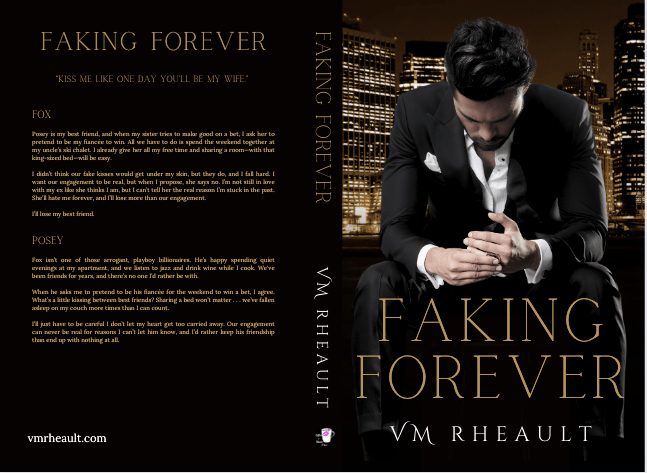
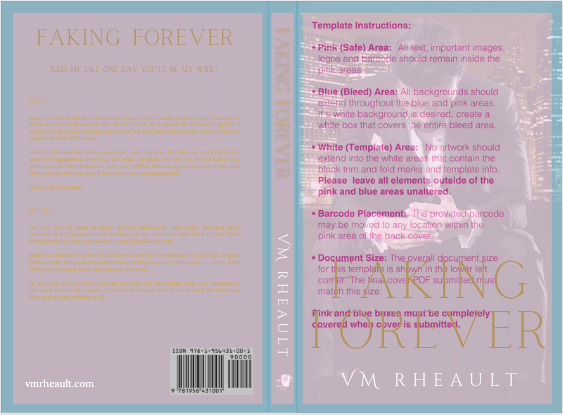
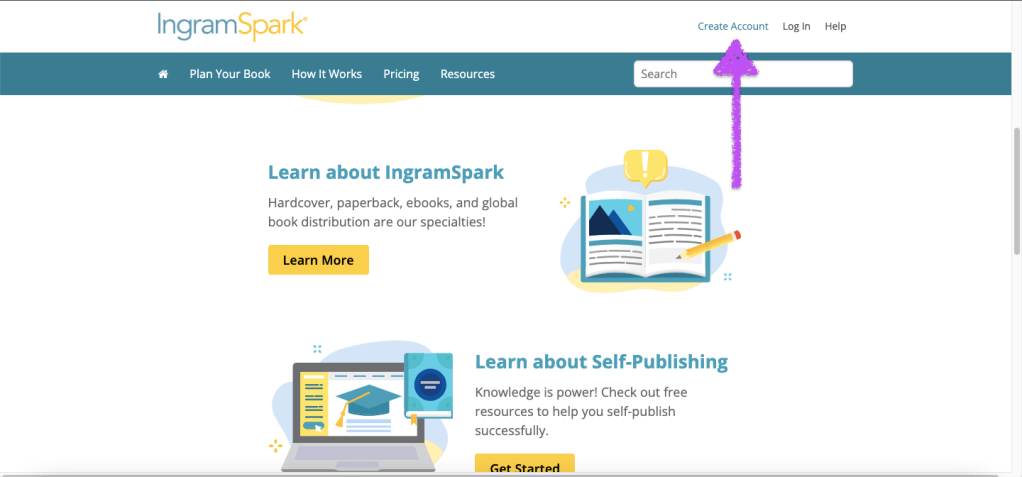
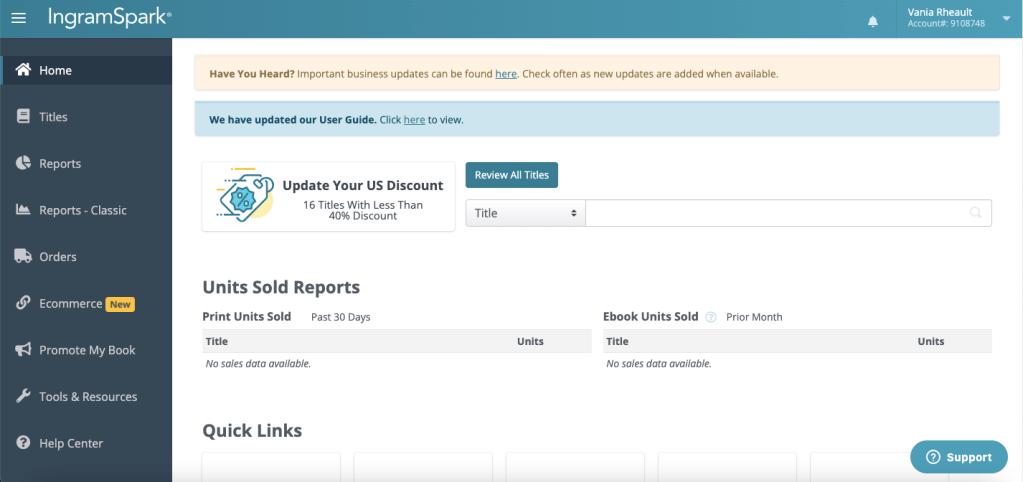
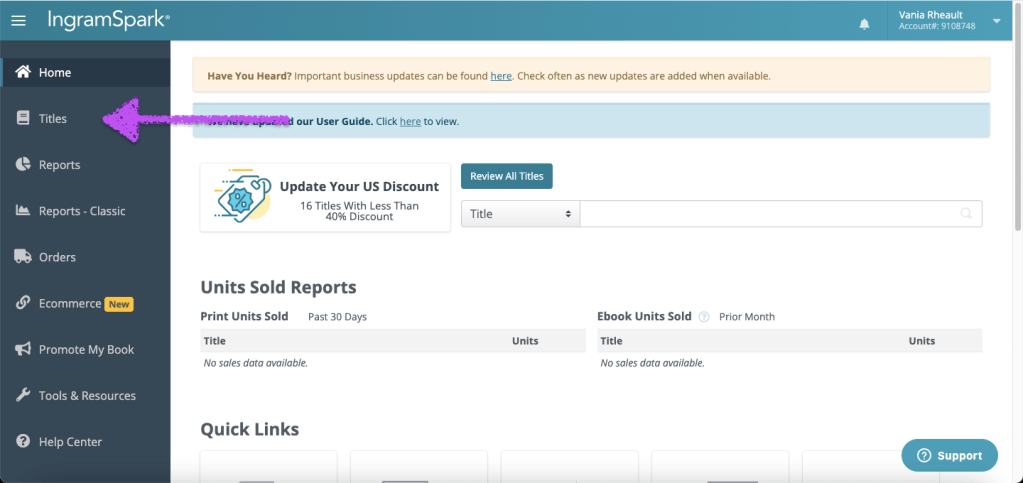
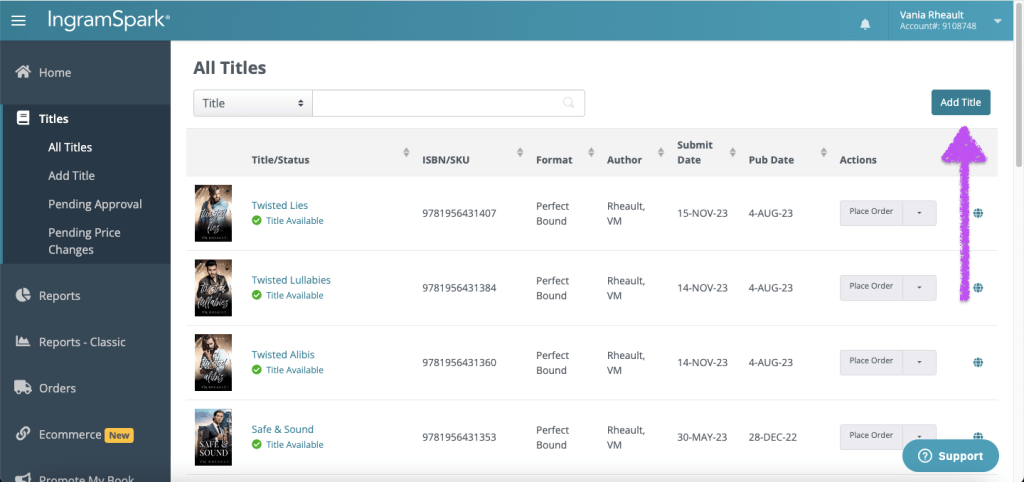
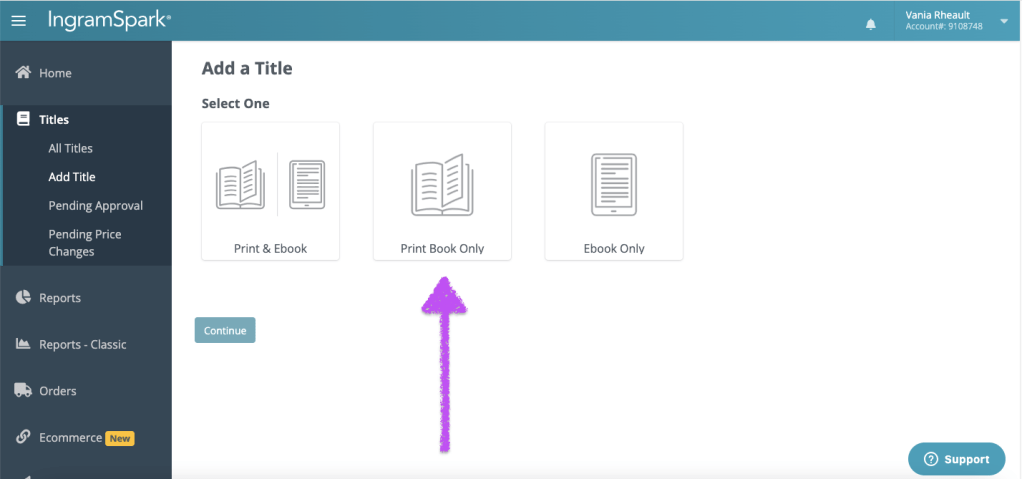
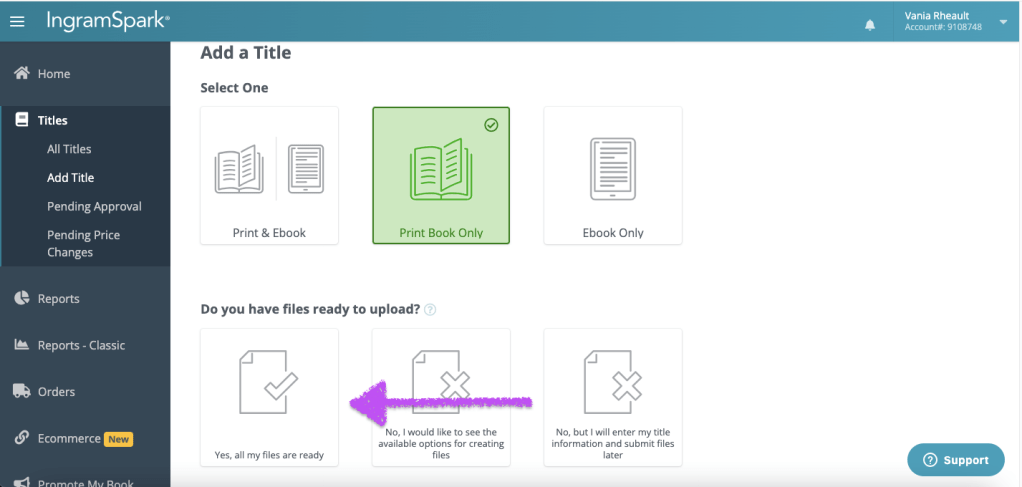
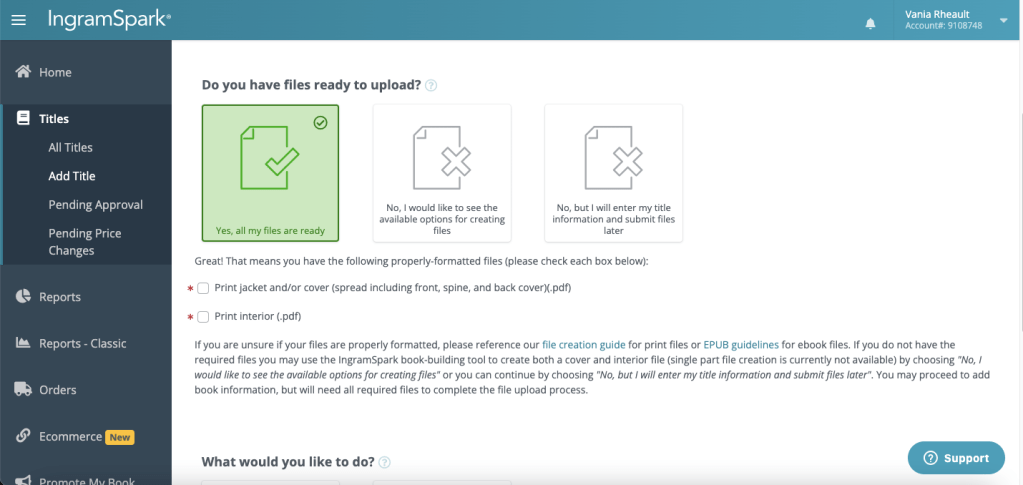
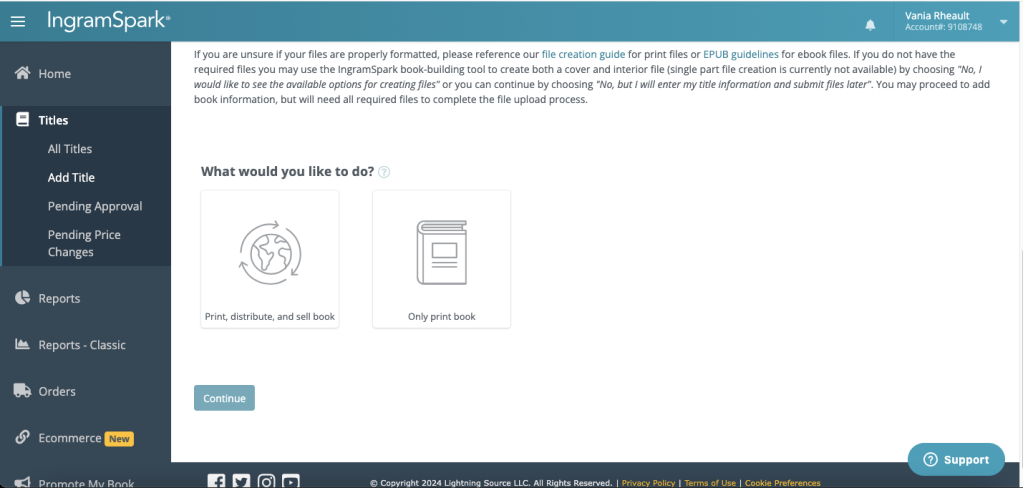
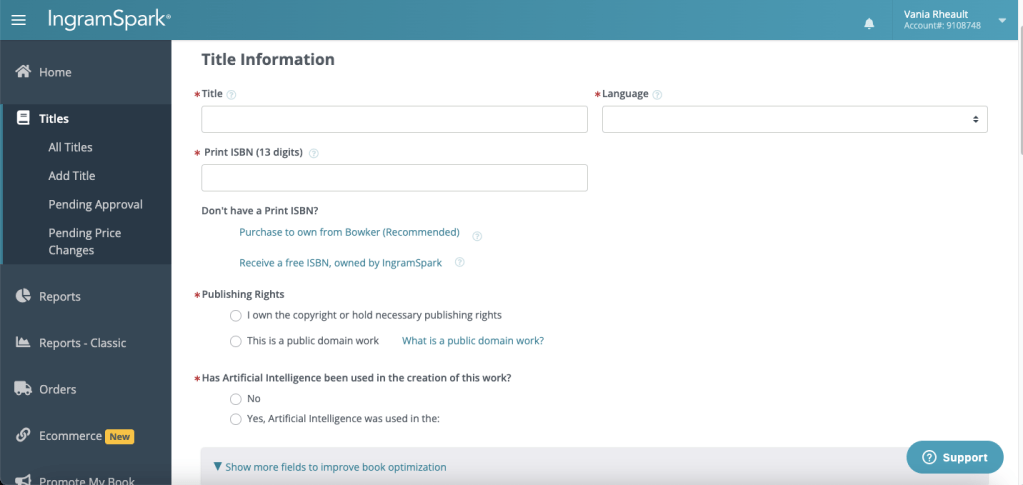
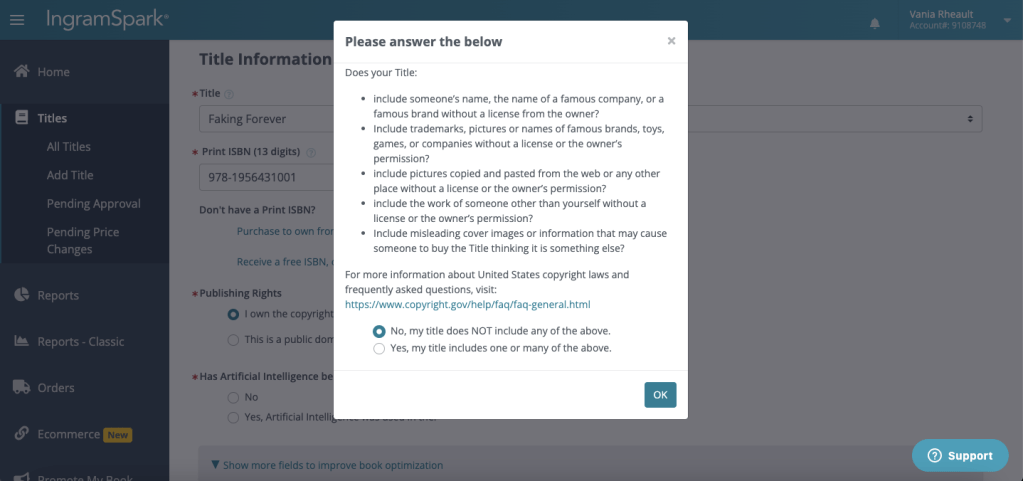
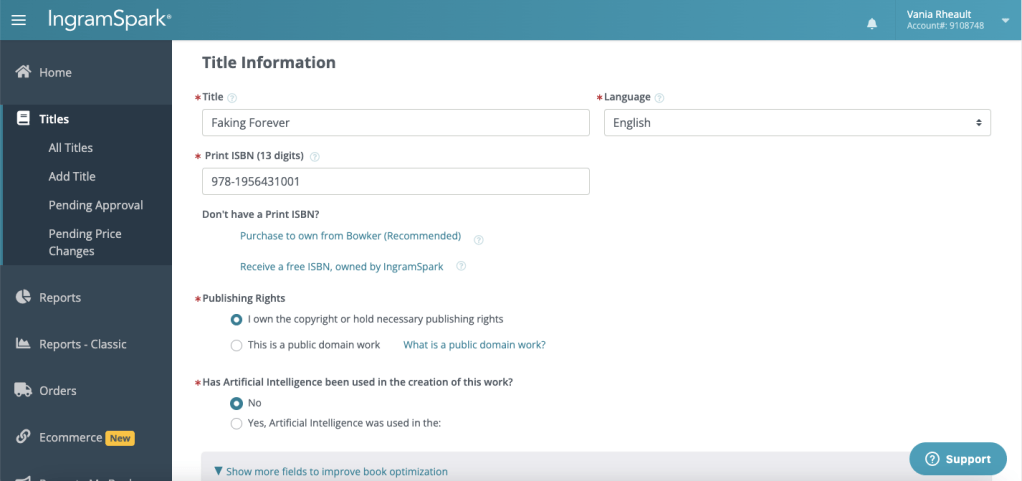
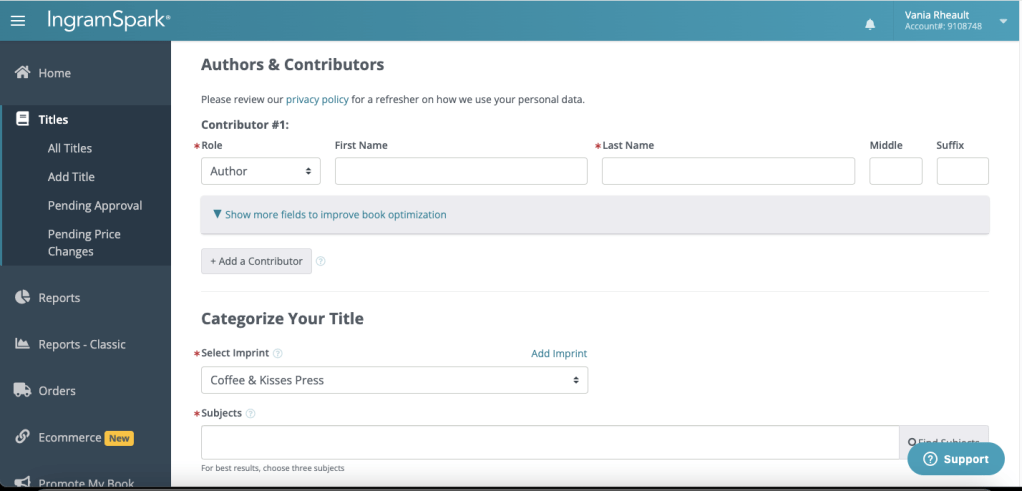
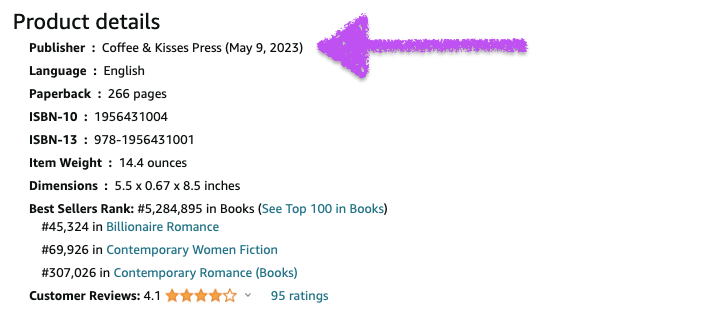

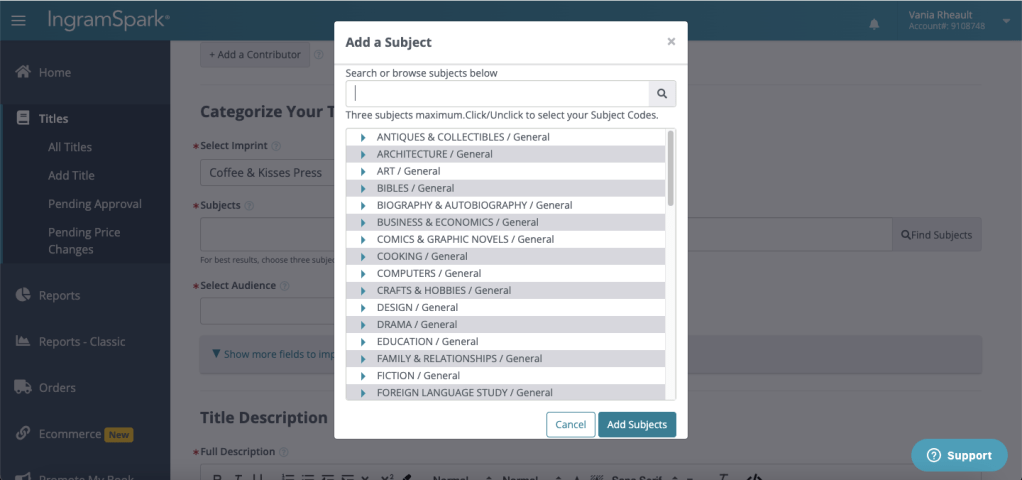
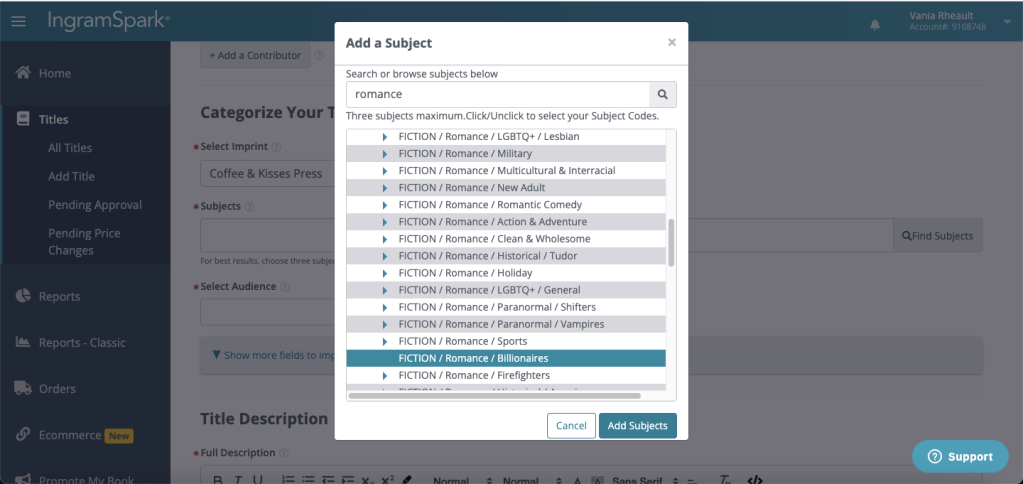
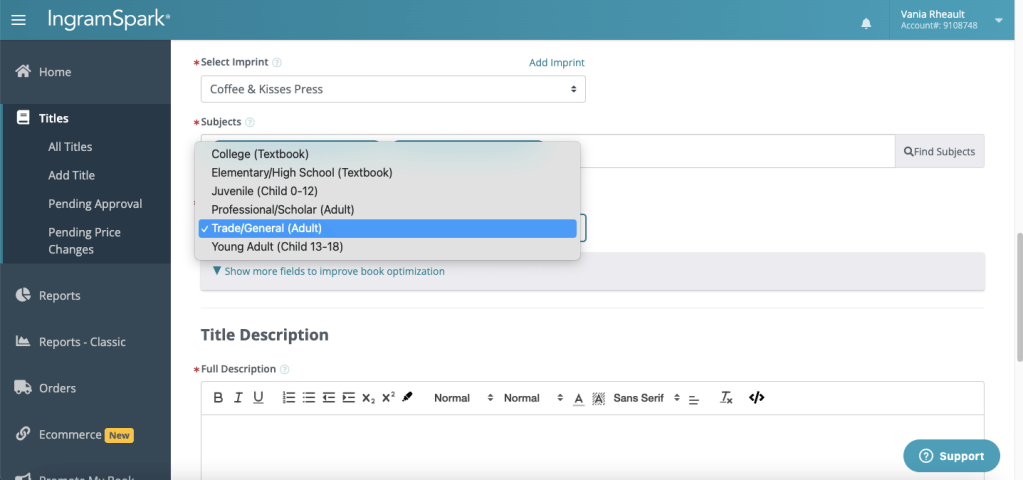
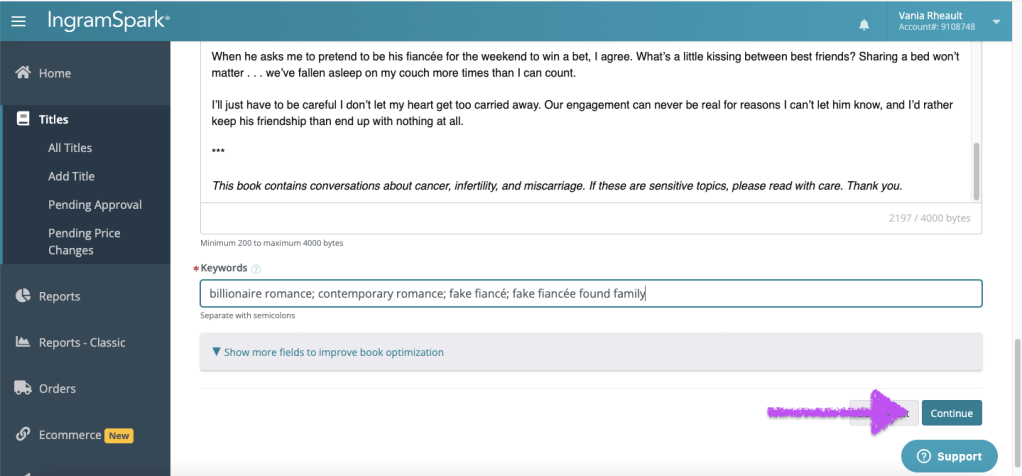
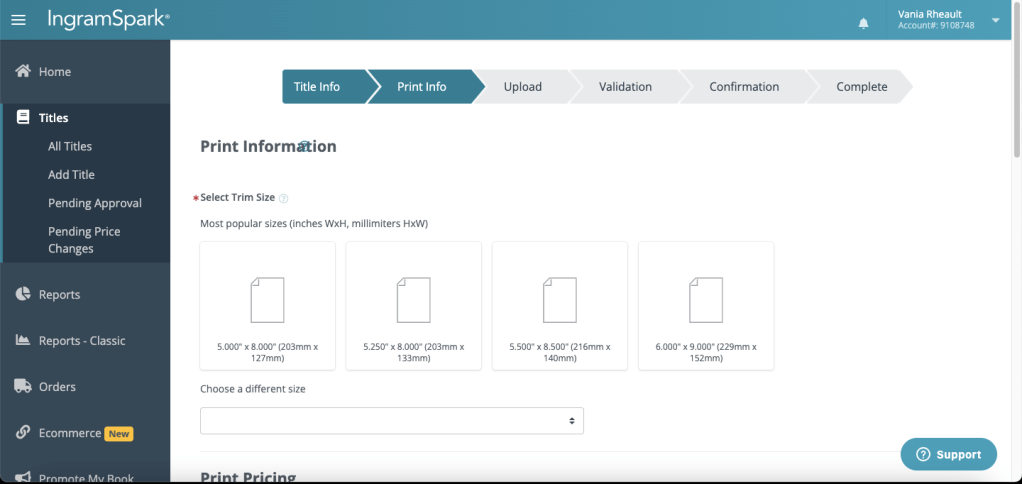
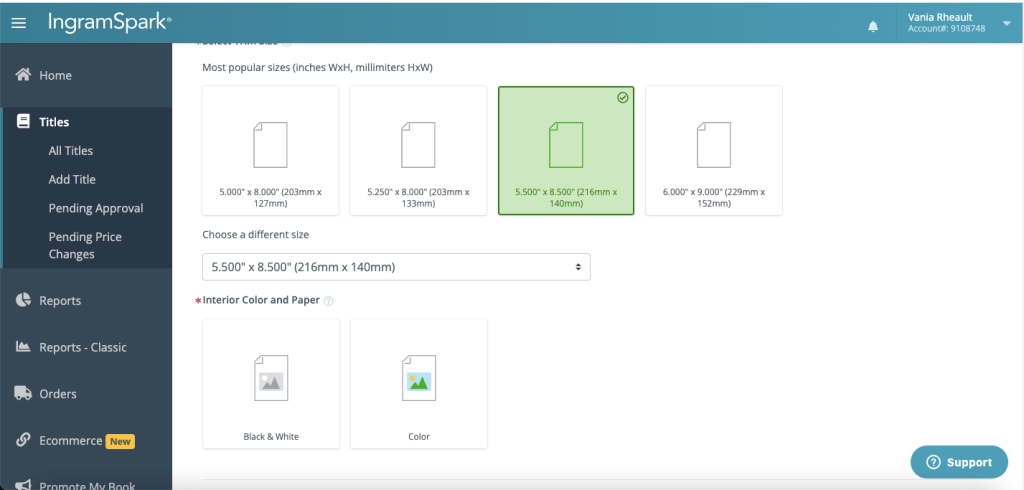
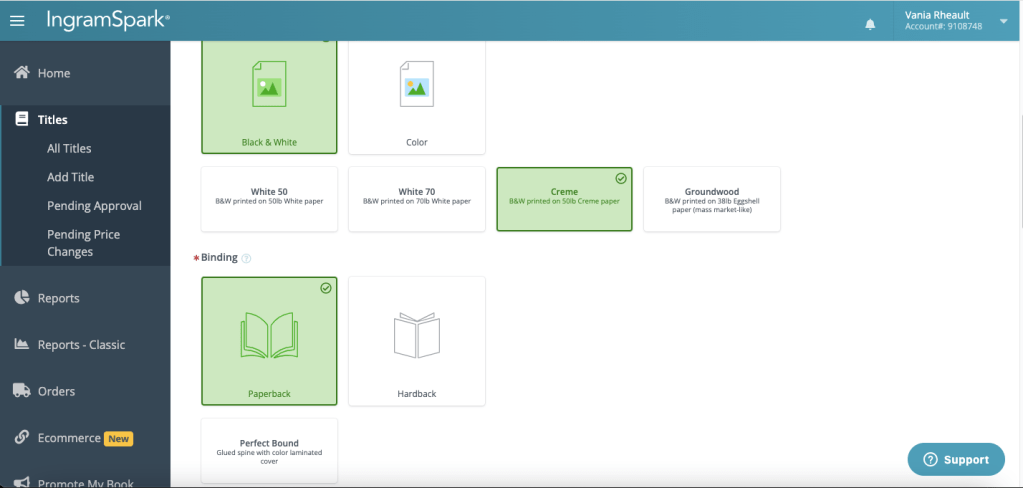
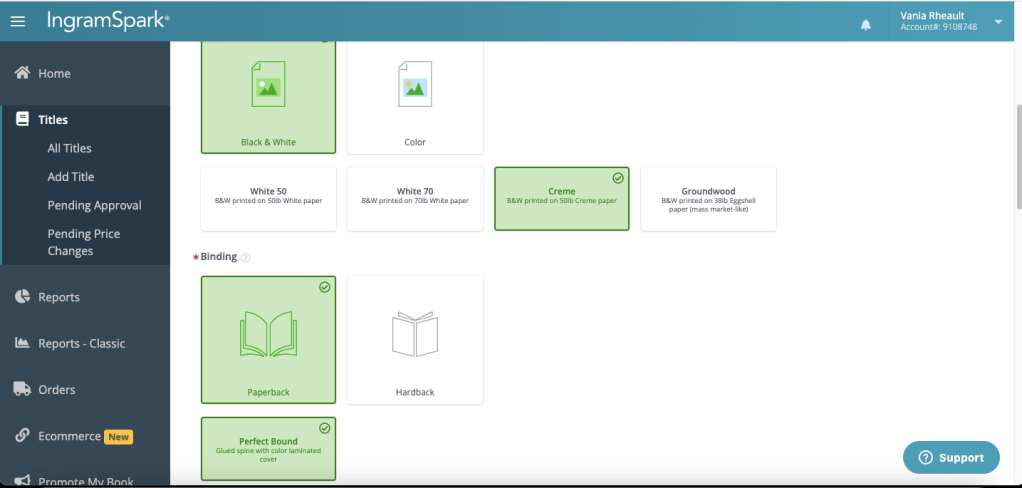
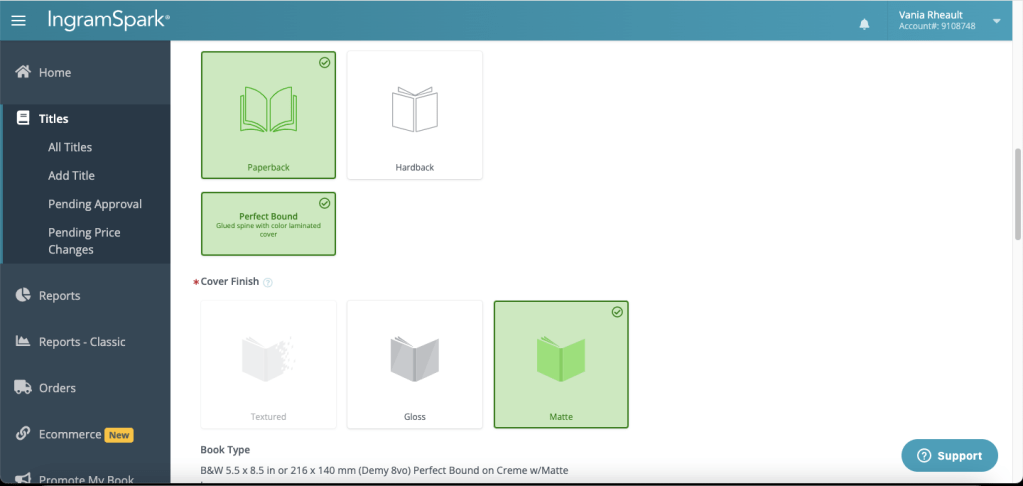
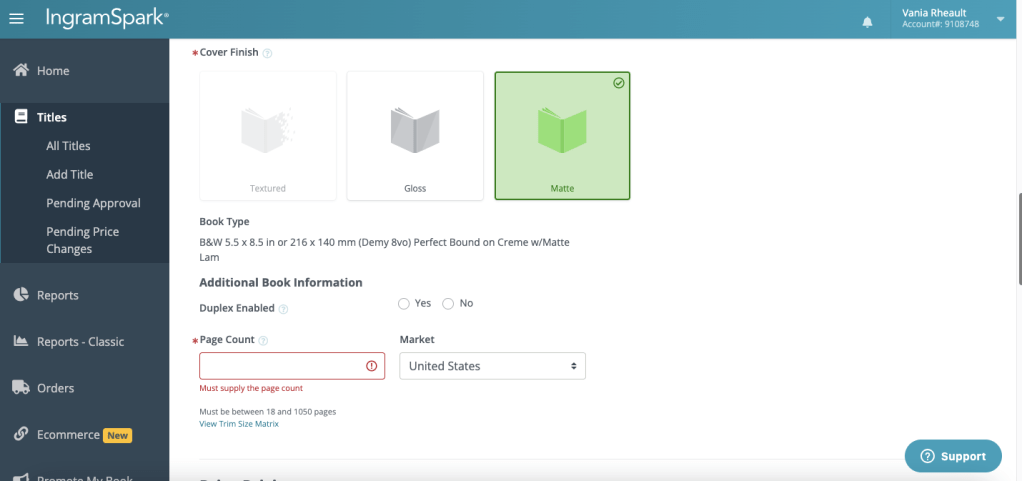
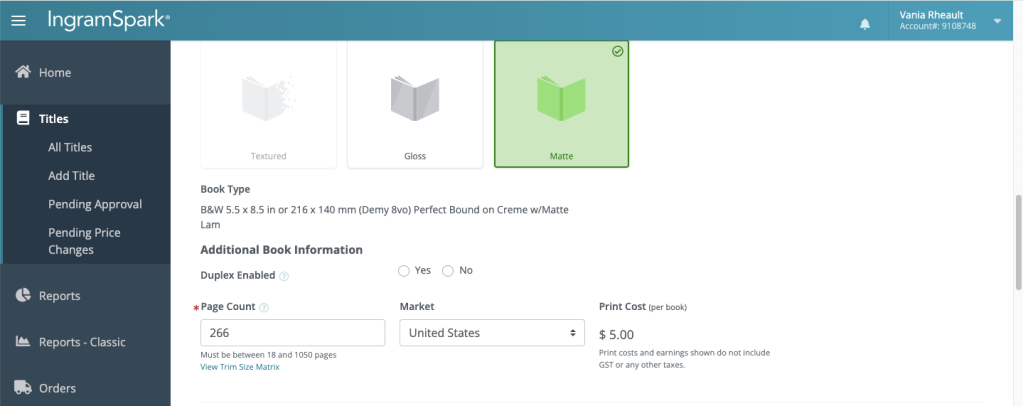
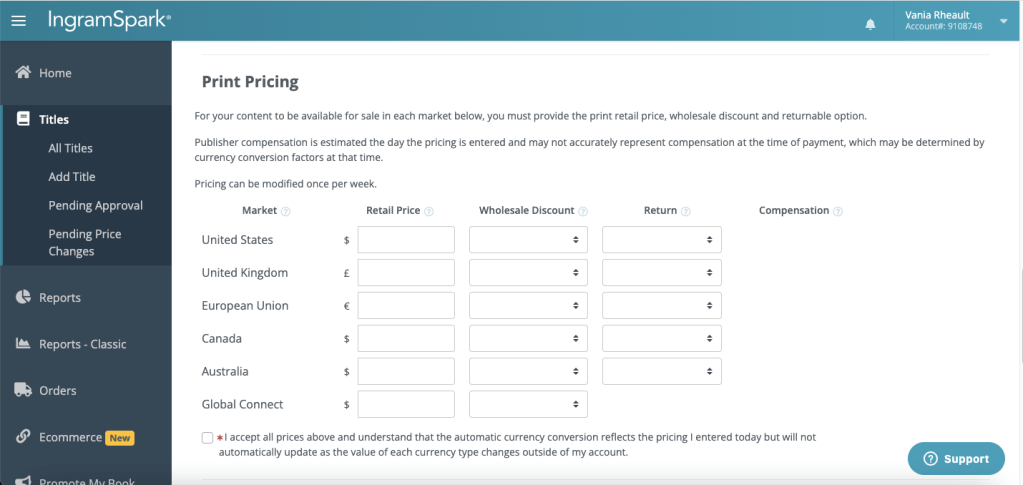
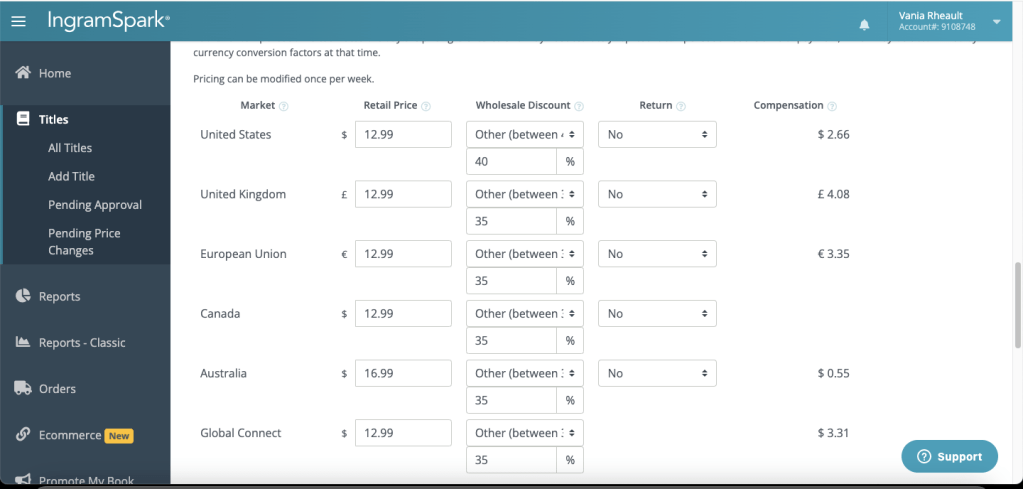
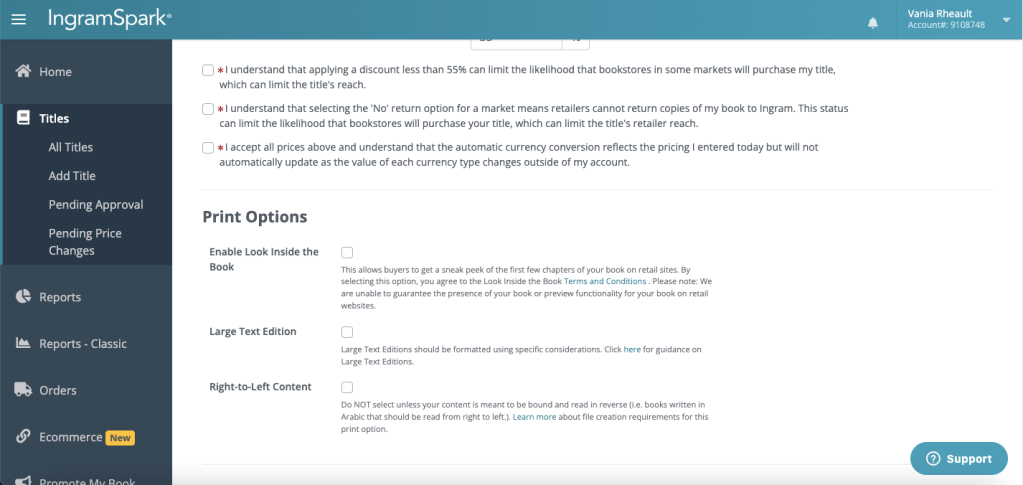
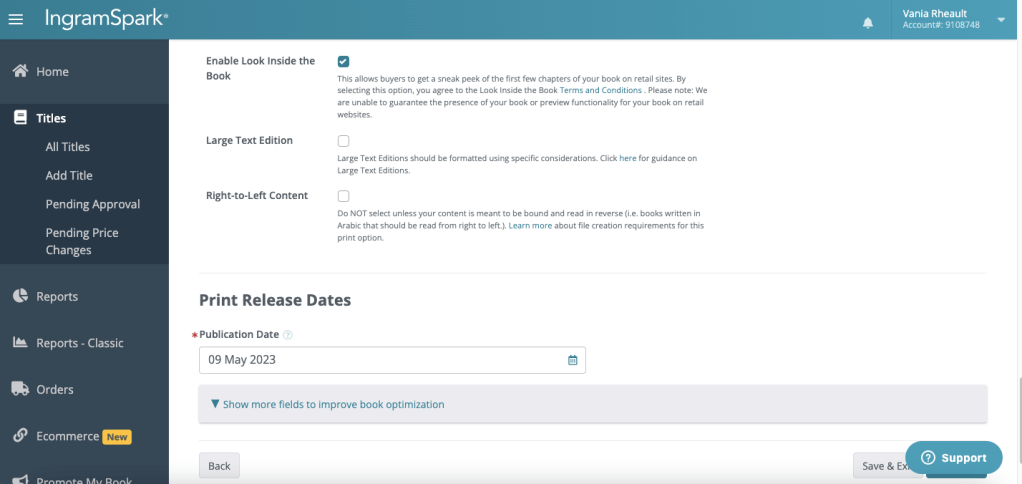
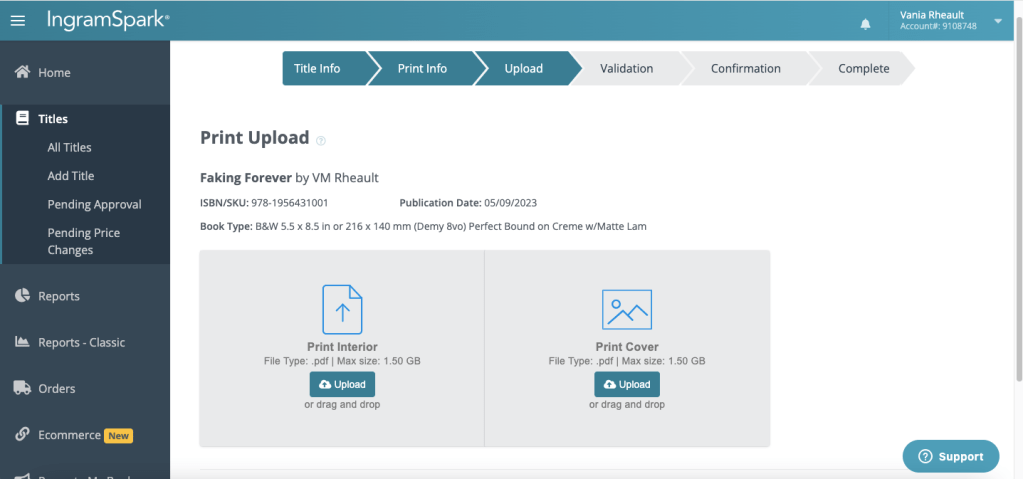
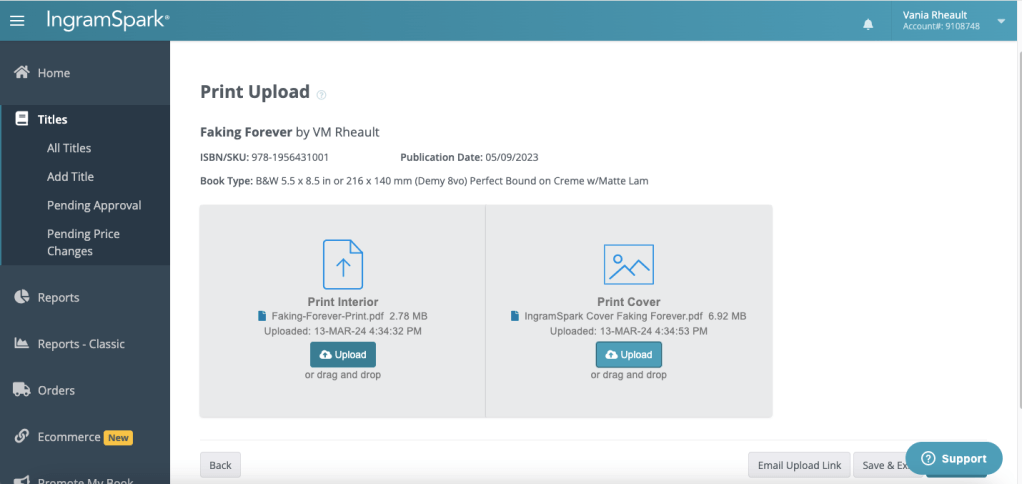
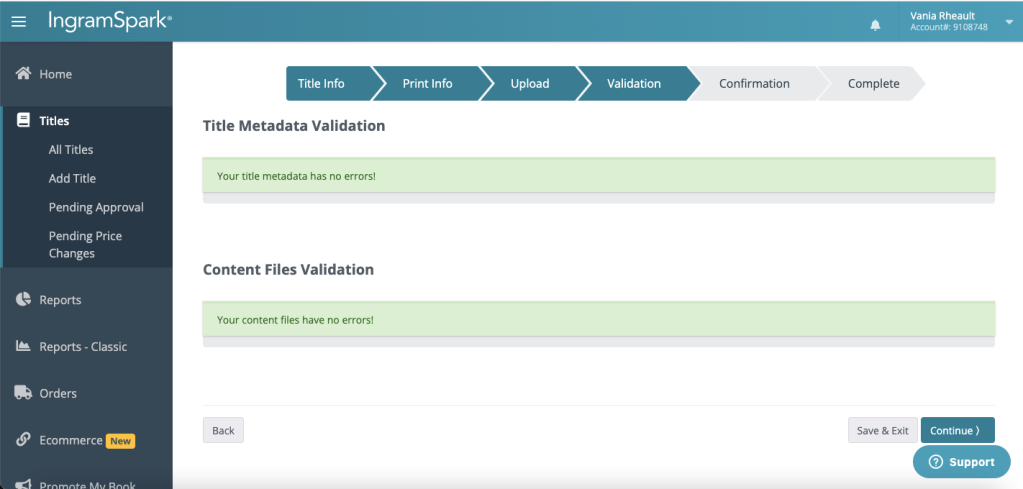
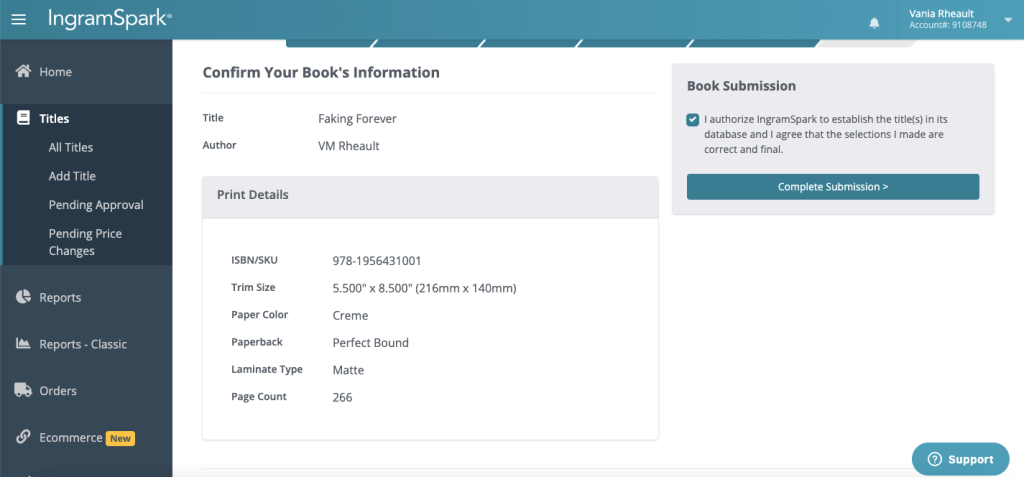
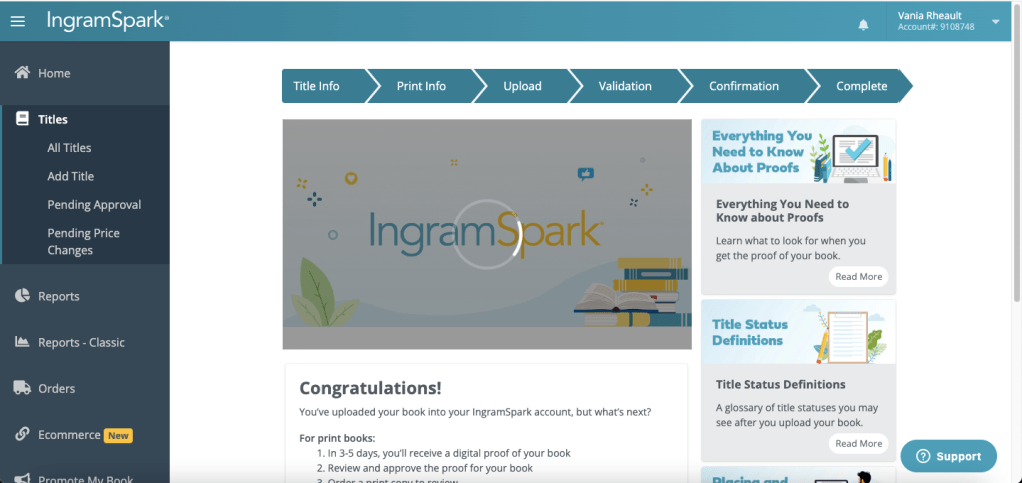
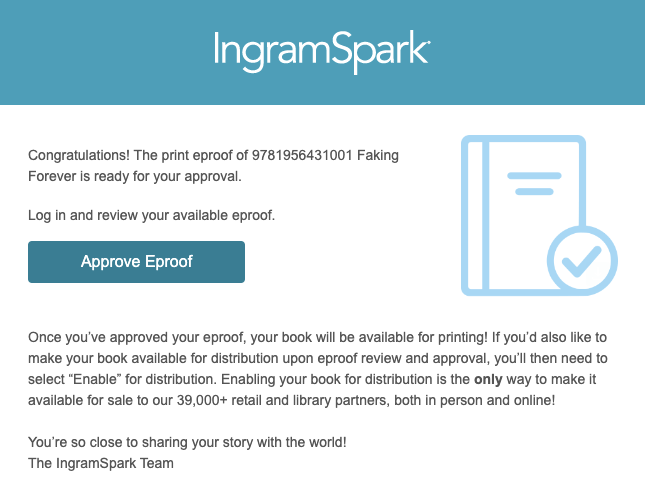
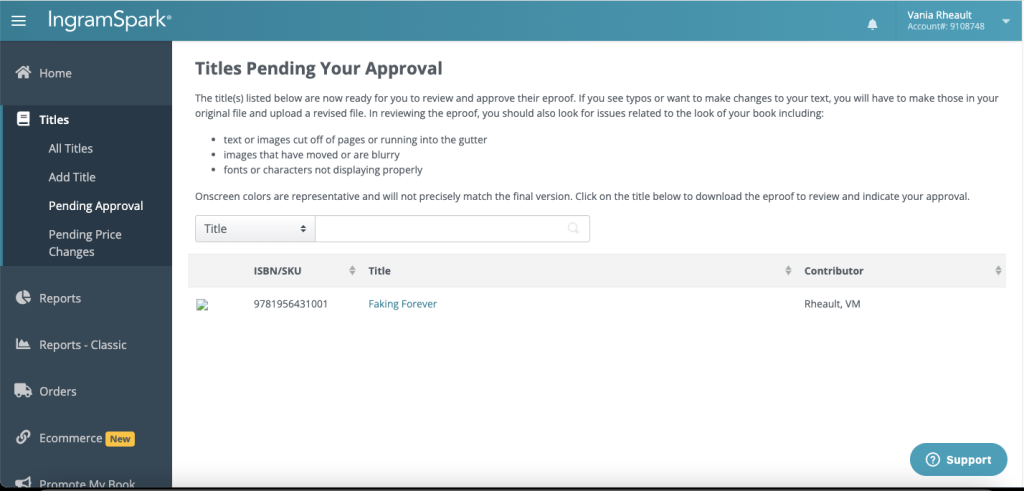
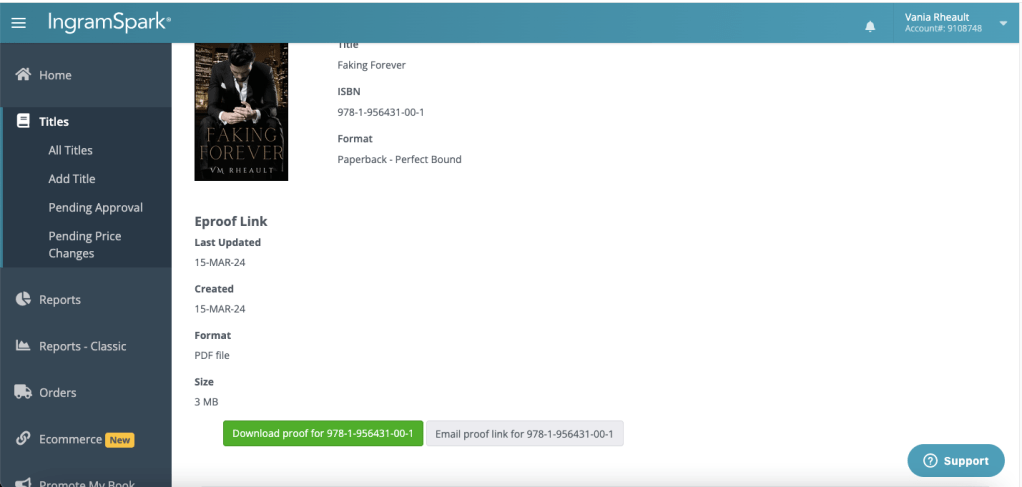
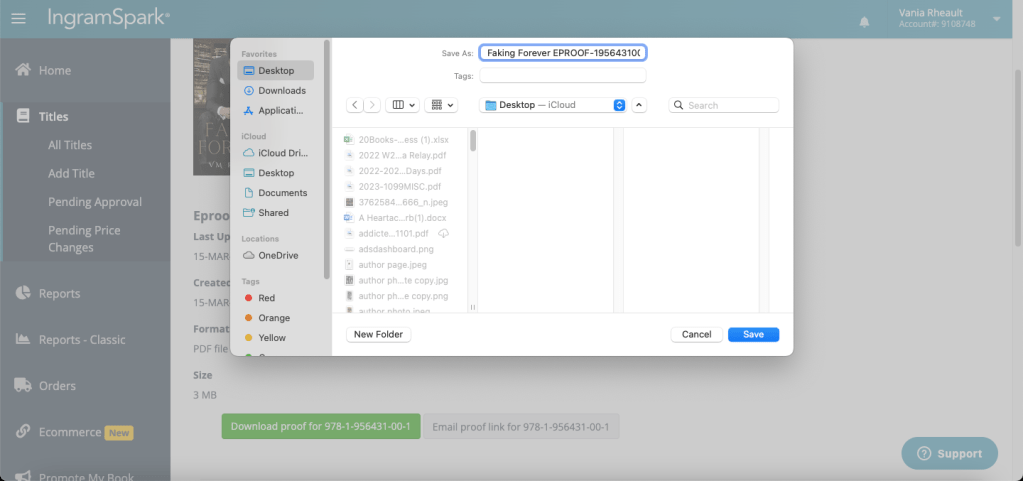
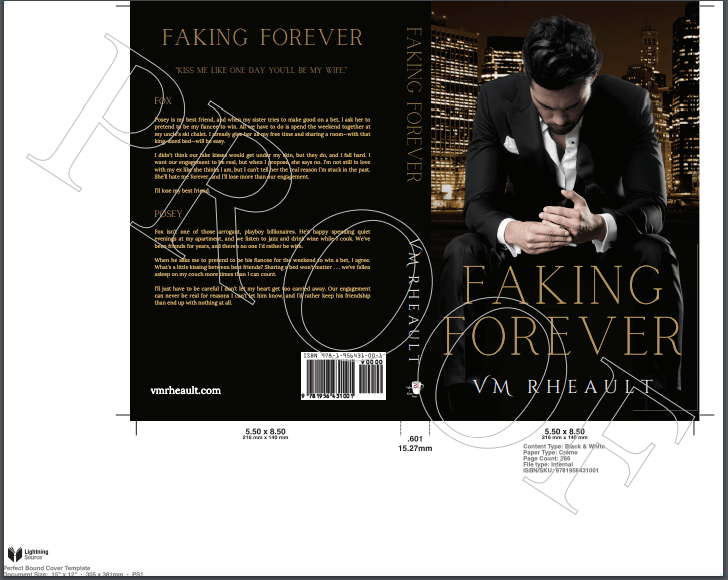
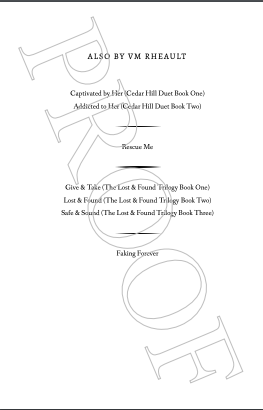
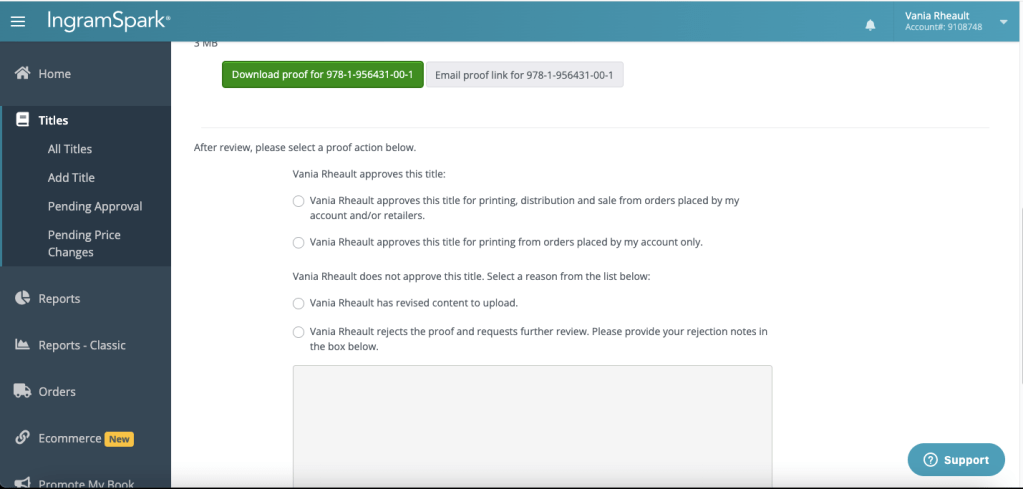
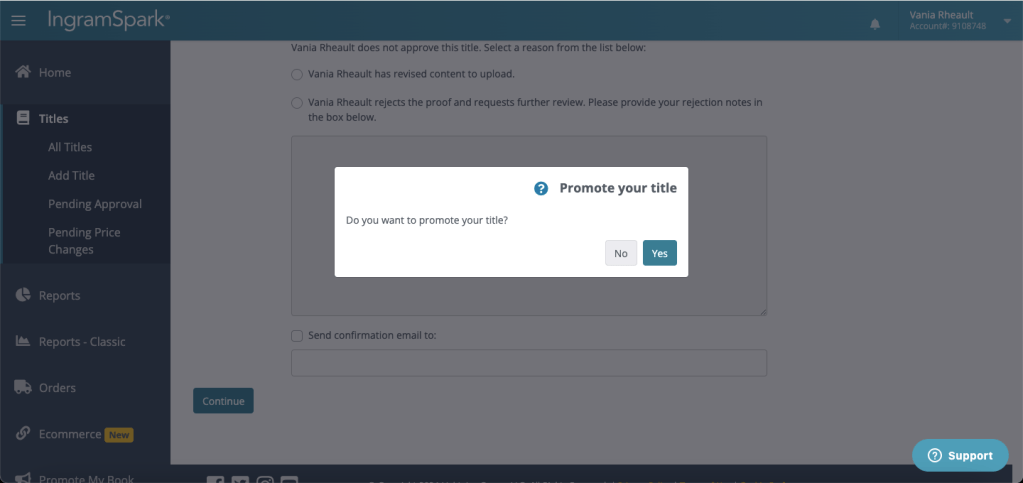
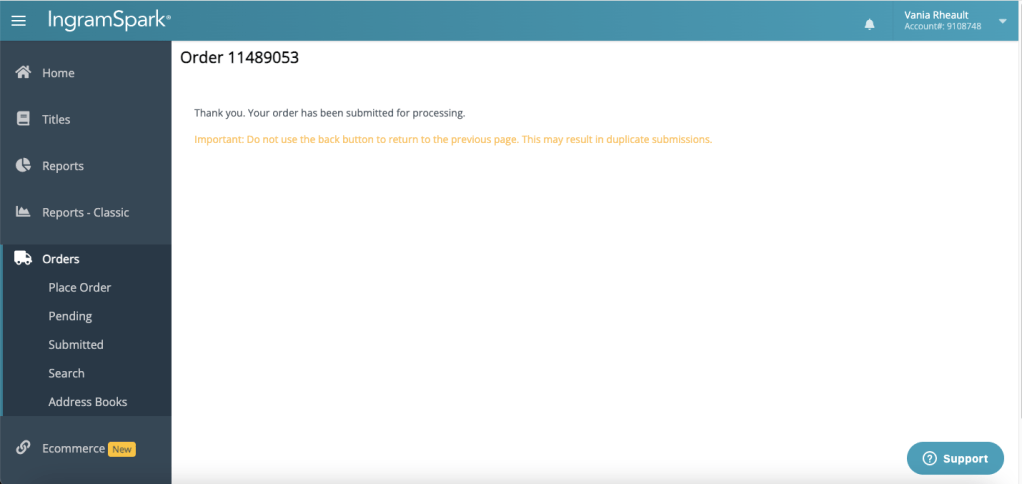
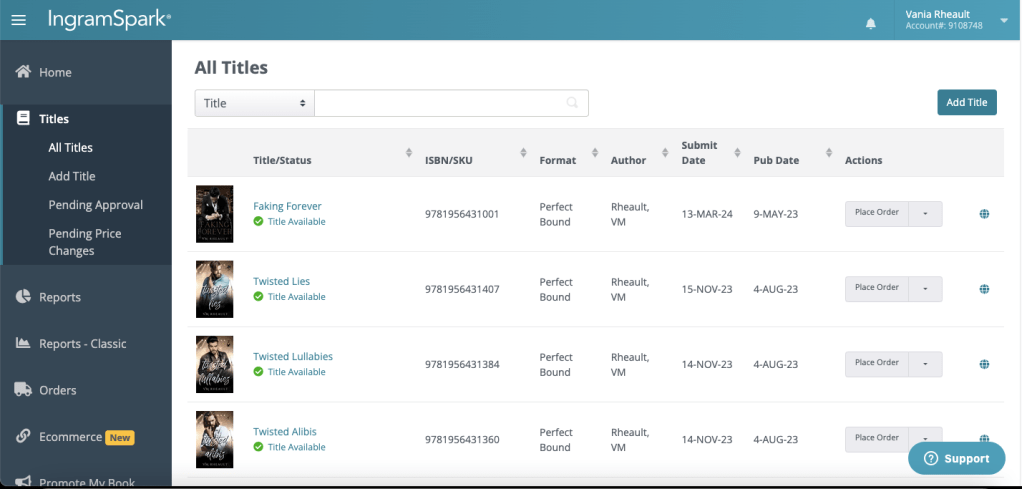

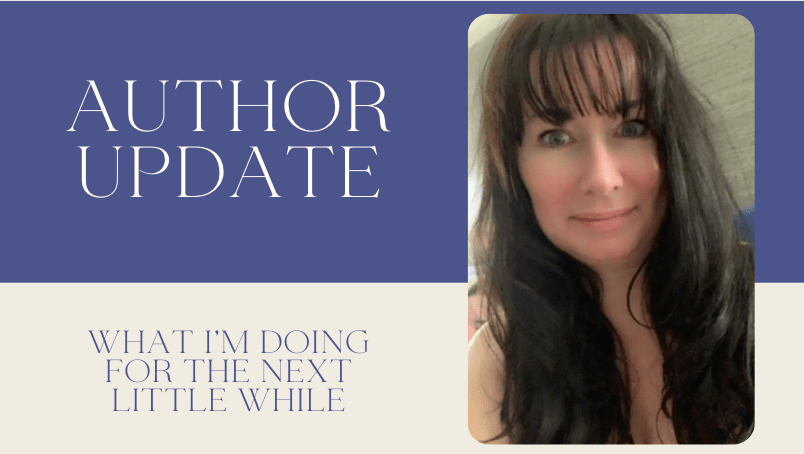

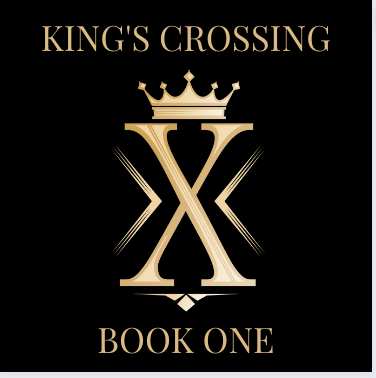

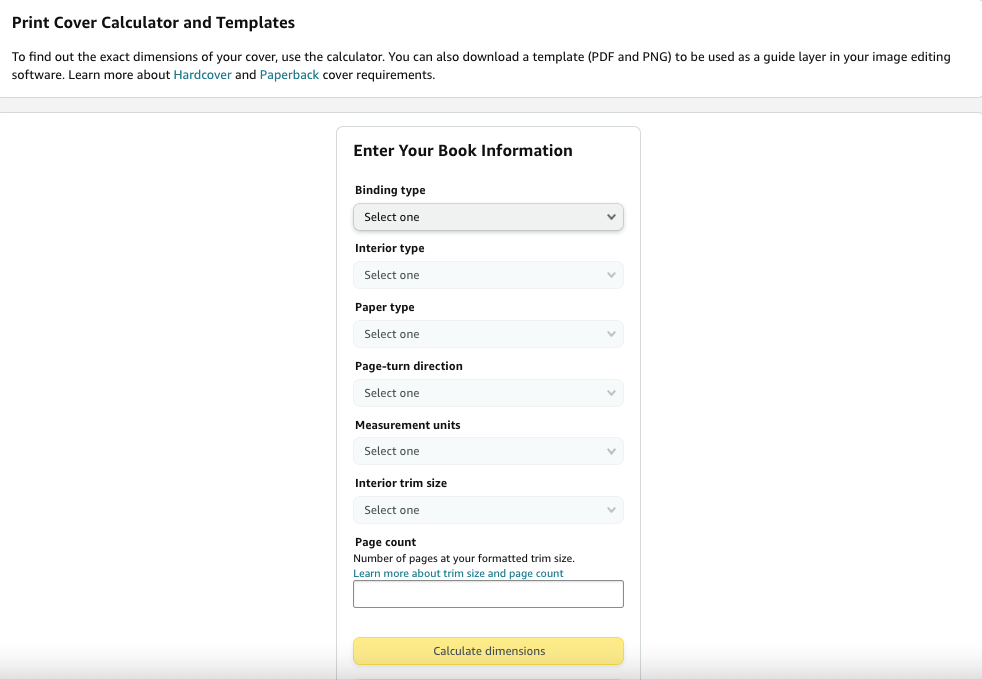


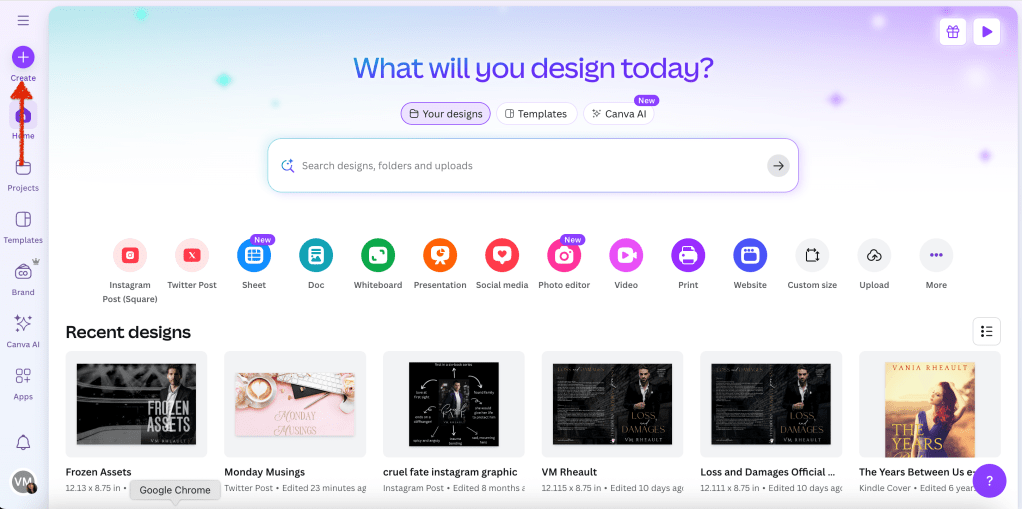

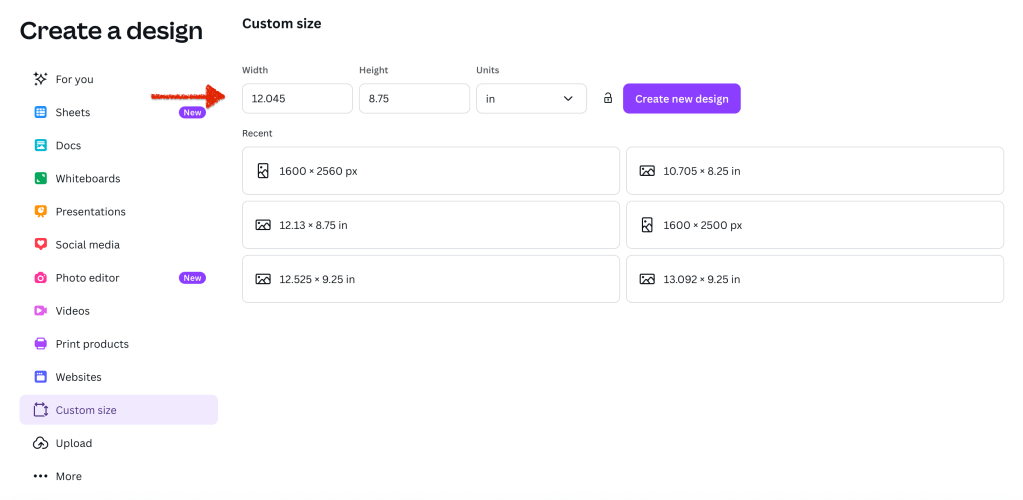
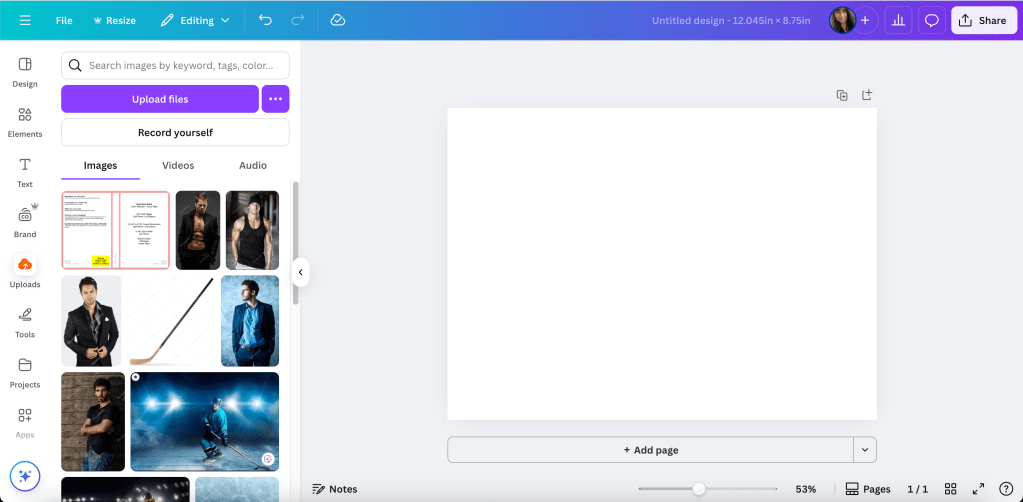
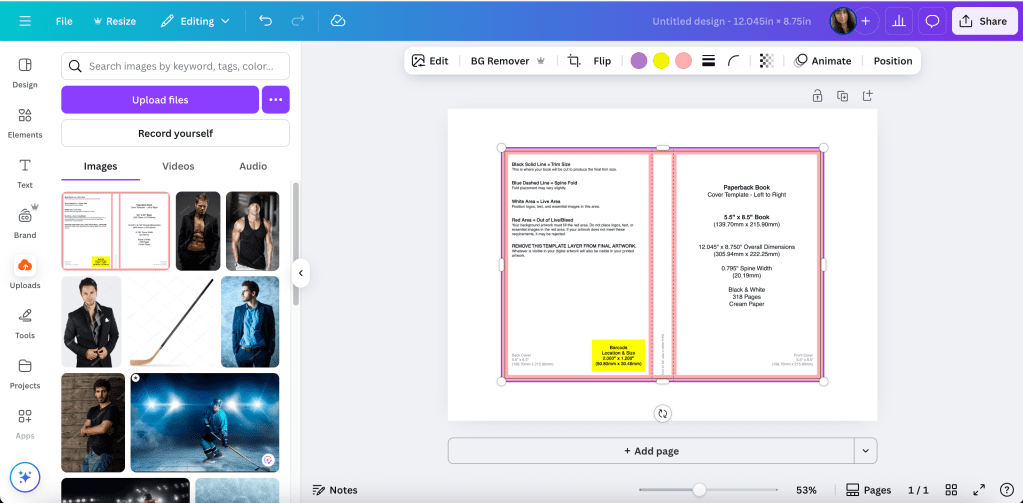
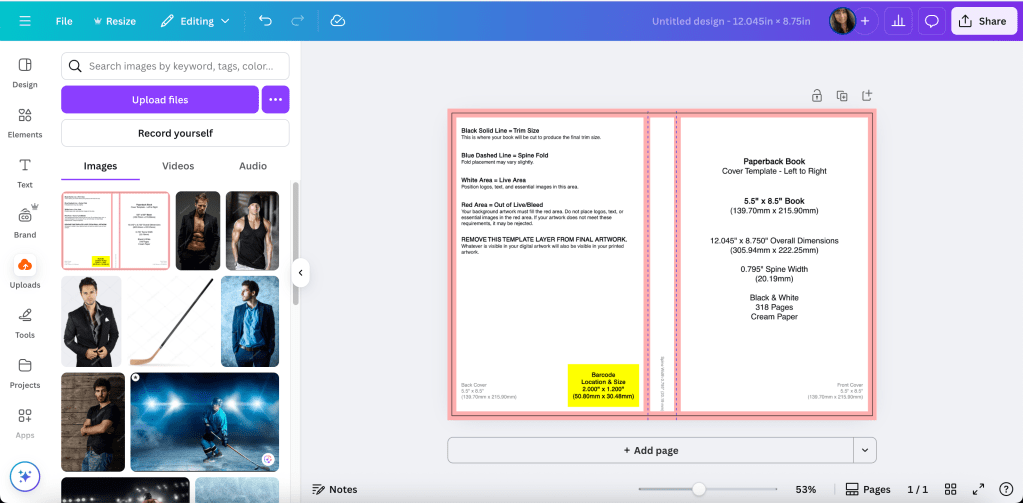
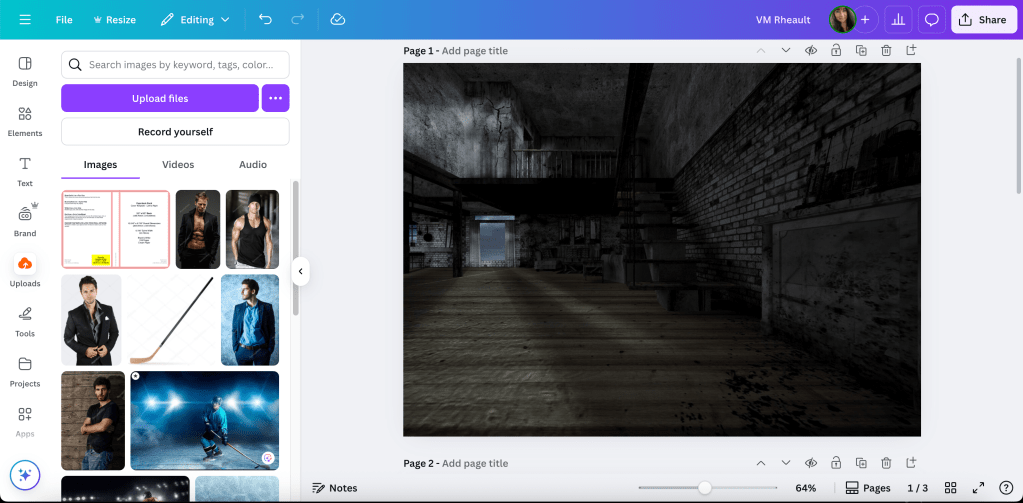


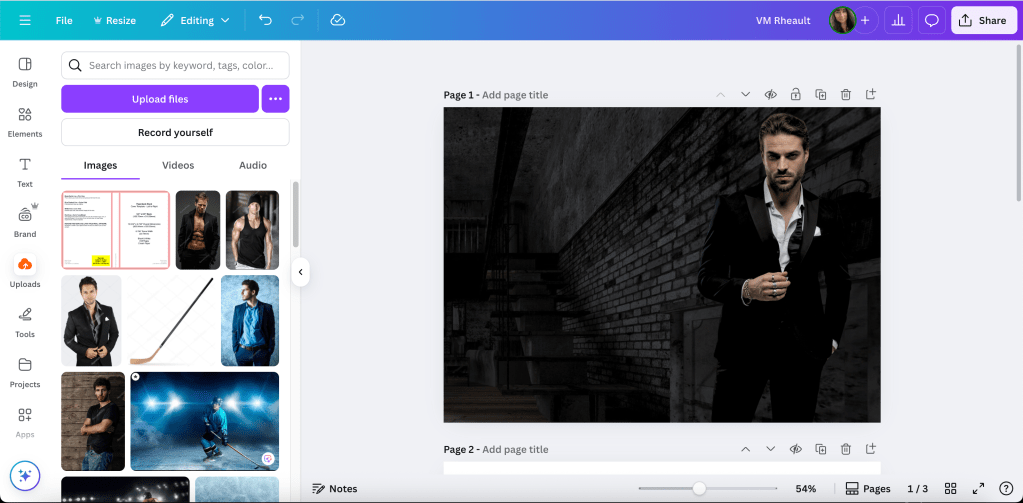

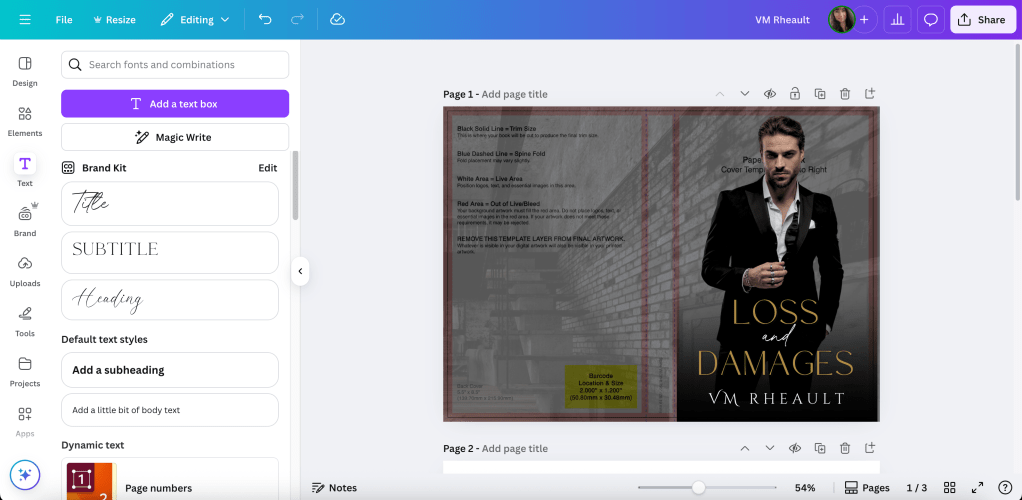

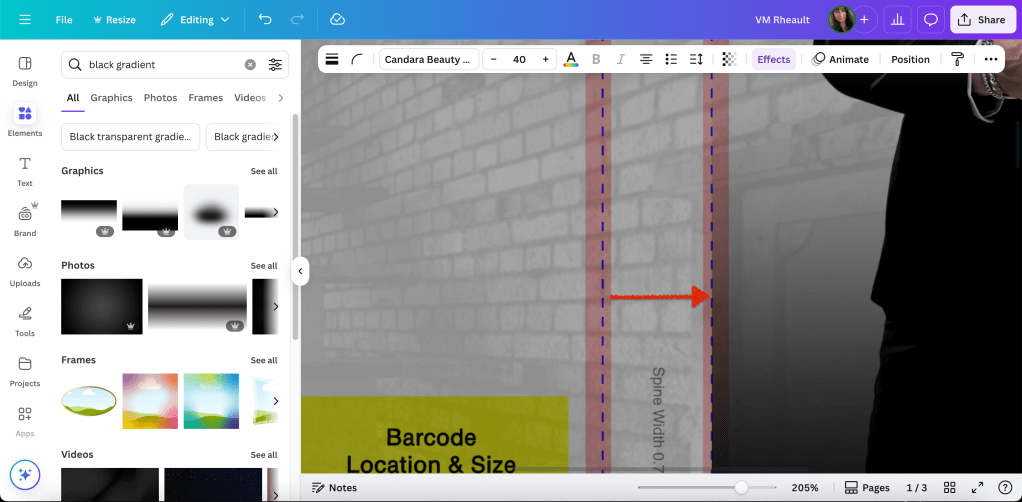
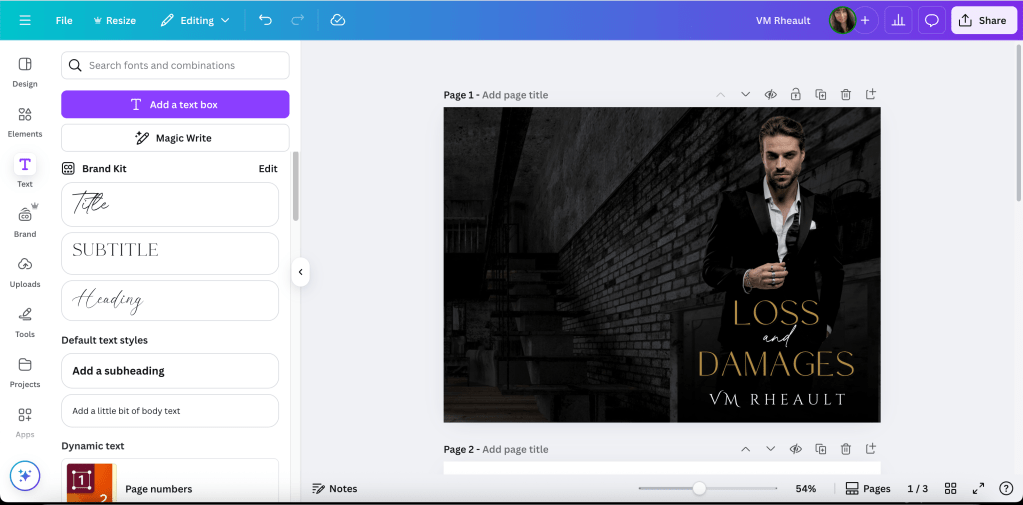

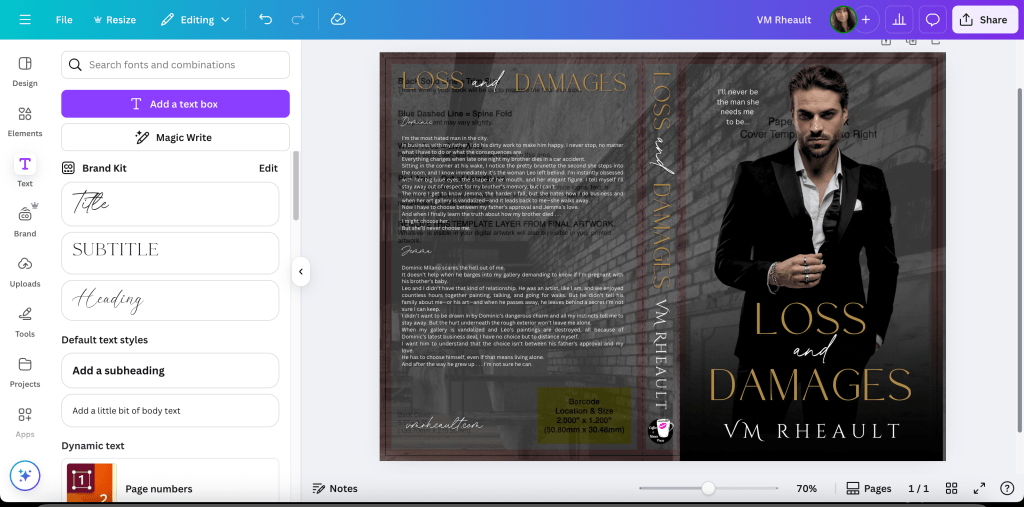
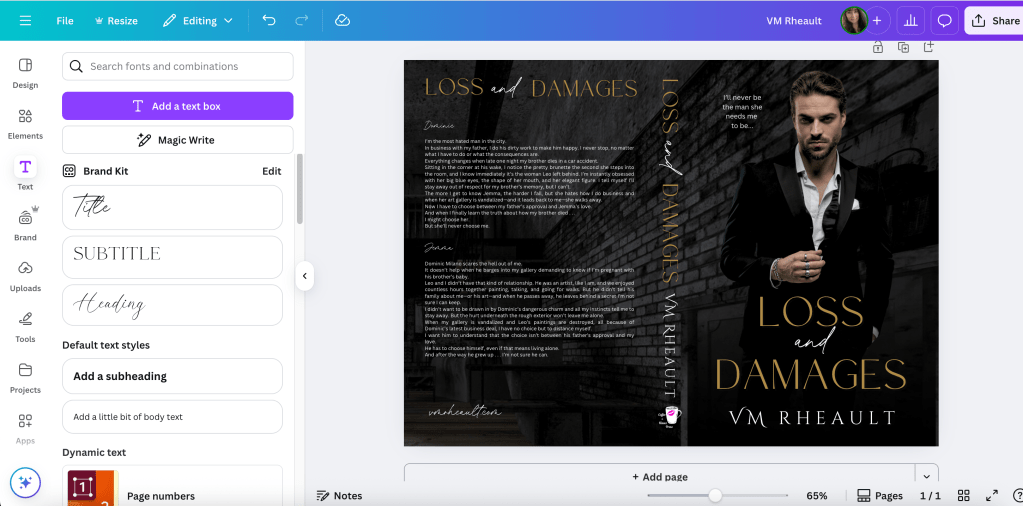
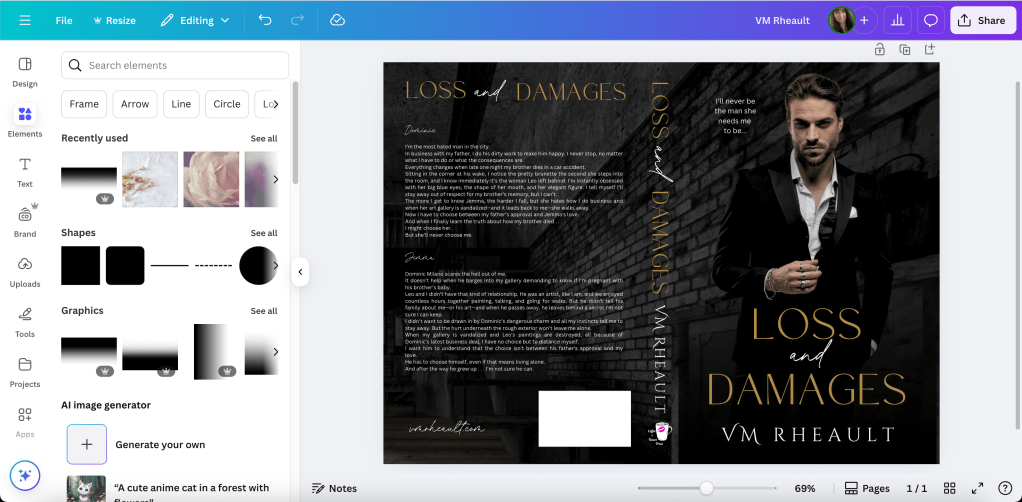
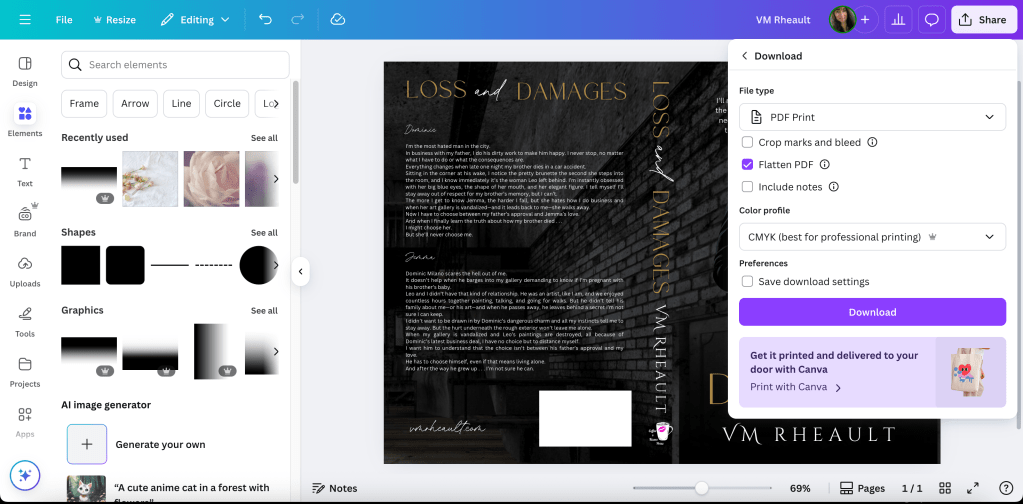
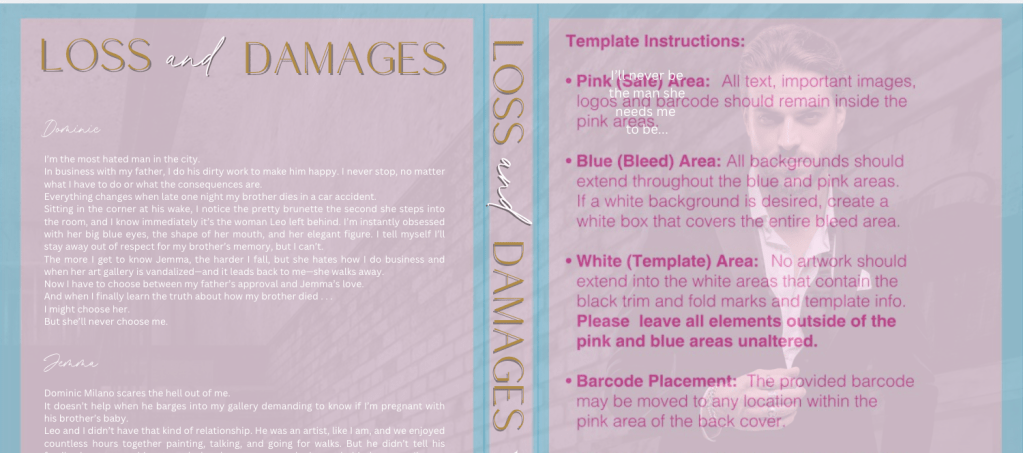

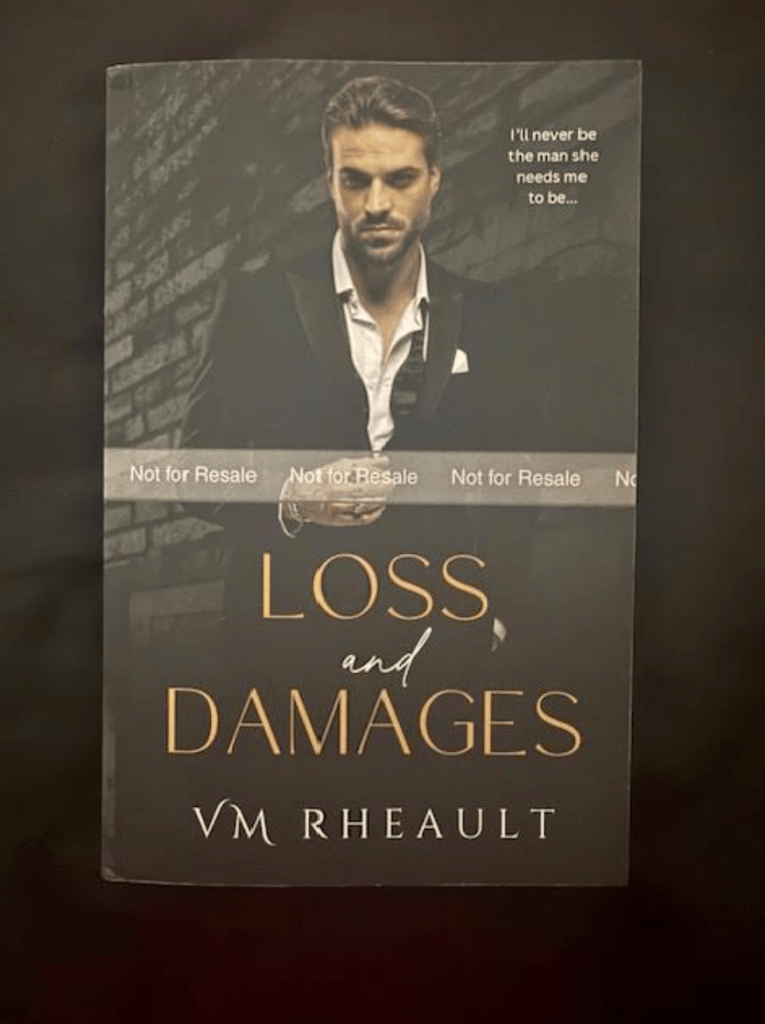


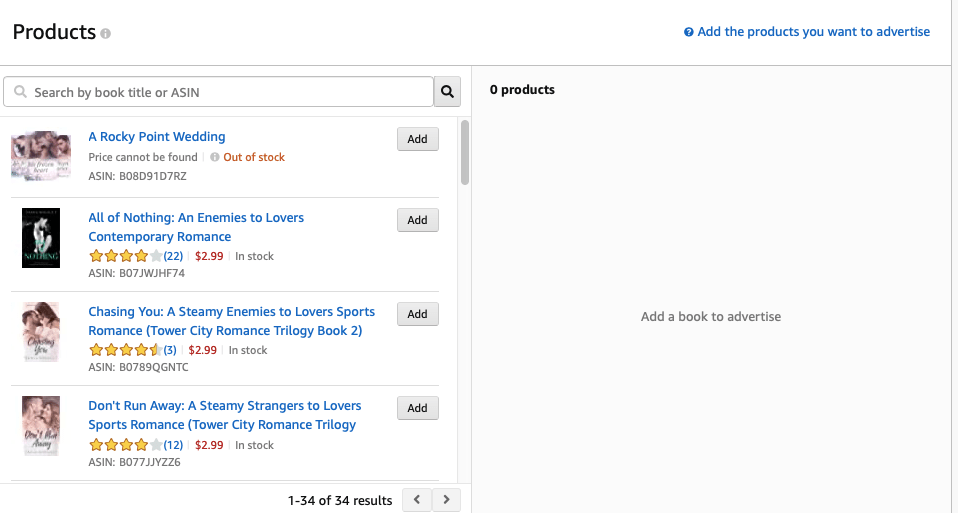
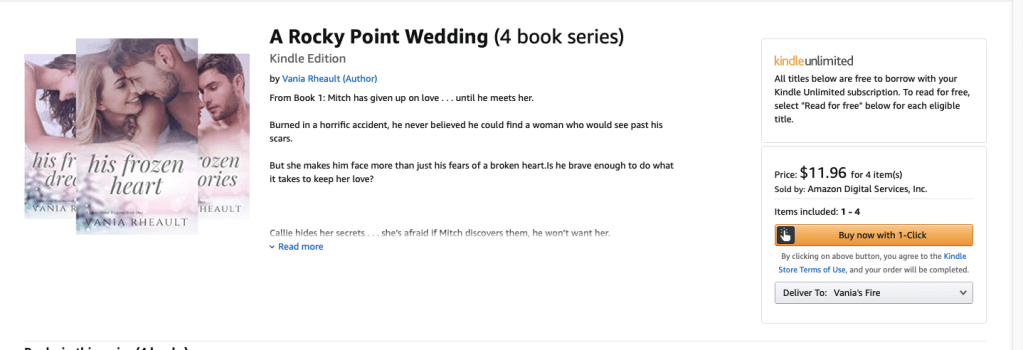
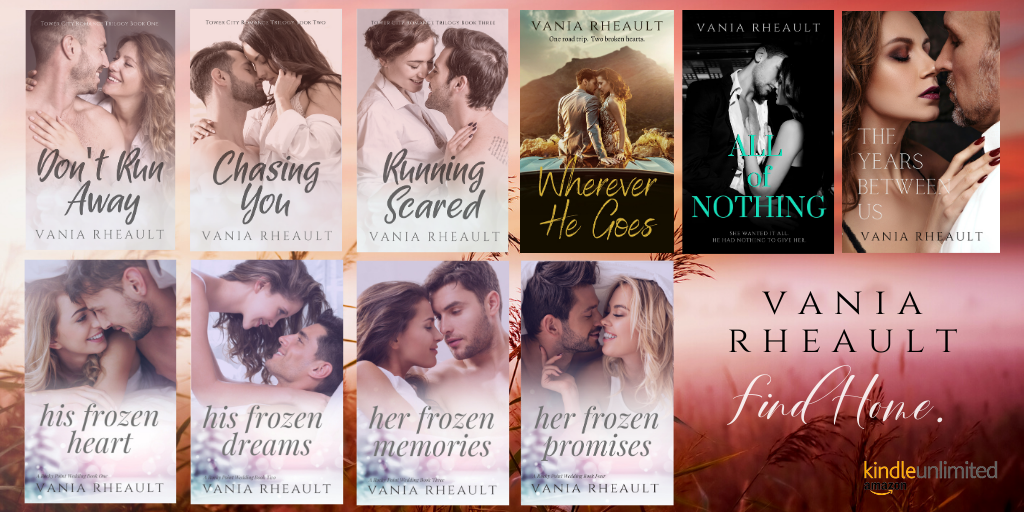




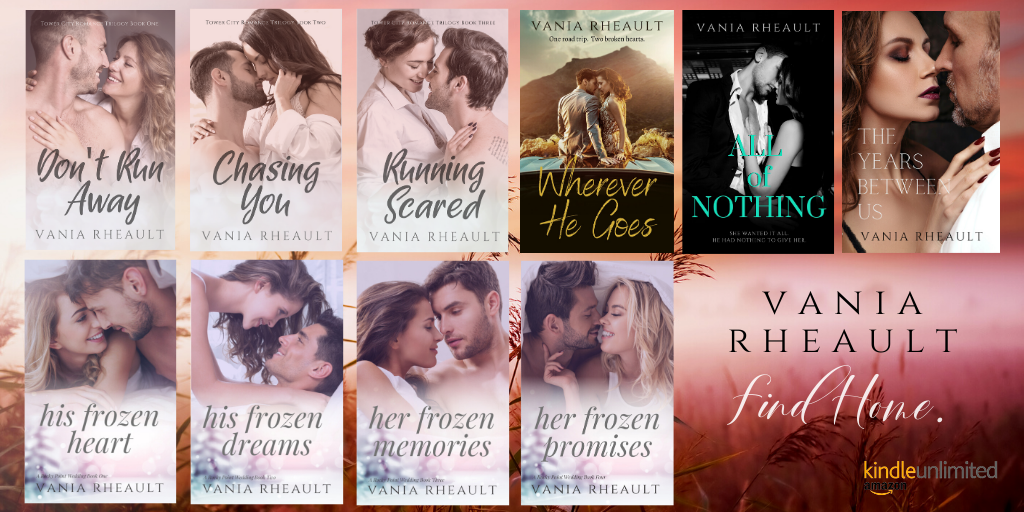

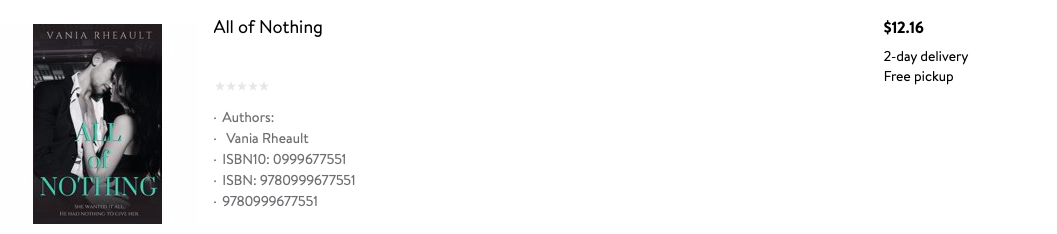
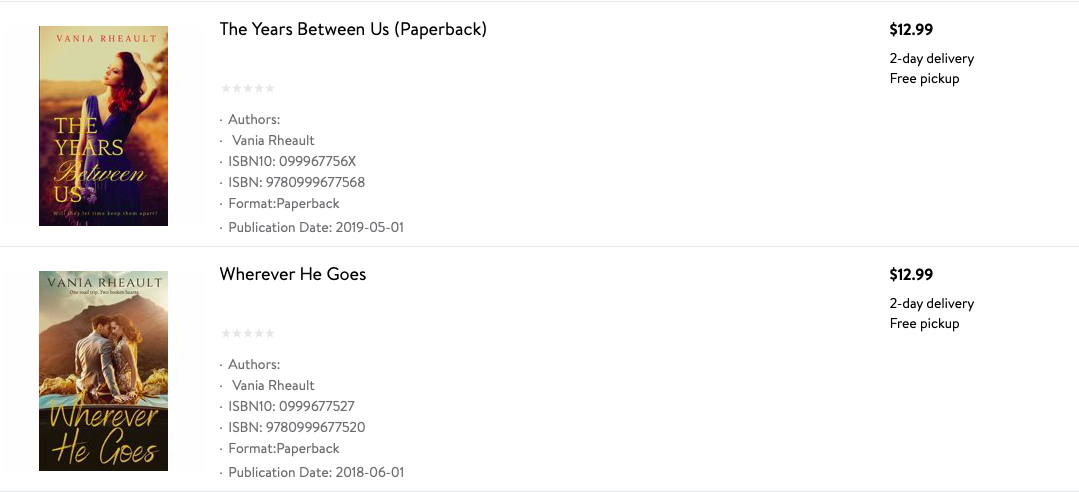

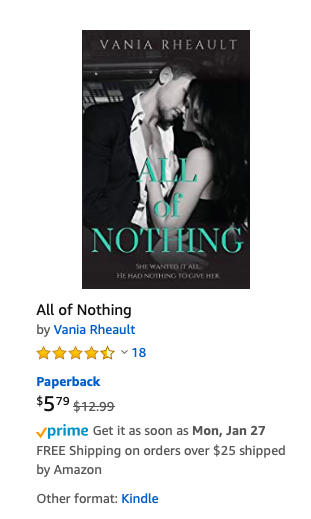
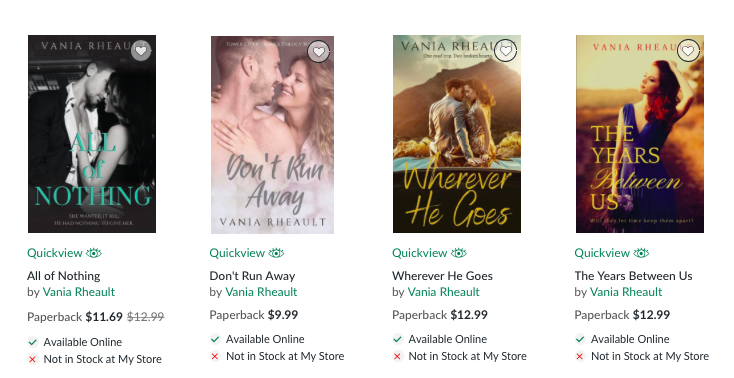


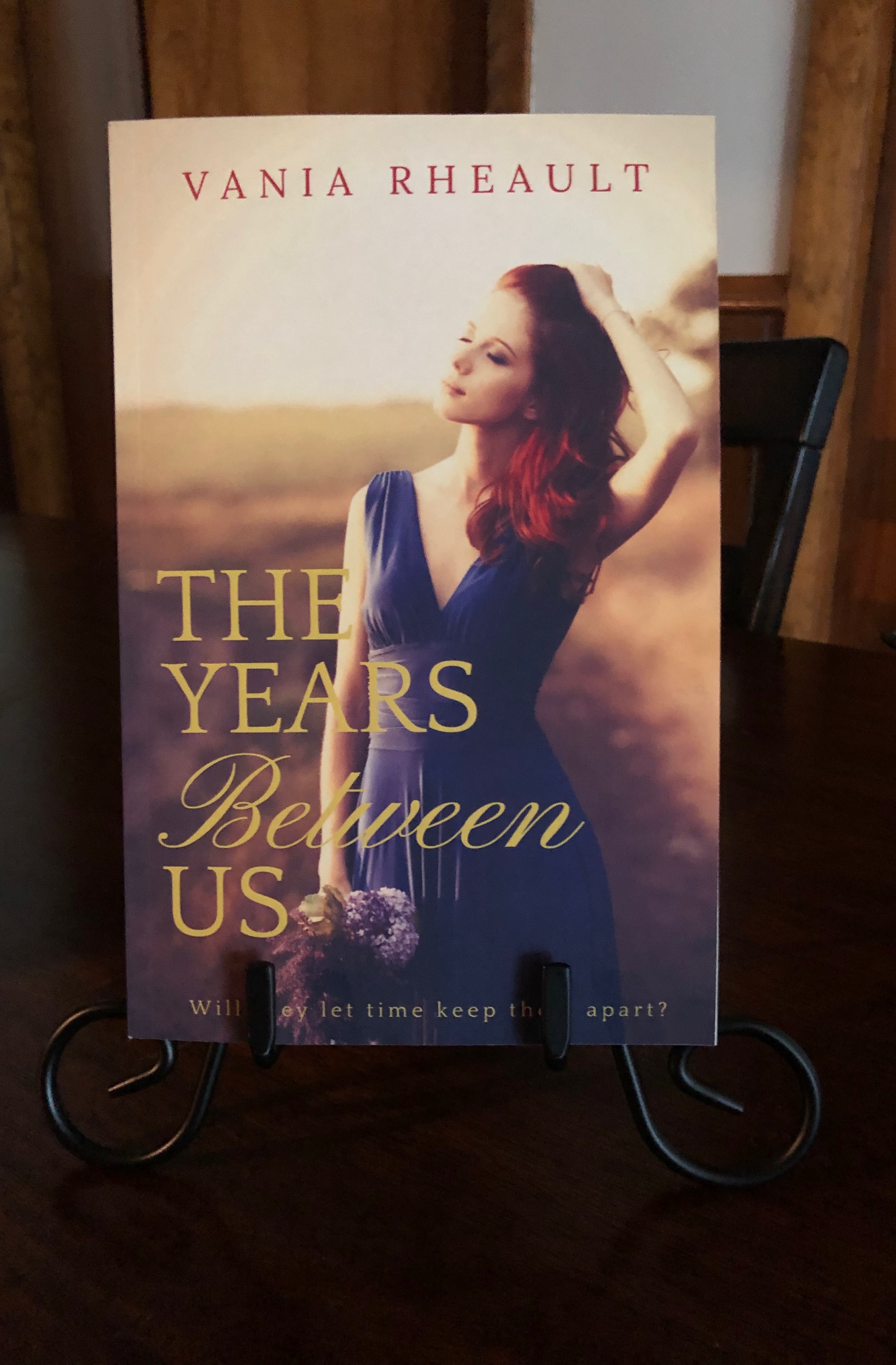


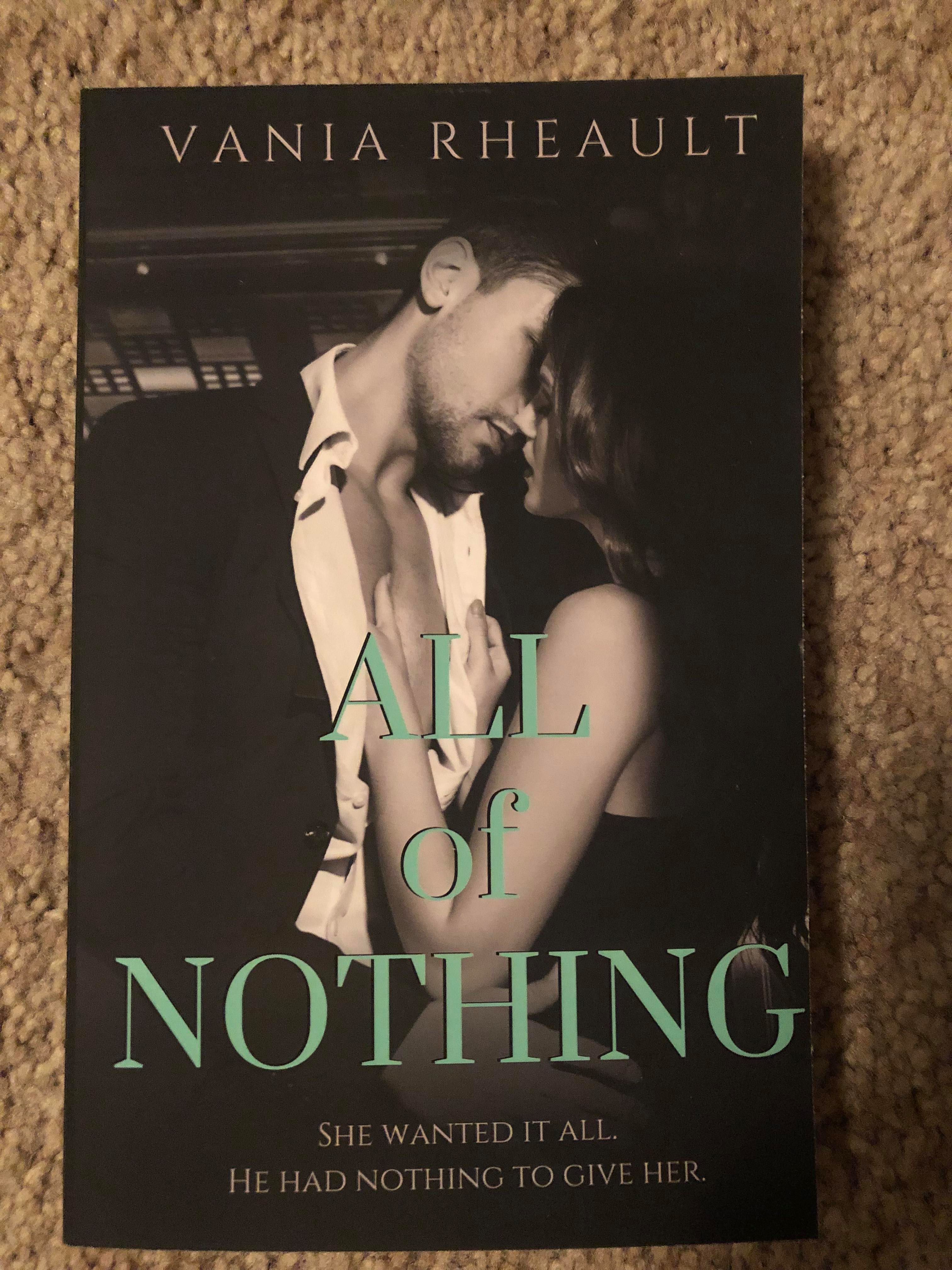
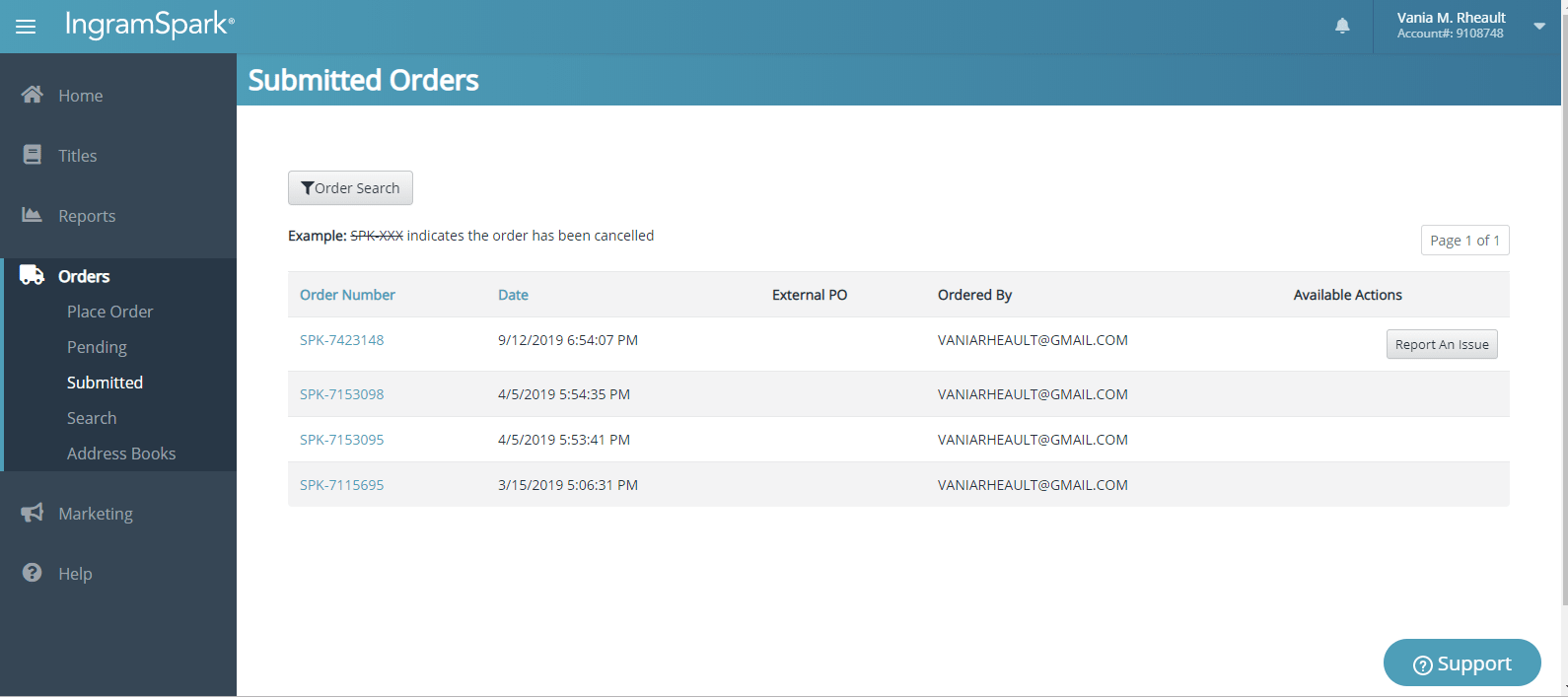



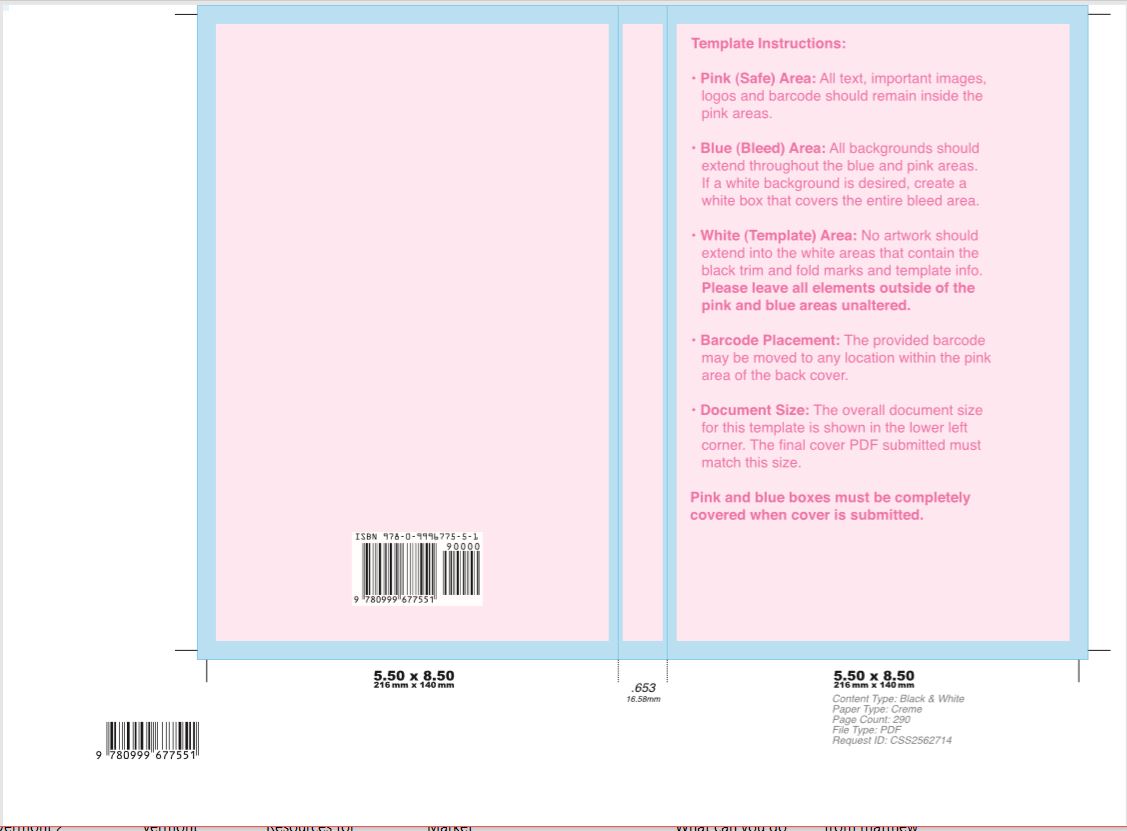
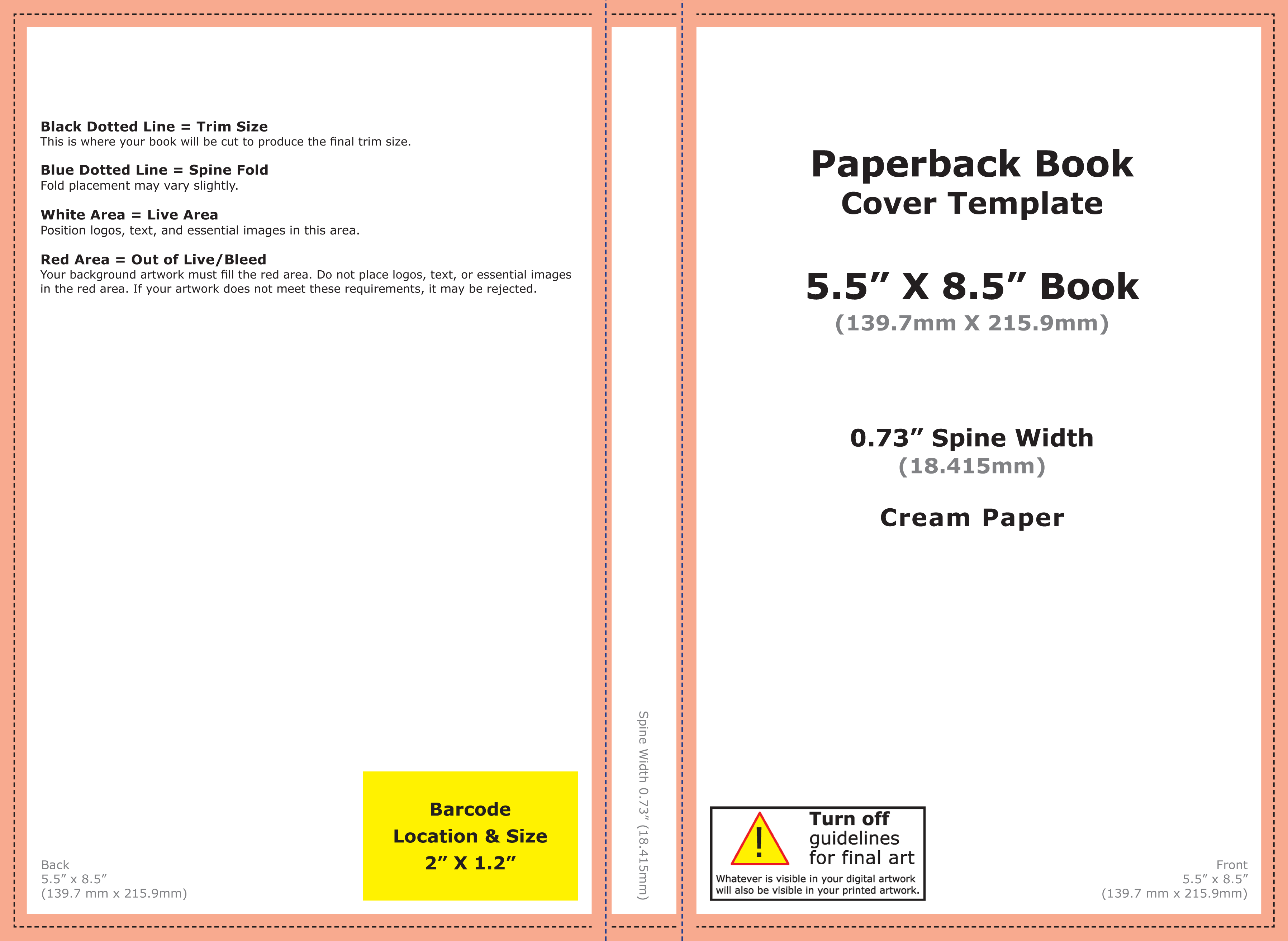
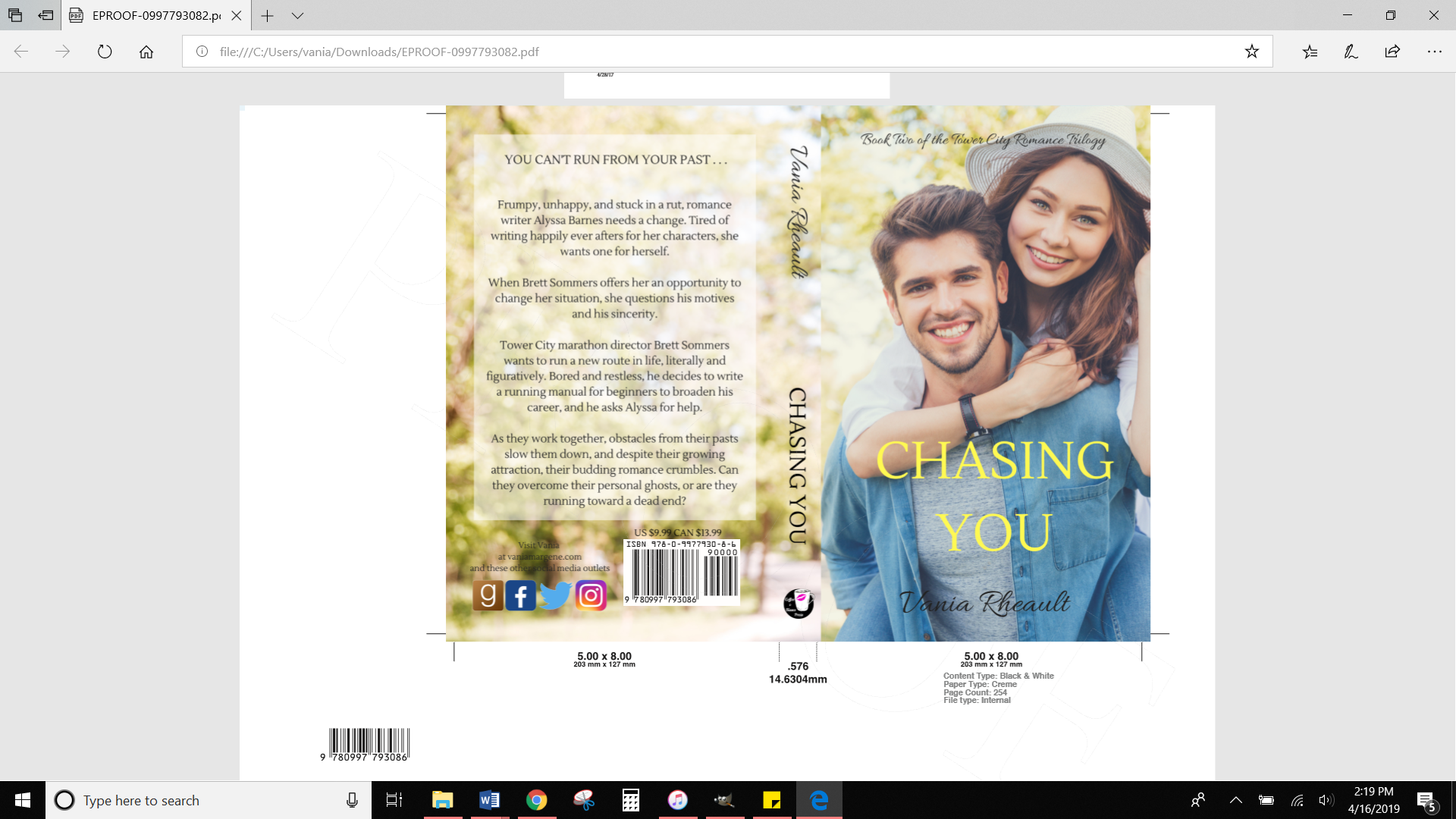
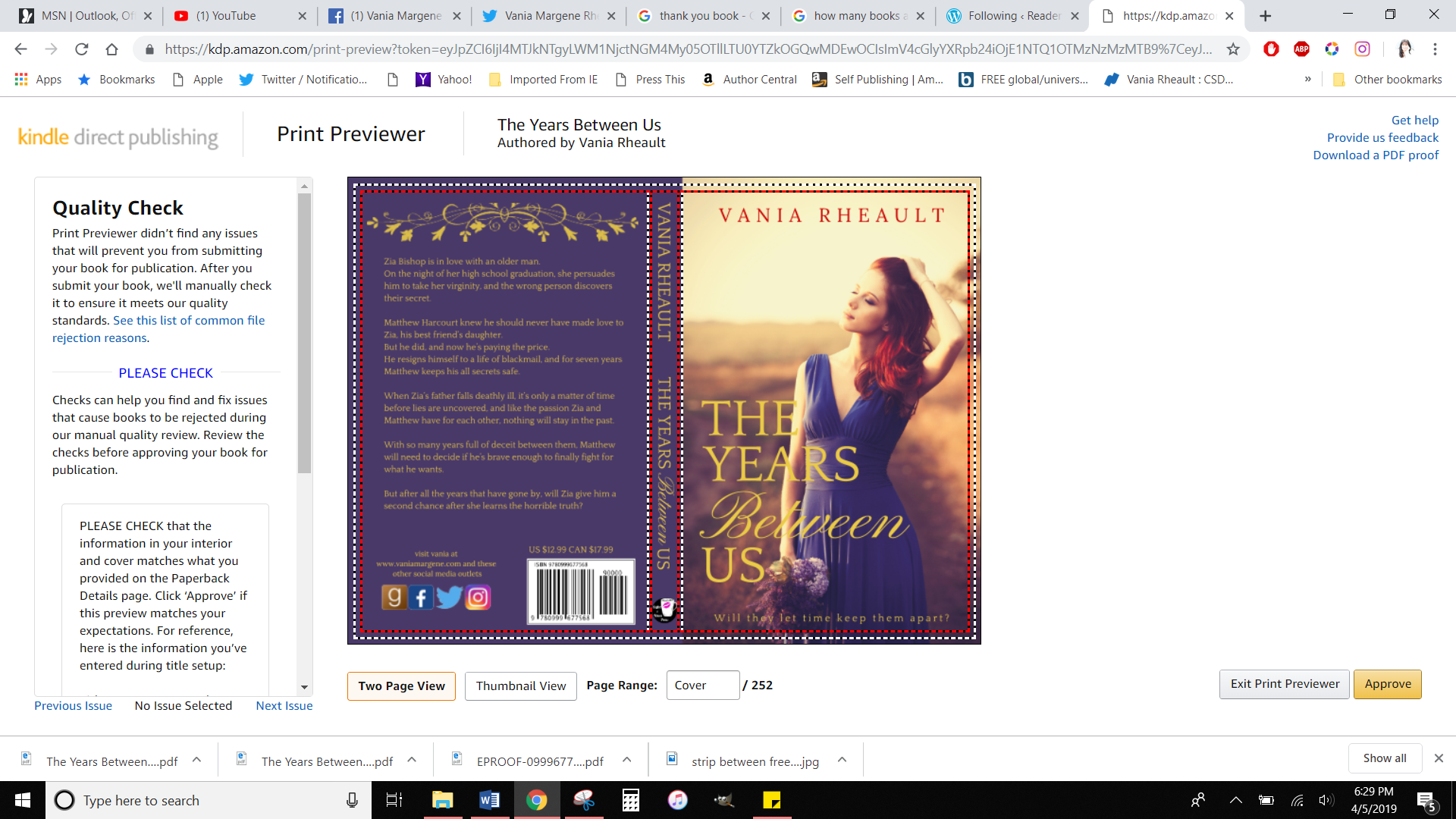
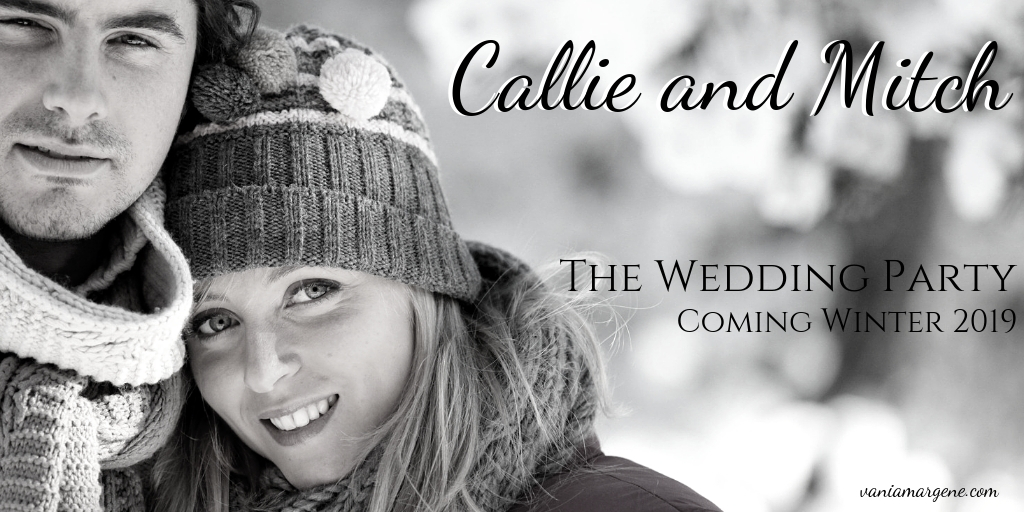

 Vania Margene Rheault