Where’d ya go, Chance Carter? (And other thoughts on author/reader loyalty.)

Actually, that question is pretty rhetorical. We all know what happened to Chance Carter. The self-proclaimed bad boy was very naughty, and not in a fun way, and Amazon punished him, and also again, not in a fun way.

But for those of you who don’t know what he did, I’ll just give you a quick recap:

Mainly Chance Carter got caught book stuffing. Meaning, he put more than one book into an e-book, made the reader “flip” to the end of the “book” to read the new content, and cashed in on page reads through Kindle Unlimited. Some books to the tune of over 2,000 pages. I hate math, so I won’t do it, but that’s a lot of page reads in KU when you think that a normal book might only be about 200+ pages depending on genre.

I wasn’t even aware of this term until whistleblowers David Gaughran and Nate Hoffelder blogged loud and long about people who violated Amazon’s terms of service. 

He did other things too, like offering raffles to readers who would review, and the biggest giveaway he did before his books were pulled was offer a chance to win Tiffany diamonds to anyone who would review.

This isn’t a blog post for trying to figure out if he was wrong or right, or dissecting his ethics when it comes to scamming.

What I want to talk about is our obligation to readers.

Chance had it going on. He had thousands of followers.  Thousands.

chance carter blog post 7_LI

Having that kind of following would be a dream for any author.

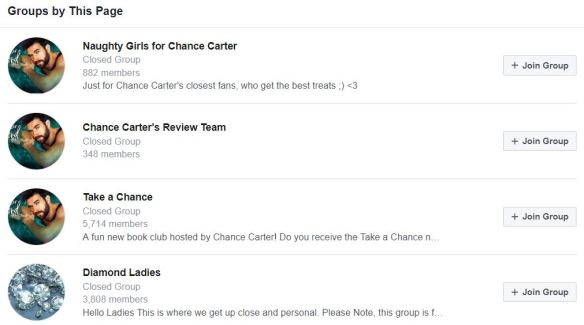
Even his fan groups were crazy with members.

chance carter blog post 8

When you have that kind of following, you owe it to your readers to be real. To be honest. I mean, that’s neither here nor there now, but once he was ousted,

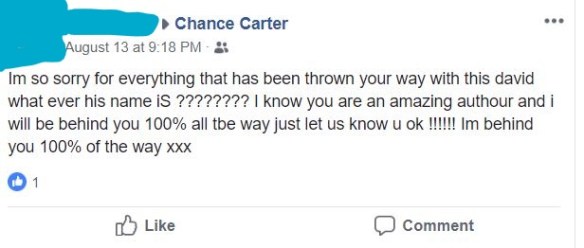
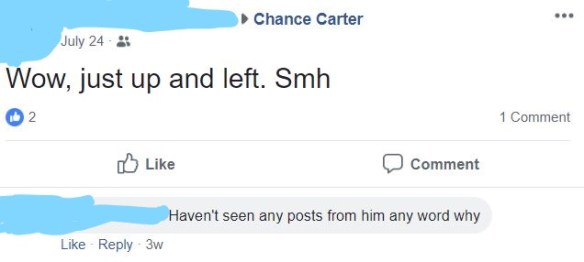
he didn’t even say goodbye.


No press release, no private message to one person who could spread the word. Nothing.

chance carter blog post 2_LI


chance carter blog post 3_LI

chance carter blog post 4_LI

chance carter blog post 6_LI

Not an apology. Not an, I’ll fix this and I’ll be back.

He completely disappeared.

I see a lot of indie authors maintain a cavalier attitude toward their readers. Mainly because they don’t think they have readers.

But do you have a responsibility? Even if you just have one or two readers? Do you care what they think? Do you care if a friend is waiting for your next book? Your neighbor? Your followers on Twitter? The forty-five people who like your Facebook Author Page?

Maybe you don’t think your readers matter until your followers and readers are up into the thousands like Chance’s.

When your readers write you open letters asking you where you are and if you’re coming back. 

First, I guess you have to ask yourself, why are you publishing? What is your goal? I can think of two off the top of my head: Readers and Money. Maybe you don’t care so much about money and you publish on Wattpad, or you write fanfic and publish it to fanfic.net. But if you’re publishing on Amazon, or Smashwords, and/or everything in between, you’re probably hoping to make a little money. With hoping for sales you would like to become well-known for your books.

But not only books. Authors like Chance know their brand. They build their reputations from the ground up, by showing up, being present. By engaging with the people who read their books.

Readers who read books by consistent authors like Chance know what they are getting. Even his covers look similar.

chance carter blog post 9

That’s a series, but his other books, look similar too:


Pecs and abs. It’s not too hard to figure out why these were popular with the ladies.


But what does that mean about loyalty for you?

  • Publishing consistently. Self-publishing is a fast-moving wheel that waits for no one. There are a million books out there to read. If you want a following, you need to give your readers something to follow.
  • Do you genre hop? Do you write contemporary romance, then throw in a bit of horror? Do you write historical fiction then jump into sci-fi when the fancy strikes? It’s okay to write what you like, but not all readers will follow you to every new path you want to take when that shiny new idea takes over.
  • Are you accessible? Do you have an email address that you check and respond to? Do you engage on social media? Do you post to an author page? When someone shoots you a tweet, or mentions you in a blog post, do you respond? Do you use a real photo? I’m not saying all those are musts, but if you take a look at Chance’s social media history, you’ll see consistent posting, videos. He shared bits and pieces of his life.  Chance Carter probably wasn’t his real name, but he was real–to 122,000 people.
  • Do you have follow-through? If you say you’re going to do it, do it. Changing up plans in mid-stream because you don’t feel like you have enough of a positive response will teach your fans you can’t be trusted to do what you say you’re going to do.

It’s tough starting out. You feel like you’re writing for no one. But it takes time and patience to build your audience. Chance didn’t wake up one day and decide to have 122,000 followers on his FB page.

It’s too bad that he didn’t treat his followers with more respect. His readers liked his books and kept buying them. They didn’t need to be scammed into reading his books or leaving reviews. They would have done that on their own. Simply because they liked him and his work.

Now they feel betrayed, cheated, abandoned. Leaving messages on his FB Page:

chance carter blog post 5


Uncle Ben said, With great power comes great responsibility. Actually, I looked it up, and he stole it, but the idea is still the same.

If you’re looking for a large number of readers, treat the ones you have with respect and loyalty.

Begin as you wish to continue.

And all you Chance Carter fans out there–I’m building my Contemporary Romance audience. I may not be a bad boy like Chance, but I can write a sexy and kind hero too–and I can guarantee, he will always get his girl.


end of blog post graphic


Whine a Little . . . Over There

There’s been lots of whining on Twitter lately. More specifically, authors whining about not seeing books sales. Even more specifically, authors not seeing their books sell.

Maybe it’s because we’re in the dog days of summer, or people aren’t looking forward to school starting, or the crap we’re all going to have to deal with when THE HOLIDAYS start in full-swing October first.Dog Days of Summer

But whatever it is, it needs to stop. Because YOU, and nobody else but you, can make sales happen for your book.

Mostly, this is on Twitter. I can say it louder for the people in the back. TWITTER ISN’T FOR SELLING BOOKS. If you’re a member of Writer Twitter, you’re a member of WRITER Twitter. There’s a reason why it’s called that. Because we’re writers. Join READER Twitter. It’s gotta be there somewhere. Maybe #amreading is wedged between #IhateTrump and #turtlesareweird. If you’re convinced Twitter is the only way to sell books, or it’s the only way you want to try, break into the #amreading crowd. Or try. I’ll leave a light on for ya.

But if you want to take stab at moving books instead of whining about it, explore these ideas. First though, you need to take a look at your book.

  • Cover needs to be decent. Needs to depict the genre, needs to fit in, but stand out (in a good way.) Join an FB cover group and get some critiques. Taking a second look at your cover and if it’s not up to snuff, fix it. It’s killing your sales before they start.
    Books to consider:

    Cover Design and YOU!: Dos, Don’ts, and Choices
    Why Does My Book Not Sell? 20 Simple Fixes (Writer’s Craft)

  • Make your blurb awesome! This is easier said than done. Bryan Cohen is great at this. He teaches webinars and he runs a business doing this. And he makes very good money doing it. But he shares his knowledge, so don’t just moan you don’t know how to do it. Read about it. You’re a writer. Research. Here’s his book. He breaks it down so you can do it, too. With his guidance, I write my blurbs in half an hour. Here’s a Book Description Critique with Bryan Cohen hosted by Reedsy. Watch it.
  • Make sure you have a decent title. No one told me this before I published, and now my very first book has a stupid title I can’t change because I don’t want to waste the money I spent on my ISBN number. If you don’t have any reviews and didn’t purchase your ISBN number, you can change your title. Changing your title and ISBN number will lose you reviews so if you only have one from your best friend Angie, she’ll probably post it again if you republish with a better title.
    Grab some ideas from Dave Chesson; he’s got some good ones.
  • Make sure your “look insides” (first sample pages) are decent. This can make or break you if all the other parts about your book are spot on. If you don’t have a solid POV, if you have typos, if your formatting is messed up, the best cover in the world won’t save you. Try to get your hook within the first few pages of your book so it’s included in the look inside. Turn that browser into a buyer!

Now that we covered that and your book is up to par, you’ll need to ask yourself what you’re doing to help your book sell. Tweeting every day isn’t going to help. So what can you do to spike sales?

  • Are you spending any money?  You have to spend money to make money. I’m not kidding. Lots of people are like, “I don’t have any money to put toward selling my book.” Then you’re not going to sell your books. No business has ever opened that didn’t need seed money. Investors. Start-up money. You buy stock for your shelves, you fork over for rental space. You pay for wages for your employees before you’ve even sold one thing. Your book isn’t any different. Nobody ever went into business for themselves because they needed money yesterday. Starting a business is a lifelong endeavor. What can you put your money toward?

    *Pay for promos. I spent 80 dollars to give away 4,000 copies of Don’t Run Away in a free book promo for FreeBooksy. It got me some reviews, and lots of KU reads for the whole trilogy. I made my money back and then some.

    *Pay for giveaways. Goodreads did away with their free giveaways but because you have to pay, the market for giveaways isn’t so saturated. People have debated as to whether or not it’s a good thing, but I think it is. I haven’t tried them yet, but in the spirit of trying one new thing with each new release, I’ll be trying it when I publish All of Nothing this fall. Read about them here.

    *Pay for ads on Amazon. This isn’t as scary as it sounds. I’ve been blogging about my experience. It won’t break the bank to give it a try, but it’s important to do it correctly. Brian Meeks has a wonderful book about it. Amazon changed the platform a bit, so his instructions are already outdated even though his book is only a year old. But his advice is still as good as gold, and just as valuable.

    *Pay for ads on Facebook. These are trickier than Amazon ads. At least, I’ve read that they are. I haven’t tried Facebook ads, and if you don’t have the money to spare, I would suggest going with Amazon ads first. I’ve spent under five dollars experimenting with Amazon Ads. But if you want to try FB ads, again, do it correctly. Michael Cooper has a super great book about it. It’s important to try ads correctly, otherwise you’ll blow through money, claim they don’t work, and you may write off a great way to let people know about your books!

    *Pay for a blog tour. I used to hear a lot about these two years ago when I joined Twitter, but not so much anymore. You don’t have to pay someone to set up a blog tour, but if you pay a legit person they’ll know the best blogs to submit your book to. I’ve never tried one of these. They’re time-consuming. Either you have to fill out an interview sheet or compose a guest post for that blog. If you’re doing a full tour, that could consist of anywhere between 5 to 20 or even more blog sites. That’s a lot of guest blogging and interviews when maybe you should be writing your next book.

    *Reviews. If you do this in a legitimate fashion, this can be a coup for you. I have not tried it because the service I wanted to try distributes the books to readers through BookFunnel and that goes against KDP Select’s terms of service. I pulled Wherever He Goes out of Select to try this review service, and it comes out September 3rd. It wasn’t doing well in KU anyway, so I didn’t see the harm in trying. I’m going to try Happy Book Reviews. I’ve heard good things and so-so things about results. But if you have a good book with a good blurb and good cover, and the plot/genre isn’t too weird, you may get good results. Give it a shot.

  • Are you writing more books? The best marketing you can do is release new books. Lots of debate on quality versus quantity, but if you just can’t scrape up the cash to put toward your book’s promo, at least writing and releasing is free. *As free as you can get without spending money on cover, editing, etc. I’ve heard you drop off the Amazon algorithms after three months, so you want to release something every three months. Try releasing tie-in novellas. Or just dig in your heels and write the next book. I see lots of people trying to build careers on one book, and that only works if you write a non-fiction book and your career is already based on that book. Readers expect more from you. Keep them happy.
  • Offer to guest blog on other people’s websites in your genre. Ask “up.” Someone in your genre who has more followers than you. Someone whose website gets a bit more traction than yours. This is where your tweeting should come in handy–you’ve made connections, don’t be afraid to ask. Most people would love to host a guest blogger. It frees up their schedule for the week. But make sure your book is up to snuff or they’ll turn you down. And be prepared to giveaway a book. That seems counterproductive to sales, but lots of bloggers want to reward their readers for showing up.
  • Think local. Ask your town’s newspaper’s lifestyle section to do an article on you. If you have local small magazines, ask them to do a profile. Ask your indie bookstore if you can do a signing, or if they’ll sell your book. Heck, maybe get together with a couple of indies in your area and ask Barnes and Noble if they’re willing to do an Indie Night. Asking is hard. We’re introverts at heart, but even if the answer is no, at least you can say you tried.
  • Take a hard look at your book. Besides the cover, the editing, the blurb, the title, ask yourself, is this something someone would want to read? Especially if this is your first book. Indies like to experiment when they’re starting out. We’re finding our niche; we’re finding our passion. Experimenting with your hamster detective series is cool, but can you get sales? Maybe not. So take a hard look at your book before you throw money at it. It may not do any good. And that’s the sad truth. If you can be honest with yourself and say yes, my book has readers, all I have to do is fine them, then good luck!

Whining about lack of sales isn’t going to help you sell books. After a while it becomes annoying, and you end up tarnishing your reputation. If your first book isn’t working, then move on. Write something else. Write something better. We get better at our craft with every book we write.

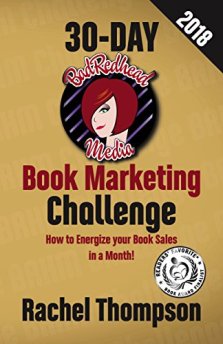
book marketing challengeRachel Thompson says we don’t get traction with our careers until we have at least 6-10 books under our belts. As the self-publishing industry gets more competitive, that number may get higher. If you’d like to read her awesome book about marketing, you can look for it here.

Book sales are subjective. What works for you may not work for someone else.

The best advice I can give you is write well, and publish often. Stay consistent. Build your brand on a genre you love to write.

Sales take time.

Have patience, and good luck!


buy image for blog


Changing Your Book Over From CreateSpace to KDP Print

This is the big bad everyone is talking about–moving your books over.

Do you want to move your books from CreateSpace to KDP print? I think, yes. Because if you’ve been following what CreateSpace has been doing (ie, cutting staff, removing services) then you know that Amazon is in the slow process of getting rid of it. Not that anyone from Amazon has admitted it.

If you’ve been avoiding it because you think it’s going to be hard, don’t worry! It will be fine. I did it just to see how it would go, and I ended up doing half my books.

Let me tell you how.

First, you go to your dashboard on KDP. The one you check when you want to see your lack of sales.

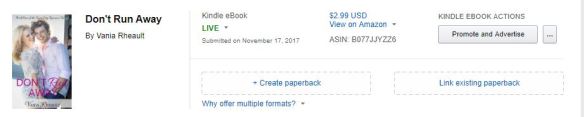
Then, what you need to do is find the corresponding book that you have on Kindle, and choose Create Paperback.

blog going from cs to kdpp5


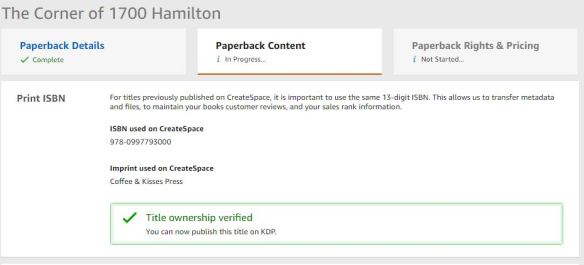
After that, there is a place for you to enter the ISBN number you used for CreateSpace. Log into your CreateSpace account and copy and paste the ISBN number from your paperback into the space.  After you type in the number, you have to hit ENTER, and the yellow button will highlight so you can click it. I don’t have a screenshot of that, but just take my word for it. They tell you in pretty green that yes, you are the owner of the title. 🙂 Thanks, KDP Print!

blog going from cs to kdpp

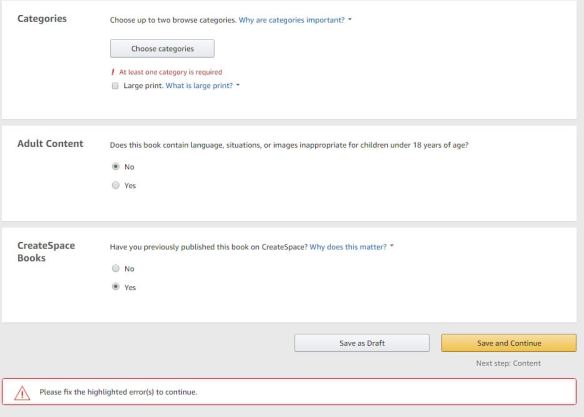
The categories don’t come with your manuscript or your cover, so you need to choose the categories over again. I didn’t, and I got the error message.

blog going from cs to kdpp4

Choose the option “you have published this book on CreateSpace.” That’s the whole point to this exercise.

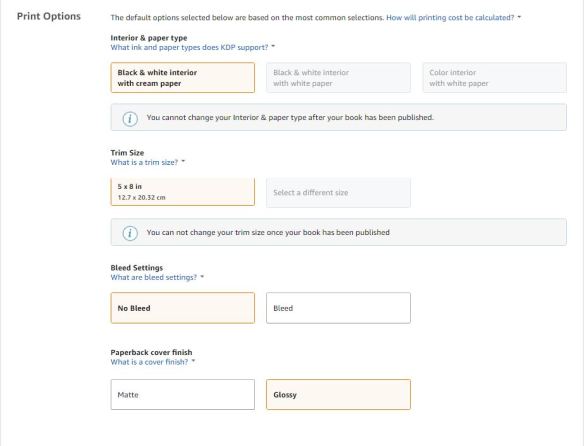
Also, another good thing to know is you can’t change your trim size and your interior since those things are attached to your ISBN number.

blog going from cs to kdpp2

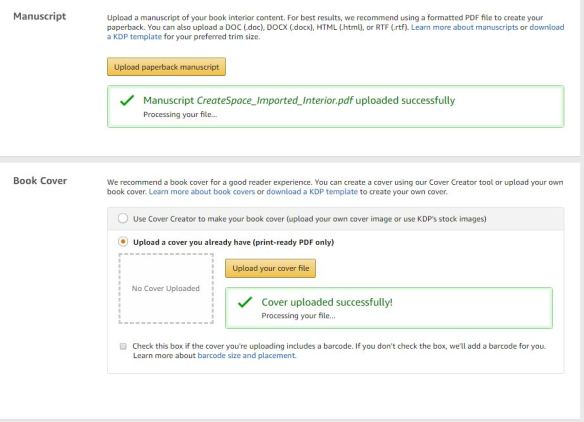
But after that, you’ll see that everything has ported over:

blog going from cs to kdpp3

After the cover and manuscript are processed, you can take a look at it through the online viewer. I open it just to be sure, because KDP Print is a lot more clear on cover and manuscript requirements.

There is one thing I found out the hard way:

If CreateSpace tweaked your cover in any way to make it passable for publication, those changes do not carry over. 

Apparently, when I did my covers for Summer Secrets, I did them wrong, and the lovely customer service people at CreateSpace fixed them for me. They didn’t bother to tell me I was doing them incorrectly. When I did a cover for one of my books in my trilogy, I called them for something completely unrelated, but the rep I spoke with pointed out that error as well. I thought since they were publishable, I wouldn’t have a problem, but I did.

I wouldn’t bring this up except for the fact that I don’t know how may covers CreateSpace helped along with no notice to the author. Is it bad? No, not at all. But if they tweaked your cover and KDP Print tells you something is wrong now, I hope you have the skills to do what CreateSpace did to fix it in the first place. Or if you hired a designer, you’ll have to ask them to make the changes.

Don’t worry if KDP Print tells you something is wrong–they get very precise when pointing out the errors. They won’t leave you guessing, and they let you know right away–in the information bar on the left-hand side of the online viewer.

It was just a surprise to me that KDP Print didn’t approve my covers when CreateSpace had published them.

You won’t know right away if they pass, even if there aren’t any errors in the online viewer–they do go into review, and you’ll get an email saying if they pass or not. And if they don’t, the email will explain why. But it is faster than the 24 hour time period that CreateSpace used to take. I got my emails back in 12 hours. The online viewer is similar to the one on CreateSpace. Sometimes it seems like it will take forever for the viewer to populate your content, but I just hit REFRESH and that seems to do the trick to get it moving.

Don’t forget to hit SAVE AND PUBLISH.

And that’s all there is to it, really. I messed with the insides of 1700, so I ordered a new proof, just to be sure.

The link to order the proof is small, and it’s on the bottom of the page, so you’ll have to keep an eye out for it if you want to order a new proof.

I didn’t mess with the insides of Summer Secrets, so I didn’t order a proof of either of those. Proofs take a lot longer to come than they did using CreateSpace, and author copies, too. Definitely plan extra time into your publishing schedule.

All in all, I was happy with the experience. It will go smoothly for you if don’t have cover issues and if you don’t change anything with the interior. Although, now is a good time to do those changes, if that’s what you were going to do at some point. All you would have to do is upload the new file and replace the ported file from CreateSpace with the file you made changes to.

Always order a proof if you make interior changes, unless you are prepared to flip through every page with the online viewer.

KDP offers instructions and offers advice, and you can read about that here.

Otherwise, there’s not much else to tell you. I plan to do the trilogy soon. Oh, and if you’re selling paperbacks like hotcakes right now, you probably don’t want to do this until your sales die down because as you switch over, your paperbacks aren’t available for purchase.

If you’re worried, try not to be. I was a new author when I did my covers, but I’m better at it now. If you used a cover designer or in any way were more experienced than me when publishing your book, you’ll be just fine.

Jump, don’t be pushed.

Good luck!


buy image for blog


When Do You Recommend Your Friends’ Books?

The indie writing community is very tight-knit. Make one of us mad, we all get mad. I think Faleena Hopkins figured that out quick enough. We support each other; we help each other. We do free things for each other: cover help; editing; beta reading.

We even do some naughty stuff like review trading.

We tweet each other’s books.

Lately, there have been a couple of people asking for book recommendations from indie authors. They want to start a list on their website, or they want to start reviewing indie books.

There were lots of tweets, as you can imagine.

And there was something that surprised me, but I guess it shouldn’t have. Someone was recommending books they haven’t read. How do I know this? For one, I know she doesn’t read indie. Two, she’s a very picky writer, and I don’t think she would have recommended these books had she read them. (That is a polite way of saying they could have used more editing.)

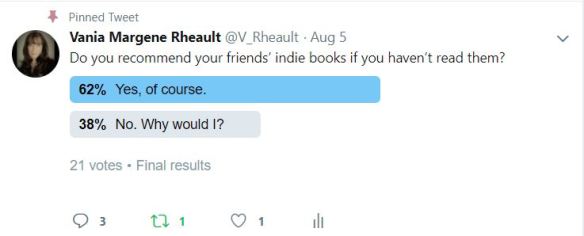
This made me do one of my super researching techniques: I ran a poll on Twitter. While the participant number was low, the results still stunned me.

indie books

I’m trying to figure this out because this bothers me.

Why would you recommend a book to someone if you haven’t read it? Would you walk into a bookstore, grab any old book off the shelf, and tell your friend it was fabulous and a must-read? Of course not.

This seems to be an indie-only thing, like not full-justifying your margins in your books when you format or adding your cover designer to the book’s contributors when you publish. Indies start stuff traditionally published authors don’t do. And the more indie authors do it, the more it becomes acceptable and the more newbie authors do it.

Of course I want to support my friends. But we all know indie writers don’t read that much. We might beta read, or be a critique partner, and that’s fine. It’s a little different in that I would assume the published book is different from a draft a beta or CP read. But at least you know the gist of the story, know if the book has proper punctuation and grammar.

At least you know the story makes sense.

But what are you doing to your own credibility if you recommend a book to someone you haven’t read and that someone takes you seriously? What if that someone takes a peek at the look inside on Amazon. What if that book has no established POV, or doesn’t have a good hook (AKA boring as f*ck)? What if the formatting is messed up, or has typos in it? What if the first paragraph head-hops into five different heads?

There were a couple comments in that tweet thread that asked the question: Who doesn’t read their friends?

Well, quite a few if my own track record is anything to go by. I can count on one hand the number of my friends who have picked up Wherever He Goes and read it cover to cover.

And if you want to ask me what indies I’ve read in the past few months, I can say one. And it was someone I edited for back in February. Otherwise, I’m busy writing or reading craft books, or reading trad-pubbed romance books. I don’t read indie simply for the fact that most of my friends don’t write what I like to read–contemporary romance. And then another reason I don’t read indie much anymore is if they find out I’m reading their book, they expect a review. I won’t leave a bad indie review. I won’t do it. So I don’t want my friends to wonder where their review is because there won’t be one if I don’t like their book.

Given those reasons, I rarely recommend indie books on Twitter. I recommend how-to publishing books or marketing books. I recommend trad-pubbed books that do something well that could be used as an example to my fellow writers.

I think it’s great that we help our friends. But if we want to help our friends, we should do it in a different way. Pass along promo sites. Recommend books you’ve read on how to do proper Facebook ads or Amazon ads. Marketing your friends’ books is not your job.

Sure, I’m flattered when someone posts a picture of my book on Instagram, or tweets about it. (And yeah, less five people have done that for me anyway.) But I don’t expect it and I don’t ask. My readers aren’t on Twitter. They aren’t even following me on Instagram right now–I got sucked into the writing world there, too. {KT Daxon is a good one for this, and I have to give her credit where credit is due. She does a great job of promoting the books she reads, and she truly does read the books she says she does.}

I would only recommend books I’ve read. It’s honest.

And you want people to be able to trust you, not question your taste.

Not question how good your books are.

I know this blog post sounds like I don’t think indies can write and publish good books. That’s not the case. What I am saying is that some indie books could use more editing. And I understand why indies don’t. It’s expensive and time-consuming. Waiting for an editor to get back to you is like sitting on pins and needles, and then you have to put in all the edits once you get them back. A total edit could push your pub date back by several months. But let’s not pretend that indies aren’t impatient, and rushing to publish is a mistake a lot of indies make.

This reminds me of the trad-pubbed writing community. I’m exposed to a lot of YA on Twitter and Instagram. It seems like a lot of YA authors do read other YA authors and tweet about their books and support each other. Being trad-pubbed is like being in a club, and those authors have each other’s backs.

Romance writers are the same way:

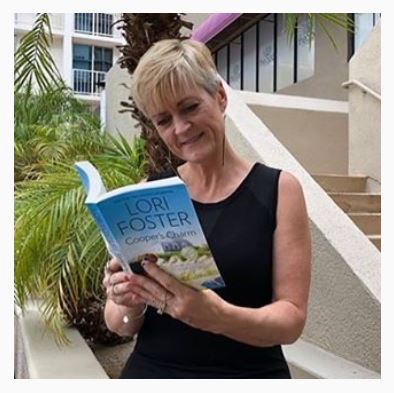
lori foster brenda novak

Here’s Brenda Novak reading Lori Foster for a book club Brenda is going to hold in her Facebook Author Group.

That’s real support. That’s real networking and collaboration.

There’s lot of bad things to say about the traditional publishing industry, but this isn’t one of them.

Let’s support our friends the right away.

Read the books you’re recommending. Because reading a book and having a discussion about the book with its author would mean a lot to the author, and a tweeted conversation about a plot twist or an evil character is true promotion.

Do you have any good reasons for recommending books you haven’t read? Let me know!


Blog book promo for the end of blog posts


I Did an Amazon Giveaway–and It Did Pretty Much Nothing

THIS POST IS ARCHIVED AS AMAZON DID AWAY WITH GIVEAWAYS IN 2019 AND HAS SINCE NOT REPLACED IT WITH AN ALTERNATIVE. THANKS FOR READING!

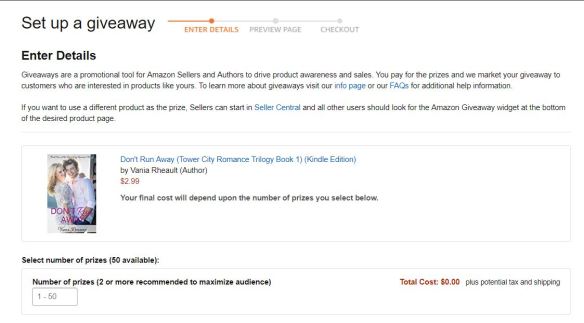
I was always curious about the Amazon giveaways–you know the cute little button at the bottom left of your books’ (or any products’ really) page. You have to scroll down pretty far to find it–after reviews and two sets of sponsored product ad strips.

amazon giveaway blog

You can give away paperback or Kindle versions, and it’s obviously cheaper to give away Kindle versions. Amazon makes you pay for your book, so if you gave away paperbacks, you’d be paying the price you set in CreateSpace or KDP Print, plus shipping.  There’s no shipping with Kindle files, but there is tax. So make sure you’re looking at the correct page, and Amazon tells you which version you’re giving away–it’s in the blue to the right of your book’s cover.

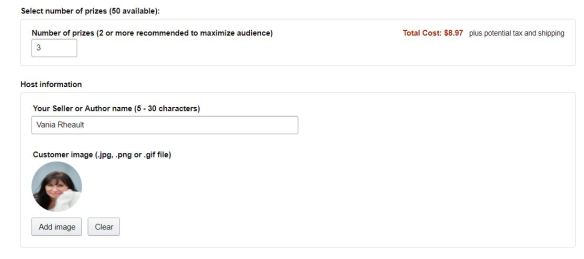
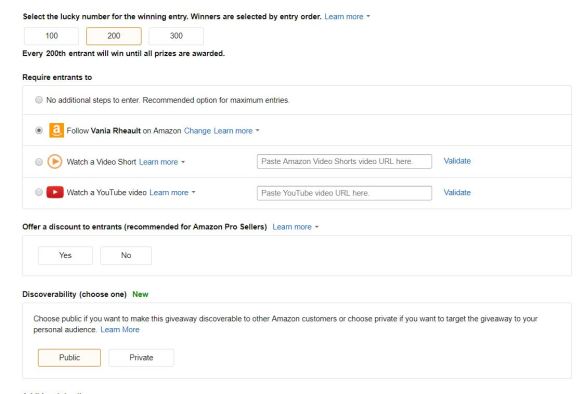
Choose your number of prizes:

amazon giveaway blog 2

I’ll give away three Kindle file copies. I did five when I did my giveaway for Wherever He Goes, so I feel like I’ve already spent money on something that probably won’t do anything for me.

amazon giveaway blog 3

Add your photo. I chose a different pose of my author photo that I use everywhere else, but I still look like me.

The next part is where I royally screwed up because I had no idea giveaways ran that quickly, or that people would enter, or maybe I just didn’t understand the stats of a giveaway like this.

amazon giveaway blog 4

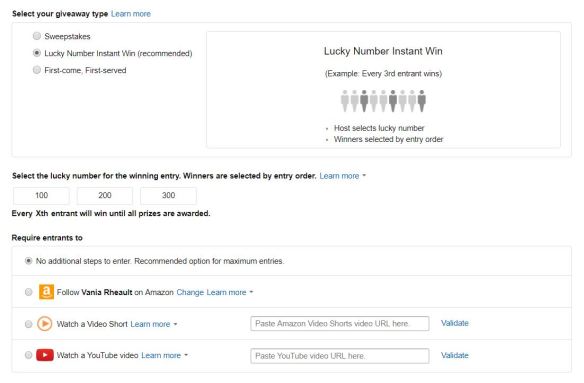
I did the recommend Lucky Number Instant Winner, and I chose 100 for the lucky number for the winning entry.

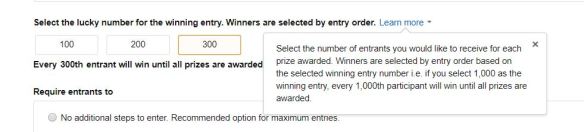
This is what it says if you click on LEARN MORE:

amazon giveaway blog 5

My giveaway lasted fifteen minutes. So When I chose 5 prizes along with the 100 entrants,  500 people entered my giveaway and every 100th entrant won a copy of my book. The fact that it only too 15 minutes for my giveaway to end blows my mind.  So will be going with a higher number next time.

And then, of course, I have them follow me on Amazon.

amazon giveaway blog 6

I made it public of course, because the more the merrier.

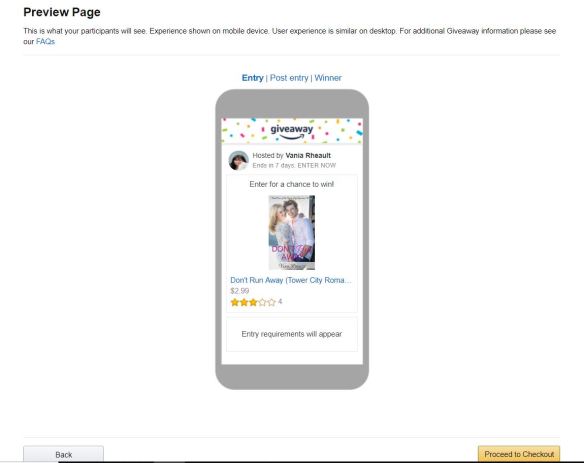
To recap, I’m doing 3 copies of Don’t Run Away. I have the number of entrants set at 200 per prize so 600 people have to enter to win three copies. They all have to follow me on Amazon.

You would think this would be a great thing. But the thing is, most people enter giveaways just to enter giveaways. That is what they do. Just for the rush of winning, I’m assuming.

I don’t think this giveaway is going to go any slower than my other one, but we’ll see.

Click on no for not offering discounts, then click next.

amazon giveaway blog 7

This is the last page, and it’s laughable. It’s probably where my high expectations came in. The giveaway will end in 7 days? Yeah right.

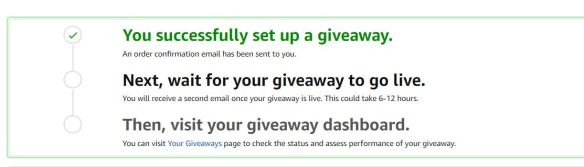
Then you get your shopping cart screen and you purchase your giveaway. I didn’t screenshot that because you don’t need to see my stuff. After you buy it, you get this:

amazon giveaway blog 8

And you’re all set.

You get an email when your giveaway is live, and for me, fifteen minutes later, I got an email saying my giveaway was over.

Amazon doesn’t tell you how many followers you have, but at some point, hopefully when they email your followers when you release a new book, that some of them will buy it.

Don’t turn blue holding your breath.

While I was typing this up, my giveaway went live–I got the email.

We’ll see how long it takes for the giveaway to end . . . . go get something to eat. I’ll wait.

At any rate, did the giveaway for Wherever He Goes do anything for me?

Not really that I could tell. At least with my AMS ads, even with little results, those are still measurable. These giveaways seem like a waste of time and a waste of money.

Maybe I’ll do a Goodreads giveaway when my new book comes out.

It will be something to blog about anyway.

Did you have a good experience with an Amazon Giveaway? Let me know!

Blog book promo for the end of blog posts


My BargainBooksy Ad from last month. How did it do?

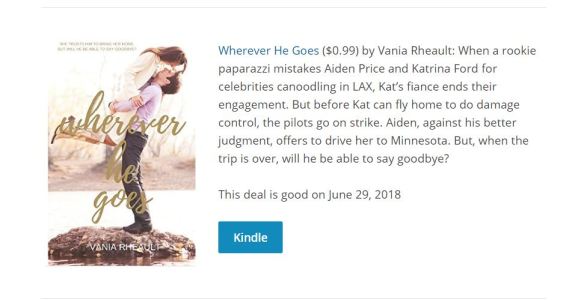
Well, apparently, not very well since I forgot to post the update. This time, this ad was a paid ad (meaning, my book wasn’t free), and I set the price of Wherever He Goes to .99. I thought, a dollar for a book, that’s pretty good, right? Heck, I spent three months working on it, I figured a dollar was a good price.

The problem is, with doing these ads, you just WON’T KNOW why your book doesn’t sell. It could be the cover, it could be your copy. It could just be that no one wants to pay. You never know.

So, in total, I sold 40 books on the day the newsletter came out and a couple days afterward. That is nothing compared to the 4,000 books I gave away during my Freebooksy ad I did back in February. You can read about that here.

june sales for bargainbooksy ad

As far as KU page reads are concerned, you can see that the newsletter created a bit of a spike, but nothing to write home about. And this is only for Wherever He Goes. My trilogy is still getting a few page reads, but I wanted to see what my ad would do for Wherever He Goes, and unfortunately, for 80 dollars, not much.

Here is what my ad looked like in the newsletter:

bargain booksy ad

Would I do this again? I haven’t made back what I spent on the ad, so it will be a while before I try something like that again.

What I need to focus on is getting reviews, but for using any legit reviewing services, I need to pull my book out of Select because the one review service I contacted distributes the books through Bookfunnel. Amazon considers Bookfunnel as a distribution platform and will yank you out of Select if they catch you using it.

For my next book, I’m going to place my book with a review service first, before putting into Select and see what happens. Hopefully, if I get some decent reviews that way, readers will give all my books a chance.

And I think if I ever do another promo with Written Word Media (Freebooksy/Bargainbooksy) I’ll do the free one, since I kind of feel like I got more bang for my buck. At least, it sounds better to say I gave away 4,000 copies than say I sold 40. It would be great if any of that had turned into reviews, but so far nothing significant on that end, either.

But, that is my experience with Bargainbooksy, and if you’ve tried them, and have gotten better results, let me know!

Thanks for reading!

Blog book promo for the end of blog posts


What do You do with Promo Photos? And Better Yet, WHERE DO THEY COME FROM?

We all see these cute photos of people’s books, you know? If you don’t know, you’re not on Twitter much, or you haven’t liked many Facebook author pages. Let me give you some examples. Hold on while I dredge some up.

wherever he goes promo composite

This is mine for my latest book I put out in June. That looks pretty cool, right? Or how about Aila’s, when she did her cover reveal for her new Women’s Fiction, Alabama Rain:

alia's cover reveal

Hers is pretty fancy; those books stacked on that nice shelf. And I love her cover. I am so excited to read this book. She made an awesome trailer, too, and you can watch it here. Anyway, I can make something similar with mine (but not the same because her skill set and my skill set vary greatly):

whereverhegoespromowithsunflower

The best part about the 3D mockup maker I use is that you can download a PNG without any background, which makes it very easy to place your book onto a different background, and you can make a super cute promo like this:

aila's promo

But what the heck are you going to do with it?

Aila says she puts hers at the end of her blog posts, making the photo clickable and driving traffic to her Amazon page. That’s not a bad idea. But she blogs–a lot. And consistently. Who can say they do that? Not me. But you should totally check out her blog. She writes very informative posts about the indie publishing industry, and she knows a lot of writing resources she generously shares.

I mean, you want photos out there. Someone might Pin It, or Retweet it, if it’s cute. I found this one somewhere and saved it for reference because I’m terrible at design:

book promo idea

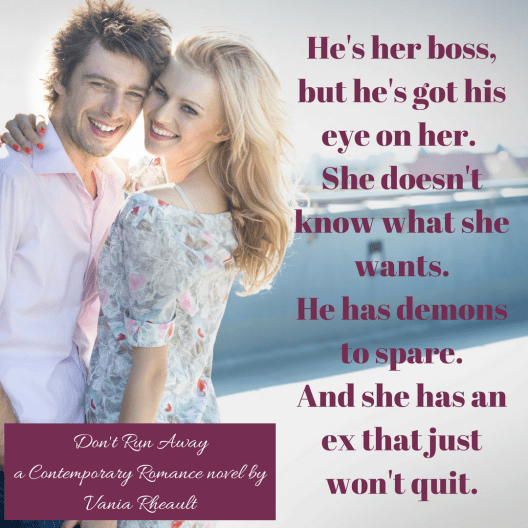
Text is good, you know? A tagline, a teaser.

I made this messing around in Canva, trying to practice, develop my eye:

He's her boss, but he's got his eye on her. She doesn't know what she wants.He has demons to spare.And she has an ex that just won't quit.

Canva is good for stuff like that. It makes placing photos in composites a lot easier if you don’t know your way around GIMP or Photoshop. I made this in Canva using my Kindle cover for the first book in my trilogy:

Don't Run Away Promo

Of course, you need to make sure the photos you are using, like the sunflower on the shelf, and this work photo, are okay for commercial use since you’re trying to sell your books. At least, I’m going to assume you are.

But the problem is, there’s a ton of this stuff out there, and it’s annoying. You can Tweet it all the time but people will unfollow you. You can’t post it on Instagram all the time, because then you’re pegged a self-promoter and no one will follow your account.

So, I make promo photos, and then I don’t do anything with them.

But part of this blog post was to tell you where you can do this stuff, so take a look at the programs I’ve used:

FREE ONLINE BOOK MOCKUP MAKER
Derek Murphy runs this site, and he’s got a lot of great information about making covers yourself. He has a YouTube channel, and it’s worth checking out. I used this to make the first picture in this blog post, and I’ve done it for my friends, just to see how it looks with other covers:

stealing home promo

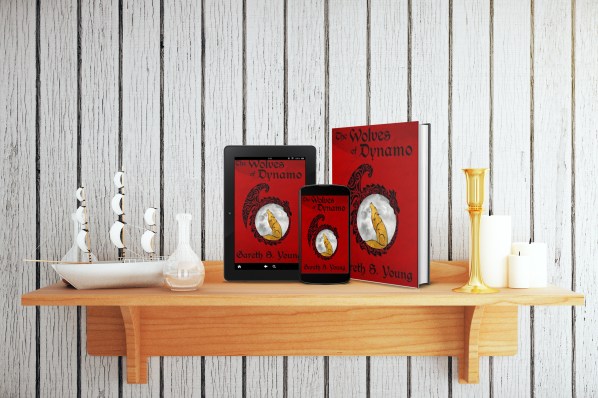
wolves of dynamoThis is a free site, though the positions of the books are somewhat limited. But it’s free and the program places the covers for you, so you take what you can get, right? If you want to place the books anywhere else, like a shelf, you need to use a program to place them onto a different background. I use GIMP to keep my hand in (I’ve spent a lot of time figuring out the very small percentage of what I do know); it’s a free version of Photoshop. But you can use Canva, too, which is a lot easier to figure out.

shelf with sailboatandbook
I bought the shelf photo from canstockphoto.com. Wolves of Dynamo is a fantasy YA geared for both boys and girls, so I didn’t want to put with anything too girlie, or something that wouldn’t fit the genre. (I showed it to the author, and Gareth gave me a tough time. LOL)

Anyway, so give the mockup maker a try. Use pixabay.com and find workstation photos. All their photos are free for commercial use. Placing your book’s cover onto a Kindle mockup is easy using Canva. Just like any software, it may take a little bit to get used to, but that’s part of the fun of making these, right?

Because it’s not like you can shove them in people’s faces all day long–people will get bored with you, fast.

This is the quick mockup I made of David’s book:

shelf with lampstealinghome

If you make a lot of these, you probably want to experiment with different ways your book looks. Stacks, like Aila’s above, or just one, or all your mockups will start to look the same.

If you do the stacks, you’ll need to have a picture of your spine and better skills because the 3D maker I linked you to doesn’t have a stacks option. I haven’t bothered with that, just because there’s only so much time I want to take messing around. And it takes a lot of time to make these things if you don’t know the software; it takes a bit of practice.

It can be a nice break though, from writing, to mess around with this kind of thing.

Aila used a different website to find her mockups, and she put a lot of work into those, but she knows Photoshop really well, and she makes her own book covers, too. I think she does a fantastic job!

Also, you can get a lot of ideas just Googling book cover mockups. On Twitter, I’ve seen people advertising to do this for you but they charge a bit. If you don’t want to do it yourself, you can hire someone from Fiverr. Sometimes if you hire a cover designer, they’ll make a couple of these for you, too. But again, it’s like, what are you really going to do with them? You know? If you like design and want to put the time in, practice so you can get to know the software for other things like, maybe eventually you’ll want to make your own covers. Then you don’t have to bother your cover designer or ask their permission every time you want to create a mockup.

I’ve given you some ideas on the book cover mockups for promos, and where you can go to make them. But don’t be wasting your time messing around with these when you should be writing. It’s fun to learn how to do these, but if you don’t have a book to market, it’s all pretty pointless, anyway.

Have fun, and good luck!

Vanias Books Promo


Can You Please Stop Saying Your Work Sucks? What if Someone Believes You?

hatewriting2

You would think writers would love their work. We sit for hours and hours holding pencil or pen to paper, or sitting in front of our laptops, or holding a microphone to our mouths weaving plot and character together to hopefully create story.

Yet, writers are first to degrade their own work so completely that if you listened to every word they said, you’d fully believe your kitten could do better.

Why do we do this to ourselves?

I don’t mean insecurity, or doubts while you’re writing. We all have those. We should have those. We all have more to learn and we need to stay open to new ideas. Thinking you’re the best will close your mind.

Mainly, what I’m talking about is Twitter behavior in the #amwriting community. And perhaps this isn’t such a big deal. But writers have to remember Twitter is still a public forum. Do you want a potential reader to stumble upon your handle, excitedly look through your tweets only to find you bashing your own work?

Of course not.

But we do it.

I’ve seen it enough times by authors that, no, I won’t spend money on their books. Why should I waste money on a book when its own author says it’s crap? They would know, wouldn’t they?

Why do writers hate on their own work publicly? I have a few ideas:

  1. They do it to fit in.
    The #amwriting community is full of doubt, insecurity, and competition. We need allies in this writing war. Why stand out when you can blend in? You don’t want to alienate anyone by actually being proud of you what you’re writing. Blend in or get out. No one wants to be your friend if you know what you’re doing and like it.
  2. You need sympathy and people to commiserate with you.
    There’s nothing more boosting to your ego than if you tweet that you just wrote twenty-five pages of crap and have ten people pat you on your virtual back and say, “You did not! Read it in the morning and you’ll be pleasantly surprised.” Or, “I just deleted two chapters of sludge. Here’s a hug and shot of whiskey [insert whiskey GIF here].” Uplifting. Encouraging. You’re not suffering alone.  Well done.
  3. You want to put your work down first.
    Say all the bad things before anyone else can. Beat them to the punch. There’s nothing better than posting a snippet with an “I know this is bad, but I’m tweeting it anyway” warning label. Besides, you know it’s not that great, even if you did rewrite it five times before you tweeted it.
  4. You’re not going to brag because what if you think it’s good, but it really does suck?
    There’s nothing worse than saying you are super proud of your work, and then later finding out it’s only sub-par. Too many filler words. You tried to be too flowery, so WTF does your line even mean? Better to admit it’s crap because really, your betas and editor will tell you it is anyway.

The thing is, at some point, you have to be proud of your work. You have to be. Or you wouldn’t query, submit to contests, or publish. Very few authors honestly look at their work, say, “This is crap,” and while believing it, still click publish.

publish image

So if you have pride in your work, why not say so? Maybe your excitement will boost someone else. Maybe your enthusiasm will open a door. You could be invited to participate in an anthology, or an agent who is thinking of signing you will be charmed by the simple joy you have in your projects.

Why sabotage your writing career?

We all have doubts but find a trusted friend and vent offline. Not everything belongs in a tweet.

Stop saying you hate your work.

Because you don’t. If you really did, you would stop writing.

And we all know you don’t want to do that.

self-confidence-2076793_1920

Formatting Your Book for Publication

If you don’t want to format yourself, yet you don’t want to have to pay too much, then there aren’t many things you can do.

Let’s start with Kindle, since more than likely 100% of you will publish on Amazon through KDP. What are your options if you don’t want to format your file for Kindle?

1. Actually, just format it, FFS. It’s easy. I pulled this out of an old blog post I did last year. Some of the info isn’t correct anymore, but you can still take a look at it here.

First, make a copy of your manuscript (just in case something goes wrong). This one shouldn’t have any headers or footers. If you have page numbers and/or a don’t steal my shit copyright header for your beta readers, remove them all.

The biggest thing with conversion is Tabs will screw everything up. If you use the Tab key to make your indents for your paragraphs, you’re going to have one messed up converted file. Here are the steps to take out your Tabs:

Removing Tabs

Press the Paragraph Show/Hide button in the Paragraph section of the Home tab so you can see the formatting marks.
Highlight (select) your whole document.
At the far right of the Home tab in the Editing section, click on the Replace button.
Click the More/Special button in the bottom left corner of the box.
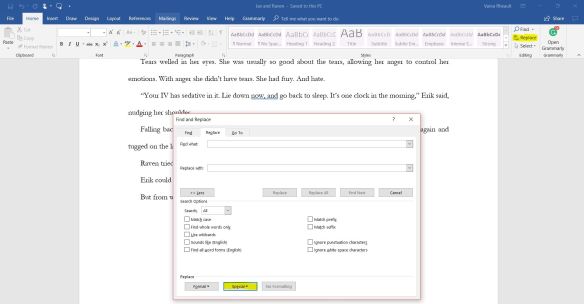
taking out tabs

Select the Tab Character.

2018-06-25_LI

Leave the Replace with field empty and click Replace All. This removes all the Tabs.

This should have taken them out. If, for some reason, you used the Spacebar to make a tab, go into Replace, and in the Find field hit the number of times you used the Spacebar to make the Tab (maybe five? Six?), leave the Replace line empty and hopefully Word will find all the Spacebar spaces you used for tabs and pull them out.

But now you have a whole book that doesn’t have any indentations. I’ve seen books like this. Don’t do it. You want your book to look as professional as possible so put them back in:

Putting your Tabs Back In

Again, select or highlight your whole document.
Click the little arrow at the bottom right of the Paragraph menu in the Home tab. Or right-click your mouse and select Paragraph from the menu.
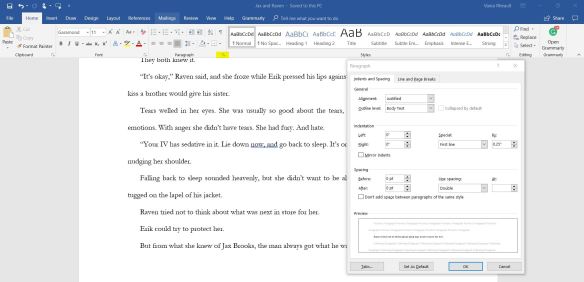
tabs

In the Indentation section of the box change Special to First Line and enter 0.25. This is how long your Tab is going to be. If you want it shorter you can do 0.23 or something. I use 0.25.

Click OK.

This puts all the Tabs back into your document, but you don’t want the first paragraph of your Chapters and/or scenes to be indented (traditionally published books usually do not have the first paragraph of Chapters or scenes indented) so you will have to go through your whole novel(la), look for the Chapter starts and scene breaks and take the tab out of the first paragraph. When you find those, put your cursor in front of the first letter of the first word, right click your mouse, select Paragraph and in the Indentation section, change By to 0. This will manually take the one Tab out.

When you start a new document, it’s easier to go into Paragraph, change First Line to 0.25 from the beginning, then you don’t have to go through all this after you’re done. It will take a little getting used to, to not have to hit the Tab button at the beginning of every new paragraph, but it will be worth it in the long run.

KDP Formatting Instructions at a Glance:

Take out all the Tabs, put them back in with the instructions above. Don’t indent Chapter starts. First paragraphs after scene breaks have started to become optional.

If there is any in your document, remove headers, footers, and page numbers.

Use a common font. I use Georgia for my Kindle, Garamond for the paperback.

Drop caps are not e-reader friendly, at least not in my experience, and I don’t have enough patience to make them work. Remove those as they will probably mess up your paragraph during conversion.

Set your margins to .5 all around–top, bottom, left, right.

Set your line spacing to 1.5. Not single, not double.

Select your all your text and set to Full Justified.

Don’t use a bunch of Hard Enters to make new pages. Please insert page breaks to create new pages. Lots of hard enters will not convert well. Insert page breaks after you Title Page, Copyright page, dedication page, acknowledgments, Table of Contents, and after each Chapter End. Use them to separate your back matter from your author page.

insert page break

If you have spaces between your paragraphs, you’ll need to select your file again, go into Paragraph and change After in Spacing to 0 pt. This takes out all the unnecessary spacing between paragraphs. (You will want to do this so you are not accused of making your book longer for the extra KU page reads.)
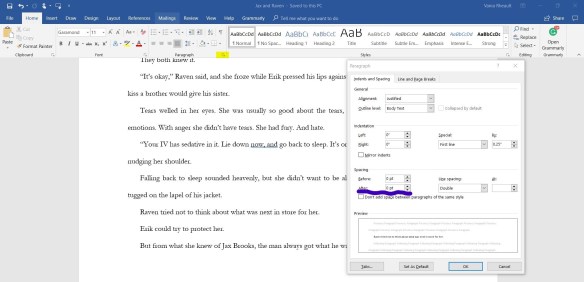
tabs_LI

To add your website or author page in the back, say, on your author page, use https:// with the rest of the website in the link.

What you’ve done is made your file as simple as possible. If you have graphics or formulas or are publishing a nonfiction book with all the bells and whistles, then I would suggest buying a book or researching how to format a complicated document. These instructions are for a fiction book with the general front matter and back matter only.


If you follow those guidelines for your Word document, you should be good to go conversion-wise. But if you don’t even want to do that then you can:

2. Use Kindle Create to format your file. The file won’t belong to you–you format it and then publish right to KDP. So you wouldn’t be able to use the file for other platforms like Apple Books or Kobo. But if you all want to do is publish to Amazon, download the App, upload your book into it and just fiddle with it until you like what you see. Watch the videos to learn how. I played around with it, and I formatted a 50,000-word book in an hour. Look here for details.

3. Use a template. The templates are already set so all you do is copy and paste your document into it. Most of these cost money, so look at these at your own discretion. You can start here: Beautiful Templates for Book Design Success

4. Draft2Digital says they’ll let you format your book on their site for free, and let you use that file wherever you want. You can even use them just to make a file for Kindle. You don’t have to go wide to use their free services. I haven’t ever tried them simply because once you get down how to format a file for Kindle, you don’t need anyone’s help. But if you just want to upload your document into D2D after you create an account, give it a try.

5. Buy a Mac and buy Vellum. I  hear Vellum is the best at formatting e-books and paperbacks. I don’t have a Mac but I plan to treat myself this summer so I can buy Vellum (although, if it’s as good as I hear, I’ll be tempted to redo all my books). If you don’t have a Mac or Vellum, and can’t afford either one, maybe you can ask someone who does to format for you. Maybe offer to trade for the favor. You never know.

6. I also hear Scrivener has formatting capabilities. I don’t use it–I write in Word. But if you use Scrivener, you can try it and see how you like it.

You’ll note that I don’t have the instructions on how to put a Table of Contents in your file. I think they are stupid for fiction. But that’s just my opinion and not a very popular one at that. If you want to know how to make a clickable ToC for your e-reader file, read the instructions I had to hunt down when I made a box-set for Summer Secrets a couple months ago.


Formatting your paperback is a bit harder.

1. I will always recommend using an interior template from CreateSpace or KDP Print. These templates are the same, you just download them from different websites. Choose the formatted template which has all the headers, footers, and end sections in place so your page numbers and your author name and book’s title are on the pages they are supposed to be on. If you take a look at any trad-pubbed book, you’ll see there aren’t headers on Chapter start pages, or headers or footers on front matter or back matter. The interior templates takes care of most of this for you. The only issue I had with them at all is that I usually have more chapters than the template allows, so I have to monkey with the end section breaks myself to create more chapters. Most of the time I just copy and paste the section end break of a previous chapter into the end of the next chapter and that works for me. If you have any working knowledge of Word at all, you should be able to do this without any hassles. The front matter and back matter is all laid out for you as well, so just copy and paste page by page, or chapter by chapter. The template is “chunked” meaning you can’t copy and paste your whole document into the template at one time. The chapters and front and back matter are broken up by section end breaks.

Have patience. If you do 98% of the work, I’m willing to bet you have a friend who would look it over and do the other 2% if you just can’t get it right.

2. If you don’t want to go this route, I’m afraid there isn’t much you can do for free besides get a very good working knowledge of Word and start from scratch to do it all yourself. I took a college class in Word, and I still couldn’t do my formatting without at least getting a good start with the template. But you can always look for a paid template. Most websites that sell e-reader templates sell interiors for paperbacks too.

3. Pay for a formatter. Reedsy has freelance interior design recommendations. They maybe be a bit expensive–that’s my guess just by looking at their qualifications. Fiverr pulled up a lot of options for interior formatting as well, and what I saw were reasonably priced. Of course, always ask for referrals, or other books they’ve done to get an idea of how their books look.


As always, I recommend learning how to do this yourself. If you’re going to be a prolific writer, or even if you’re just going to write a book or two a year, you might as well learn how to do it. Hey, you might even get good at it and you can trade services with other people. That’s what the writing community is all about: I’ll scratch your back if you scratch mine. If you can format for someone, maybe they’ll beta read for you, etc.

I know there’s stuff I’m forgetting. I mentioned Draft2Digital but not Smashwords. If you want to publish through Smashwords, they have their own system, and I’ve read their how-to-format-your-file book so that it will convert through their “meatgrinder” process.  I’ve never published through them, so if you’re interested, here is their STYLEGUIDE that will help you format your file to upload to Smashwords. It’s long, but Mark Coker makes it funny, so there is that.

When I first started formatting, it was a lot of trial and error. Make use of the interior viewer on KDP, KDP Print, and CreateSpace. Trust me when I say what you see is what you’ll get. If you get caught in an upload, fix, upload, fix, upload, fix, upload, fix pattern and you feel like you’re going to go mad, take a step back, go outside and come back later with a clear head. There is nothing worse than trying to format when you are quivering with rage.

Try practicing on short stories or novella. It’s a lot easier to work with few words then build up to a complete MS when you kind of know what’s going on.

I hope this blog post helps you format!

Good luck!

Up next is cover design!

Thanks for reading.

Editing: What it is, why you need it, and where you can find help.

Editing your novel can vary in cost. You can pay nothing if you can find someone to swap with, or it can cost you in the thousands if you pay for all the things.

The types of editing vary, too, and it’s wise to figure out what you need before you look for an editor.

Types of editing:

  1. Proofreading. This is a sweep looking for typos. This is probably the cheapest and easiest editing job you can hire out. Even a beta reader could probably do this for you if you give out copies of your final draft.
  2. Line Edits. This goes a lot deeper. These editors look for punctuation, grammar, incorrect word usage, syntax, repetition, subject/verb agreement. If you don’t have a strong grasp of grammar, punctuation, or have a weak vocabulary and you often use an incorrect word, then a line edit is probably mandatory so you don’t look like an ass.
  3. Developmental Editing. Developmental editors read your whole book and make notes on plot holes and incomplete character arcs. They point out pacing, passages that don’t bring anything to the story or doesn’t make sense. If you wrote yourself into a corner and pulled a deus ex machina to get yourself out, they will call you on it. Developmental editors are good for writers who haven’t finished a book and need help getting there, or for a writer who is trying to stretch their writing wings and may need guidance with a more complicated plot. Book coaches or book doulas aren’t exactly the same thing, so research who/what/when/where before you hire anyone.

As an indie, you must decide what kind of editor you need. Because also, as an indie, you aren’t going to be able to afford all three–though some of the big indies who “have made it” pay for a combination of the three because they can.

What’s an indie to do if you can’t/doesn’t want to shell out the cash?

Let’s start with the developmental edit.
Look for places online that offer a critique partner match-up. On Twitter that’s #CPmatch. If you’re part of the #amwriting crowd you could probably just tweet you’re looking for a critique partner for your new novel in your genre. But the problem with this kind of service is the expectation of reciprocation. If you’re not willing to help someone else, don’t bother to look online for someone to help you for free. Expect to pay out. You could pay a beta reader for some feedback, but I doubt they would go as deep as a developmental editor. Betas maybe will give you a sense of what’s working and what’s not–but developmental editors can tell you how to fix your issues. There are also a gazillion writing groups on Facebook. Join a couple and ask if anyone would be willing to work with you. But this kind of situation is the same as Twitter–be prepared to reciprocate in some way in the future. And be prepared to wait. Not everyone will get back to you when you’d like them to.

Join a local writing group. People will be more than happy to tell you what’s wrong with your work. If you can develop a thick skin, and admit you need help, a writing group critique can be valuable. But people have the propensity to be cruel whether online or in person. So if you really need help of this nature, it may behoove you to pay out. At least the editor will be professional about it and actually tell you what you need to know to fix your book. I’ve spoken with people who have gotten such cruel feedback from writing groups they’ve stopped writing. I don’t want this for you.

Can you be your own developmental editor? You may need to write a few books before you can get your plot points, backstory building, saggy middles, and character arcs under control. Read up on plotting and building character arcs. If you want to avoid tons of rewriting and backing yourself into a corner only a deus ex machina could get you out of, then maybe learn to plot out your books. Pantsing is okay if you know where you want to go, but just letting your mind and your characters run wild may open you up to forgotten side characters, saggy middles where no one is doing anything, and plot holes that may take forever to fix.

One of the best ways you can learn developmental editing is to chart out a book you read that you enjoyed. Write out chapter by chapter what happened (mini-cliffhangers), paying special attention to the first part of the book (what drew you in), the middle (what kept the plot moving), the couple chapters toward the end (what made you keep reading to the last page). This is why it’s important to read in your genre. Eventually, you’ll learn the rhythm and feel of your genre and it will show in what you write.

Line editing.
If you really need this kind of help, there aren’t many places you can find this type of editing for free. I line edit, and it’s time-consuming. Pointing out grammar, punctuation, syntax, incorrect word usage, and repetition takes a lot of concentration. I do “look and finds” a lot. “You used ‘walked’ 300 times. ‘Looked’ 250. ‘Saw’ 600.” Whoever line edits for you needs to be able to point out comma splices, tell you when a word like saturated is better than lingered when it comes to a scent (or did you mean smell?). Did you mean waive instead of wave? Waist instead of waste? Or if it’s April second in your novel and you wrote there was a full moon, but at that time of year, the moon would actually have been a quarter? This attention to detail that a line editor gives you cannot be produced for free. It’s just too much work. Did you mean Kleenex or tissue? Because if you’re referring to the brand, you better capitalize it. Same with Jell-O or gelatin. Does your main male character watch sports center or SportsCenter? Because only one of them is correct, and I bet you can see which one it is.

The good news is you can teach yourself a lot. Read grammar books. Self-editing books. You need to train yourself to pay attention to detail. Look up words if you don’t know their exact meanings. The best way to learn is to read a lot of fiction and non-fiction books. In time, you’ll get better. But until then, are you talking about karat, or carat when you describe your FMC’s engagement ring? If you don’t understand, or you don’t know what you don’t know, you’re going to have to find, and probably pay, someone to tell you.

Proofreading.
Proofreading is the cheapest form of editing. Don’t give your book to someone to proofread unless you are done.

Done.

Because when you go through your book fixing things, sometimes you can fix in a mistake right along with it. Your proofreader will be your last set of eyes. So don’t decide to rewrite chapter one after your proofreader has done her job. That wastes everyone’s time.

There are some software programs that can help–but a software program can’t take the place of human eyes, so take their suggestions with a (huge) grain of salt.

Grammarly. Grammarly is okay. But they are comma crazy. They are also hyphen crazy. I stopped running my manuscripts through it. You’re better off knowing your stuff and reading your MS line by line with a ruler. In my experience, no help is better than their help. **I do have Grammarly installed on my laptop, and though I don’t use it for my books anymore, it’s great for blog posts, tweets, and FB posts. I appreciate their assistance when I’m blogging, as for non-fiction, it’s an accurate help.

Hemingway Editor. The Hemingway app gives you a free sample online. Just copy and past part of your manuscript into the program and see if it would be beneficial to you. It’s only $20.00. I have it, but I don’t use it.

ProWriting Aid. I’ve used the free sample online, and it’s similar to Hemingway. They have different levels of pay (per time usage), so see what’s best for you if you like the online sample. My friend Aila loves it and wrote a great blog post about it (but please note the giveaway is over), and she’s an affiliate with them. If you decide to buy the program, I would appreciate it if you bought it from her affiliate link.

If you have trouble with syntax, natural-sounding dialogue or if you have slow areas that affect your pacing, you may want to try having your computer read to you. I love doing this–especially if you ever think you’ll turn your books into audio. The voice isn’t perfect, but it’s better than nothing. Some people read their manuscripts aloud, but because you know what you want it to say, you may miss things.

Here is a list of my favorite editing books:

Writing Deep POV

Self-Editing On a Penny: A Comprehensive Guide

Self-Editing for Fiction Writers, Second Edition: How to Edit Yourself Into Print

VOICE: The Secret Power of Great Writing

Fix Your Damn Book!: A Self-Editing Guide for Authors: How to Painlessly Self-Edit Your Novels & Stories

Mastering Showing and Telling in Your Fiction (Busy Writer’s Guides) (Volume 4)

Structuring Your Novel: Essential Keys for Writing an Outstanding Story

Creating Character Arcs: The Masterful Author’s Guide to Uniting Story Structure (Helping Writers Become Authors) (Volume 7)

That should be enough to get you going. I’ve read all of these and they are my favorites.

If you hire an editor, always be sure to send a sample first. Some editors charge you for this, but if you hire them, they’ll put that fee toward your book. Give them as clean a draft as possible, because if your sample is a mess, they will quote you higher. They’ll think your book will take them a lot of time.

Writers are not always good editors, and editors don’t always make good writers. Writing and editing are different skill sets and they are not inclusive of each other.

Know what you’re getting into before forking out the cash.

Where to look for an editor:

Join Alli, the Alliance for Independent Authors. They have a great list of resources for indies. They take a stance on putting out supremely professional work though, so don’t be surprised if their resources are expensive. Unfortunately, you can’t gain access to their resources without becoming a member.

Joanna Penn makes her resources available for free. But be careful. Someone’s best fit won’t necessarily be yours.

Reedsy. Create an account and you will have their resources at your disposal. Vetted for skill and professionalism, you’ll get what you pay for. They have a lot of different freelancers for the different kinds of editing you’d be interested in.

reedsy editors

Start looking for an editor quite some time before you wish to publish. You’ll be put at the end of the queue. While you wait for them to edit your book, you can work on something else, get your author platform going, go on vacation, what have you. But you won’t be working on your timetable anymore.

I hope this blog post and resources have helped you a bit.

Next up is formatting! Fun times!

Thanks for reading!