My Wedding Quartet Update

I haven’t been doing much with my series, so there’s not a lot to say about it (she says but after she’s finished typing she has a 1400 word blog post about it).  I have finished book two, which will now be book one. To stop having to give that convoluted explanation, I’ll just refer them by the order they will be published. I changed them because I realized the second book I wrote was stronger, and it would make for a better first book in the series. This will take a little rewriting, as I started the book thinking readers were already going in knowing who characters are, but that’s okay.

I finished the first read-through of book two, and after I finish the read-through of book one, I’ll print them both out and add to book two since I know more about what’s going on with the story.

What’s been dragging me down has been looking at stock photos for the covers. I briefly looked into hiring them out, and depending on how much hair I lose between now and when they are ready to publish, I still might. The problem is, and the problem most indies have, is figuring return on investment versus cost. I found a site that will do custom covers for 350 dollars a piece. Now, if I were only doing a standalone, that would be more than manageable. That also includes a full paperback wrap, so I wouldn’t have to worry about that, either. But being that I’ll have four, well, you can do that math. (In case you don’t want to, that’s $1400.) You can see how I would maybe balk at that. Now, I’m not saying I can do as well as that artist can, probably (most certainly) I can’t. But I’m poor, and I have no problem with saying so. I would have to work a lot of hours to cover that. And with the way my books are selling, I would never recoup that cost.

So, for the past few nights, instead of writing, I’ve been researching wedding covers, looking at stock photos, and slowly losing my mind.

To make matters worse is that yes, there is going to be a wedding in this story, but the bride and groom are not a featured couple in the any of the books, so does it make sense to put a bride and groom on any of the covers?

My books all end with some kind of a wedding proposal or a promise to love forever, so implying my couples will get married at some point isn’t a lie.

Another reason I have so much pause is something someone said in one of those FB book cover groups I keep talking about. Someone said that indies are held to a different standard than trad-pubbed authors are. And I guess they are right. Our covers better be pretty damned special to catch a reader’s eye because we can’t depend on our well-known names to make the sales for us.

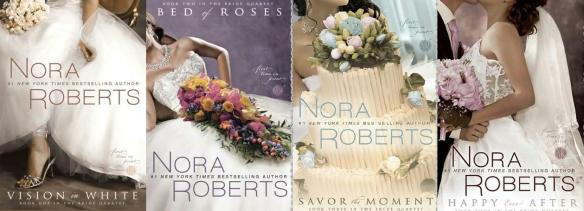
nora roberts quartet

I think of Nora’s quartet when I’m looking at my own covers. If I thought I could get away with it, I would definitely do something similar. Look here for the article accompanying the image I borrowed.

If I go with this way of thinking, I most definitely need couples on my covers. Maybe not locked in a steamy embrace, because these books are the same as other books I’ve written. Not a lot of sex, but there is some.

What does that mean for me? Can I put bridesmaids and groomsmen on my covers? Singly? Because I’ve looked through a lot of photos and I can barely find one good couple that looks part of a wedding party, much less four.

Can I put a bride and groom on all my covers?

Items don’t seem to go over as well with indie authors, so choosing bridal bouquets or other wedding paraphernalia may not be enough to make a sale. (See the dreamy covers on Nora’s books above.)

If I take the wedding element away, that gives me more choices, but that still leaves me

Elegant couple posing together.

The plastic, vacant looks on their faces do not match how I feel my characters are portrayed in my books. (Photo purchased from depositphotos)

digging through photos of pretty girls with dorky-looking guys. I don’t know how that happens, but it’s weird. (Out of respect for the men, I won’t post an example here.)

Or I get too “plastic” and they look kind of fake. Definitely not the kind of book I’m writing.

I mean, you know the book covers this couple would end up on. Mega rich, lots of hot sex. And maybe one day I’ll write something like that, but I need down-to-earth couples, and sometimes that means the people look just a little too “real” for a book cover.

It’s a balancing act that makes me want to poke my eyes out.

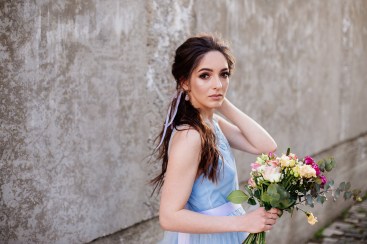
And while it’s a necessary part of the creative process, to keeping trying, that is, it does make me feel like I’m wasting writing time. Anyone can tell you  that you don’t need book covers if there’s no books. But I’ve blogged about book covers before, and figuring out what looks good, and finding the right photos, takes a lot of time. Not only time, but practice. I have Canva open all the time, shoving photos into their templates, experimenting with font for the titles. I did find this beautiful photo and I thought right away she reminded me so much of Leah, the female main character of my second book. She looks so much like what I envisioned, she literally took my breath away. You might say that would be a sure sign to use her for the cover, because if she evoked that much feeling when I took a look at her, hopefully she would for other readers.

Wedding bouquet in girl's hands.

Leah! Isn’t she gorgeous? 

But, don’t forget she would only be one cover of four. And she is cover worthy, so it’s not that she wouldn’t be perfect. But is she perfect for a series, and more importantly, is she perfect for a contemporary romance cover? Unfortunately, she doesn’t pose with a man in the series of photos that were published on depositphotos with this one. But I have purchased her, (that’s why she doesn’t have a watermark) so I may decide to use her somehow.

Anyway, I have 6 pages of book 3 I have written out longhand that I’ll be transcribing after I finish out this blog post. I still hope to have all four books done by Halloween. Probably not fully edited, but close enough that I should still be able to start publishing them around Thanksgiving. I read Craig Martelle’s book on Rapid Releasing, and to be perfectly honest, what he wrote didn’t give me much hope for a good launch. I have no readers. No one waiting for these, so to tell you the God’s honest truth, it doesn’t matter when I publish. I do know that after they are done I’m going to take a short break because these are going to drive me nuts between now and the end of the year.

I’ll keep you updated on progress though, and next week I’ll share a snippet or two of my favorite scenes so far. I’m glad that Autumn and Cole are the last couple because I’m very much looking forward to getting their story out, and as of right now, it’s what’s keeping me going. I love all my characters, but the sheer scope of writing four books and producing them all at once is daunting and I’m overwhelmed at times. But because of consistency issues, I’m glad I’m taking things slow and writing them all first before I publish.

As for Autumn’s blog posts, I need to get on with typing those out and writing more. As the stories go on, and she interviews more people, her list grows longer, and I’m falling behind. Still not sure what I’ll do with that extra content. It’s looking like more and more they’ll end up on the website to maybe drive some more traffic here. Not sure.

If you’ve stuck with me, thanks for reading! I’ll be visiting Tybee Island as you’re reading this, on a vacation with my sister. After I take a week to breathe and see the ocean, I’ll come back with a clear head and hit the ground running on the second half of my series.

I hope you all are having a great summer!


My books are wide! Check them out at your favorite retailer!

Don’t Run Away: books2read.com/dont-run-away
Chasing You: books2read.com/Chasing-You
Running Scared: books2read.com/running-scared

Wherever He Goes: books2read.com/whereverhegoes1
All of Nothing: books2read.com/allofnothing1
The Years Between Us: books2read.com/the-years-between-us

Try the Tower City Romance Trilogy Today!

Everyone in this business has a business–Be careful what you pay for!

When I was looking to hire out for my trilogy covers, I became overwhelmed. Very quickly. We all look for products and services that won’t break the bank, but will maintain some level of quality.

Finding that balance is harder than keeping a kid from screaming in a candy store after you tell him no.

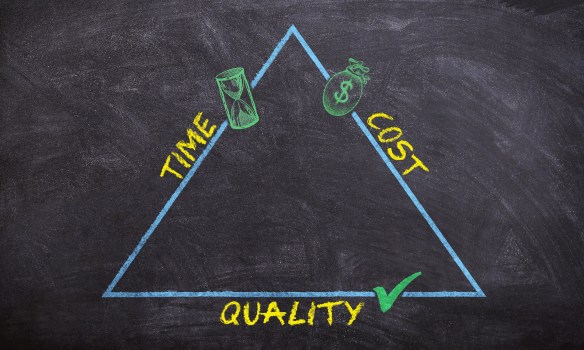
Quality that won’t break the bank that is delivered in a reasonable amount of time. Ugh.

quality cost and time I’m a part of various groups on Facebook, and I’m not going to divulge any groups here. (I don’t want to embarrass anyone, nor do I want to get banned.) Not necessarily to look for products and services, but to keep my ear to the ground and learn tips, tricks, and obscure rules that may never occur to me know in the first place. Like, apparently it’s against Adobe Stock’s terms of service to use their stock photos on romance/erotica book covers. Who would ever think of that? (And who determines if it’s romance vs. women’s fiction?) When I went onto the Adobe Stock site, there was nothing that mentioned photos could not be used in this manner, but it seems to be common knowledge among the Facebook group I’m involved in. After a quick Google search, I did come across this discussion thread, and it appears the questions were answered by an Adobe Stock employee. Luckily, a lot of their pictures of kissing couples, after a quick perusal, seem to be available on other sites.

And that’s the point.

When you hire someone, you are hiring not only their skill, but their knowledge. It’s their job to know the rules, the guidelines, the terms of service.

skills-3371153_1920

Not long ago I was scrolling through my feed, and a post caught my eye. A woman was explaining that she and her husband were starting a premade book cover business. It turns out that they had used free photos from stock sites like Pixabay. I’ve only learned this recently myself that you shouldn’t use free photos on a book cover because the people in the photo may not have signed model release forms. Also, a lot of these photos have name brand items in the photo that cannot be used on a for-commercial-use item, like a book cover. So if you purchased a premade from someone who used a photo that shouldn’t be used–you’ll be the one to get into trouble, not the person who made the cover. I’ve heard other stories like designers on Fiverr who steal images to incorporate them into “original” covers.

Looking for someone I could trust made my head spin and my checkbook cry . . . and I gave up.

The indie publishing rush has opened up the arena for cheats and thieves, scam artists and simply people who think they can do something and charge you for it when their skills are less than adequate to get the job done.

In the case of the woman using free photos for her premades, that’s insulting anyway. Anyone can get their hands on a free photo and shove some text on it using Canva. Part of a designer’s fee should pay for a stock photo that hasn’t been around the world wide web a few thousand times. {Insert crass whore joke here.}

girl reading

We’ve all seen her before. Would you want her on your book’s cover? No matter how pretty her hair is.

But how do you know what you don’t know? Maybe I can help.

There are three major things an indie pays for:

  1. Covers for their books.
    Don’t simply pay and walk away; even if you’re extremely happy with what you’ve been given. Especially if you’re extremely happy and maybe want to make this person part of your publishing team.
    Ask where they purchased the photos. A cover could have quite a few elements that make up the whole. If you are in doubt if any image is okay to use, look at the terms of service and make sure the photos were used in a legitimate manner. It could take some digging but better to know now, than after your book is published. Copies of your paperback may never be recovered.
    Ask where they found the font. There’re plenty of places that offer free-for commercial-use fonts. Your designer could have purchased a font suite, or picked them up singly as the need for them arose. If you’ve hired someone to do your cover, it never hurts to be sure the font is okay to use.
  2. Editing.
    Someone really can’t, well I was going to say someone really can’t cheat you with editing, but of course they can. They can charge you for a shitty job. I’ve been a victim of that. Note to self: a writer does not an editor make.
    Editors are human–even traditionally published books are published with typos. But not all editors are created equal and some will be better than others. Always ask for a sample. Some will do it for free, some will charge you a small fee and then put that sum toward the total if you hire them.
    If they won’t give you a sample, steer clear. After the sample, take a look at it. Does it look like they ran it through Grammarly? Used the Hemingway App, or ProWritingAid? Does it look like an actual human read it and made real-life comments? And do those comments make sense? Did they maybe give you a link of proof to back up their edits? (I do this with my friends, especially if I had to look it up myself to make sure.)
    If this person’s rates are reasonable and you don’t have to wait five years to have your manuscript back, maybe it’s a good idea to get a second opinion on his or her work. Because you’re ultimately building a team to help you publish your future books. And someone who can do the work and charge a fair price is worth their weight in gold.
    You want people around you that you can trust to do a good job. If she gives off a good vibe, and the second opinion of her work pans out, you may have an editor you can trust for many years to come.
  3. Formatting.
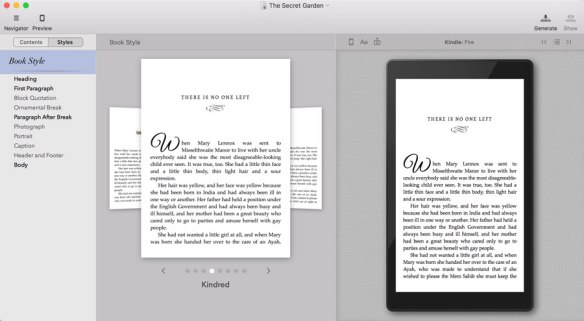
    This one makes me mad. You know why? Because Vellum has made it super easy to format books–both ebook and paperback (they offer large print, too!). It will generate files for Kobo, Nook, iBooks, and a generic epub for places like Draft2Digital and Smashwords. They will also give you a fabulous interior for paperbacks with dropped caps for chapter starts, and options to have the name of the chapter in the headers, which will change with each new chapter title! Trying to do that in Word would make me an alcoholic! There is a small learning curve, and I had to Google a couple of questions that popped up when I did a friend’s book, but after a couple of books, you can get the hang of it pretty quickly and format a book in less than an hour. Especially if you have all of your front and back matter written, and your links are already gathered together into one place.
vellum formatting ad

A picture of what using Vellum looks like. Taken from their site.

And this what drives me INSANE! People are charging for this. I realize that everyone deserves compensation for their time. And if you purchase a Mac so you can use Vellum, you’re investing 1500 dollars right off the top for your business. But holy cow, if you hire someone to format your book and you know they are going to use Vellum, maybe you can network a little bit and find someone else who will do it for trade. Or if you already have a Mac and you know you’ll be producing a lot of books in the future, buy it yourself. You can take a look at it here.
Another way you can format your book is to use Draft2Digital’s formatting tool. You don’t have to publish with them to use the tool, but you do have to create an account, which feels like they are locking you in to use them to publish, but they aren’t. They format both paperback and ebook and there is no charge to use their service.
If you like Word and have a little knowledge about how to make the page numbers and End Section features work for you (the template adds them, but inevitably you’ll have to add chapters), you can try the template KDP Print offers you. This used to be the way to do it when you didn’t want to pay for a formatter, but it’s no longer the best way. Still, if you’re stuck using this, it’s better than not having a paperback option at all. There are scammers I’ve run into on Twitter who charge to do for this for you. I don’t know if they still do being that Draft2Digital offers you a free way, and almost anyone can find someone who uses Vellum because it’s that good. Once I pinned a tweet cautioning against paying someone to copy and paste, and a woman who did indeed charge for this simple formatting thought I was singling her out. I wasn’t, but she retaliated by giving me a poor review on a book of mine on Goodreads. She also charges for website building through Wix, and Wix, I’ve heard, is one of the easiest websites for a beginner to use. My friend Aila has a blog post about it, and she made Wix sound so good, I was tempted to change!

So, just be careful who you pay and for what. If you’re paying someone simply so you don’t have to do the work, that’s one thing, because we’re all willing to pay for convenience in one way or another. But sometimes it’s just easier to learn how to do things on your own.


Everyone from huge vanity presses asking you  to “invest in your book” to the person charging to copy and paste your book into a template provided by KDP Print for free are happy to take your money.

Trust doesn’t come easily to me, and I’d rather learn what I don’t know to stay in control.

There’s nothing wrong with charging for a service, just as there is nothing wrong with paying a fair price for that service.

Just be sure that the price balances the skill and you both walk away happy. Maybe a lovely business relationship will develop.


As a silly side note, I used a photo from Pixabay in a blog post last year. I said in the post I found the photo there, and since Pixabay offers photos free for commercial use, I was safe in using it for my blog. But I found an email in my author email (I rarely check that account) and this gentleman had emailed me about a photo I had used.

Hi there, 

Thanks so much for including one of my pictures on your page. I love seeing my work featured around the web.

This is the image the page is on: https://vaniamargene.com/tag/fear/

And this my image: https://www.flickr.com/photos/158456412@N05/40174218953/
Could you please link to https://www.mytradingskills.com as per my attribution credit request on the image?
Thanks very much and have a great day!
XXXX

Name: XXX
Title: Creative Director
Website: www.XXX.com

Imagine my surprise when I found that in my box. Of course, I changed the attribution in my blog post, just to keep feathers from being ruffled (who knows if he’ll even check), but could you imagine if his email had held any weight? I was scared for a second. So always make sure that the photo is safe to use. And that is your job, whether you hire someone or not.

I always give attribution to the photographer and print the photo ID in my front matter of my books. That causes some extra work for me because I had to swap out my files when I redid the covers for my trilogy. But I feel it’s best. I also credit using Canva.com to make those covers.

Cover all your basis, guys and gals, because we are in BUSINESS, and other people are in business too. Never think for one moment that someone will give you a pass if you make a mistake.

Happy and SAFE publishing!

Publish Safely!

photos taken from Pixabay and/or taken from and made in Canva.


Moving my books to IngramSpark. So. Much. Fun.

going wide girl on tracks blog post

If you’ve been following my blogs about going wide, I’ve been filling you in on what a pain the butt it’s been to move stuff over.

With my ebooks situated where they need to be (except for Smashwords, and are they worth it? I tried to look for a link to give you guys, but nothing came up since 2016? I don’t now if that speaks to their relevancy or not and it will have keep for another post), I’ll explain just what is going on with Ingram and if they are worth the hassle.

As always, you need to think of your business plan. If you are wanting a store to carry your books, or you want to hold a book signing, you may find some places that will take your books on consignment (meaning you buy your own author copies and give them to the store and you get paid when a book sells). This isn’t such a bad thing. But if you’re wanting to plan a book signing at a Barnes and Noble and they ask you if your book is available in Ingram’s catalog so they can purchase copies at the discount, if your books aren’t in there, you’re going to have to say no, and that looks unprofessional.

Anyway, so I began the process of moving my books over. Read on to find some differences between KDP Print and IngramSpark, and you can decide if it’s worth doing it in both places.


kdp print logo

KDP Print is a dream. I love it. They still aren’t as good as CreateSpace used to be. They held your hand, walked you across the street, opened the door to Starbucks, and bought you a cafe mocha. But KDP Print is pretty good, too. No live people to help you anymore, but if you upload a decent cover file and formatted interior of your book, there’s nothing to worry about. It was the hand-holding CS used to give you that everyone counted on. They fixed things for you when you didn’t even know it! I know they fixed a couple covers for me without telling me and pushed my files through the review process. That was awesome, but also scary as hell because holy crap was it a surprise when “my way” didn’t work anymore.

That was almost three years ago, and if you want to look at my disastrous attempts at making covers way back when, look here for a good laugh. Since then I have found better ways of doing things, but even with all I’ve taught myself, the transition from KDP Print to IngramSpark wasn’t easy.

Big differences between KDP Print and IngramSpark

The Templates are Different

The biggest difference is the cover templates are different. This is only because the paper they use is different, making the spine thinner when IngramSpark prints them. This makes the templates just a little off on the spine.

Can you fit your KDP Print cover over an IngramSpark template? Yes, yes you can. But be prepared for your book from Ingram to not look exactly right. The text for All of Nothing on the back cover is off center a little, and it is for Wherever He Goes too. Not so much that you notice it right away . . . but just enough that it’s probably nothing you’d want to sell, or in large quantities like a book signing.

Here’s All of Nothing. Can you tell which is which? I did fix the spine on the one so it matches the front cover (that was part of my consistency stuff was talking about before).  And the prices on the back covers are updated, too.


This slideshow requires JavaScript.

I make my covers in Canva and I don’t have a good way yet of using a KDP Print cover on an IngramSpark template. There are just enough differences to make your cover out of whack. I have heard of authors doing it without problems, so maybe give it a try if you don’t mind being out 3.00-7.00 dollars for a proof copy.

If you can’t see the difference–IngramSpark’s copy is on the right. The text on the back is to the left a bit, and the pink color is brighter. Besides that, the books were the same as far as I could tell. I’ll go back and fix the text on the back cover . . . some day.

I don’t own Photoshop and I don’t know GIMP well enough to build my covers from scratch using it. Besides, why would I learn when I can make beautiful covers in Canva? I’ll continue to experiment and report back. (It takes a lot of work to be this lazy, yo.)

ingram all of nothing template for blog post

This is what IngramSpark will send you when you download a template for your book.

5.5x8.5_Cream_290

This is what KDP Print sends you. Very different.

It takes time and bit of know-how to figure out how to use the PDF that IngramSpark gives you. If you hire a designer and tell them you are publishing to both platforms, they will give you two files. I asked in a Facebook indie book cover group, and it’s a good one to join if you want feedback on a cover or your blurb. There’s also Indie Book Cover Design Group 101 that focuses more on how to make covers rather than just giving you feedback. They are both closed groups, so you’ll have to ask to join, but they don’t seem discriminatory. I mean, the let me in. Just kidding. They are very friendly, and I suggest you join both.

Anyway, I have read where you can cover up the ISBN that Ingram gives you with the template and they will add it for you, wherever you leave room on the back cover. I added mine in GIMP. This is definitely the hardest and most time-consuming part of the process.

The proofing process isn’t the same.

IngramSpark will send you an eproof of the cover that looks exactly like what you sent them. They certainly do not give you the bleed lines that I have come to expect from KDP Print.

2019-04-16

If you scroll down in the PDF, they’ll show you the interior, as well. But this is the proof of the cover they sent me. Kinda looks like what I sent them. So. Thanks?

Here’s KDP Print’s online previewer:

2019-04-05 (2)

For someone who has never submitted before, knowing where the bleed lines are would be a big help. I think this is so much better than what IngramSpark gives you.

When you submit your files to Ingram, be very careful. I was used to the way KDP Print does things, and they urge you order a print proof to look over your book in person. With Ingram, my book was already in distribution, and when I ordered a copy of my book, I thought I was getting a proof, but it was really an author copy. This could be a very bad thing for a new author who was counting on being able to look at their book first.

I can take responsibility for not reading clearly (or more like, not understanding what I was reading, wherein, it’s still my fault I wasn’t asking questions) but IngramSpark does not make things very easy, either. After a quick chat with an Ingram rep, it appears there is an option to not put your book into distribution. I suppose this is their way of making the book available to you so you can purchase ARC copies before the book goes live. This is just one area where it pays to read read read. Don’t do this in a hurry, and if you don’t understand something, bring up the chat box ASAP and ask.

Price Changes Take More than 72 Hours (and we all know that KDP’s 72 hours is really like . . . 4).

With IngramSpark, if you change the price of your paperback and you have the price on the back cover, they have to match. If you change your paperback price and then redo your cover to reflect the change, your cover may be unapproved because the prices won’t match. Price changes used to take effect on the first of every month. I recently read an article that said they changed this to weekly. I didn’t know this, and the submission for my cover of Wherever He Goes stalled because the prices didn’t match. They did on my end, but not on theirs. You can get around this by not putting the prices on your book. It’s not really necessary, and it gives you more freedom to change your prices if need be. I changed mine because I wanted to remain consistent and have a plan. I hope to have a big back list, and I needed a system I was going to remember.

KDP Print doesn’t care what’s on your cover. You could have a US price of $199.99 and sell it for $7.99 and no one is going to say anything to you. I know because my prices were all over the place. Ingram taught me professionalism in consistency, so that is one thing I can thank them for.

What else can help?

  • Keep communication consistent. If you have a general question that isn’t answered in their FAQs, the chat box is great. But if they email you, they want you to email them back. I tried to chat regarding my price discrepancy, but the rep told me to answer the email they sent me so information stays with the same person. That’s good to know so you’re not wasting everyone’s time.
  • Take your time and read.
    I have a ton of patience, but I had five books to move over and for some reason, I wanted it done yesterday. Even if my friend would have helped me with the covers (she ended up having a family emergency), what I didn’t know would have given me (and her) problems, anyway. Though not having proofs beforehand would have sat easier with me, since she knows what she’s doing. I know I could have slowed down. I would have known better about the distribution process had I asked questions and read that part better. I had kind of a “f#ck it” attitude with them that I’m surprised I had. I’d heard so much about how working with them was difficult, I got myself all worked up and caused problems for myself I might not have had otherwise.
  • You might get color warnings.
    IngramSpark likes CMYK. GIMP likes RGB. And that’s fine. Photoshop uses CMYK. I received color warnings and was told that because my covers were in RGB they may not print correctly. With the five author copies that came from IngramSpark, none of the colors came out weird. Clicking the “I know my cover could print like crap” box didn’t hurt the quality of my books. But the warning is big and bright and red, and it scared me. Just remember that Print on Demand isn’t the best in quality with either IngramSpark or KDP Print, and printing errors can occur no matter which service you use.


I was lucky and did all this in the month of March when they were running a free promo for NaNo participants. I was able to upload all my files for free.  If you are going to (re)submit files, I would look for some kind of code otherwise fixing mistakes you didn’t know you were making will be costly. Look for promo codes to bypass the fees, or join the Independent Book Publishers Association. It states clearly that free title set up and revisions through IngramSpark are part of their benefit package. They offer a lot of other things too that are worth taking a look at. I’ve also heard that free title set up and revisions are free through The Alliance of Independent Authors, but their benefits package is not so clear, so you may want to email them and ask first.

I’ll keep offering all my books through Ingram. I want to perfect my cover process–the easier, the better. If you’re wondering why I never mentioned the interior of my books, I format using Vellum. Out of everything I do for my books, at least I know the formatting will come out looking good.

If you don’t think you’ll ever ask to have a local bookstore carry your book, or if you think you’ll never do a book signing, I can’t say for sure if Ingram is a benefit. I like to try things. Partly because I’m curious, partly because I’m stubborn, and partly because I like to pass information along.

But one thing is for sure–no matter who prints your book, it’s a thrill to hold it, isn’t it?


Still working on my Wedding Party Series!
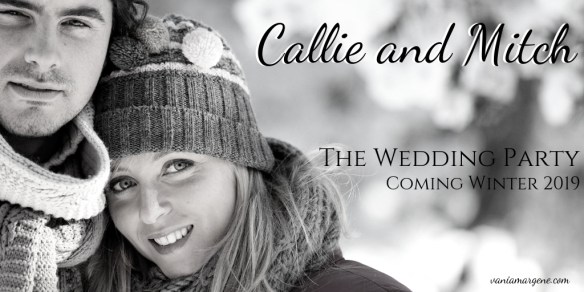
Callie and Mitch blog graphic

Mid-March progress . . . going wide . . . The Years Between Us . . . series update

The Years Between Us and E-book Update

The Years Between Us

The tentative front cover for The Years Between Us. Tired of looking at it yet? 

Slowly but surely I’m making progress with The Years Between Us. I’ve been having Word read it to me to catch typos and concentrating to find discrepancies and inconsistencies. I’m trying not to get bogged down in little stupid things, and when I take out a comma then put it back in then take it back out, I can only assume my brain is tired of the story and it’s time to pass it on and publish already. I feel like I have been working on it longer than some of my other books, but only because I’ve dealt with so much while writing and editing it. Had I not had surgery and not had to deal with this crappy weather, I would have had it out long ago. But, in any case, I have a proofer lined up and rarin’ to go, and using Vellum and making a cover in Canva won’t take any time at all once the book is ready to be published. I was thinking of doing a pre-order, but there’s already been enough time between The Years Between Us and All of Nothing, so I’ll just put it up for sale. I don’t have any promos or marketing lined up at the moment. I’m reluctant to do that since all my ebooks are everywhere and nowhere. Going wide is a stupid waiting game that has been made even longer by the fact mistakes were made.

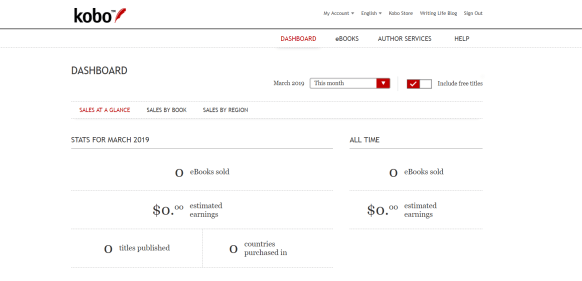
All of Nothing and Wherever He Goes are up on Kobo, and doing a bang up job with no promotion:

2019-03-12 That is as far as I’ve gotten so far. I should put them on Nook and iBooks, and Draft2Digital for the rest. Then I’ll have those two done at least, and do The Years Between Us when it’s released.  It will be a couple months before I can do my trilogy, but it is what it is.

Paperback Updates

Things are moving slowly with paperbacks. Ingram isn’t as hard to work with as everyone says they are, yet they present challenges in their own way.

One of the first things they dinged me for was having a price not match what was on the back cover. I put all my prices above the barcode. I think it looks professional, and I just like to do it. But, Ingram looks, and if your retail price does not match what you put on the cover, they won’t approve your files. So, note to self for future books–remain consistent. That’s a good policy to go by, anyway. You want to look professional, and you want your books to be the same across the board.

Consistency is key.

So after I received that warning, I thought, how do I want to price my books going forward? I redid all my paperback covers (tweaking them in Canva is really easy) and changed the prices on the back. I needed to price my books in a way I’ll remember, and I decided to price books in a series at $9.99, and stand-alones at $12.99. I don’t sell many paperbacks anyway, but I thought if someone were to want to buy them, buying a series shouldn’t break the bank, stand-alones can be priced a bit higher. After printing and distribution costs, Ingram barely pays you anyway, so I didn’t feel the need to worry about cost. I just needed something I could remember so when it comes to pricing books I remained consistent.

That holds true for covers, too. I had lightened up All of Nothing‘s paperback cover for printing reasons, and I uploaded that file to Ingram without changing the one in KDP Print. So, again, my covers looked a bit different. At one point, Ingram DID accept that file for my cover, but I didn’t order the proof. I wanted my books to look the same, no matter where someone ordered it, so I changed the brightness back to the original and resubmitted the cover file.

But after I resubmitted, they emailed me an error:

ingram errror email

Of course, I had no idea what this meant. When I read the GENERAL INTERIOR ISSUE I thought I had formatting issues. But that couldn’t be the case, since I formatted in Vellum, and that program is very very good. Then I saw that I didn’t own the SKU. That SKU is incorrect–the front part of the number is missing. So I had to chat with an Ingram Spark associate. It was quick and easy, but I still have to wait for my issue to be resolved:

ingram chat

I buy my ISBNs from Bowker. There’s no reason why my number should have been rejected. Especially since it had been accepted once before.

She was nice, but running into issues isn’t fun, and I can see where people would be intimidated by working with Ingram. It’s a benefit real people are behind the scenes working on your books and making sure all is well. But there is a certain simpleness when all you’re dealing with is an automated system like KDP Print. The automated system also allows for scammers to publish their books, so you have to take the good with the bad for each company.

Anyway, I want to get All of Nothing figured out and a proof ordered. I’m doing the covers in GIMP working with their template, and I want to make sure it will print well before I do the others. I’m hoping by spring this will all be over, and when I decided to go wide, I had no idea it would take so long or be such a pain in the ass.

Lessons learned so far:

  1. Be consistent. Prices, how your covers look. You want it all the same across the board. Not just for you and your readers, but because in the end, it’s just easier to deal with.
  2. Be patient. In the scheme of things, how much money am I losing not having my books for sale while I’m messing with Ingram? Not many. How many sales am I missing not having my e-books everywhere I want them to be? I don’t know. I’m waiting for my books to be where I want them to before I invest in any more promos. I’m losing sales, I’m losing sales. Once my books are wide I can concentrate on finding a readership on all the platforms. Will I miss KU money? Sure. But while this isn’t a debate on KU vs. Wide, I would never be comfortable trusting one source for all my royalties.  I already do that–it’s called my day job.
  3. Keep looking forward. I’m still working on The Years Between Us, and I’m looking forward to opening Jared and Leah’s file again and filling in some blanks. Besides blog posts, I haven’t written for a while, and I’m starting to get antsy. I did edit for someone, and she’s been going through them. After she makes the changes and does some rewriting, I’ll probably do a second sweep. That’s okay. I adore her, and I don’t mind at all helping her out.

I’m a bit closer to do some tutorials about doing a full paperback cover in Canva. I found a software for recording screen time I think that will work, and I’ve started watching tutorials on how to use it. I’ve been posting a couple covers I’ve made in a FB group dedicated to indie covers, and they’ve all said a tutorial would be helpful. My friend Aila said I should start selling them, but my range is very narrow, and for now I just prefer helping a friend here and there when I can, and practicing to make my own covers better.

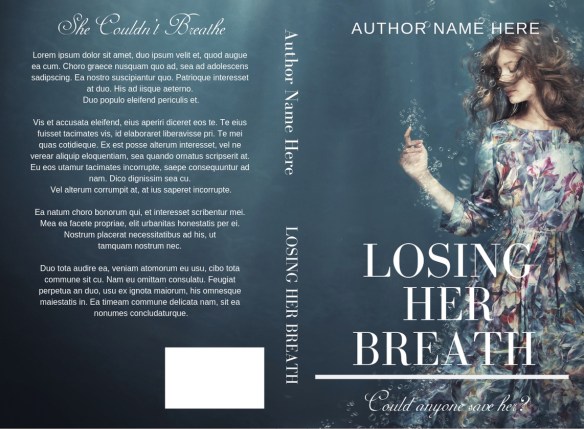
losing her breath fake cover

Do you trust me fake cover

Mostly it’s finding a good photo in canstockphoto.com. I have fun, and I’m developing an eye. Now I only wish it were so easy to do my own covers.  Doing my cover for my series is going to give me hives.

What do I want to get done before March?

I’d like to have a proof of All of Nothing ordered through Ingram. I’d like to have The Years Between Us published. But we’ll see. When you are working with other people, you need to be flexible, and like I said, in the scheme of things, waiting isn’t going to make my whole career fall into shambles. I’d like to have Jared and Leah plumped up and maybe an editing pass completed. We’ll just have to see how things go. The weather here seems to be perking up a bit, with highs in the thirties all week. The sunshine will help. I just hope it doesn’t storm again. We’ve had enough snow.

What do you want to get done before March?

Let me know!


jared and leah for end of blog posts


More of My Adventures Going Wide (Paperback Update)

going wide girl on tracks blog post

Like a clock with dying batteries, my wide adventures are moving, but at a snail’s pace. That’s okay. I think about all the time that’s being wasted, but I’m not sure what I’d be doing anyway, besides what I’m already doing–writing the next book.

While nothing can happen with my ebooks–all I can do is wait for my trilogy to drop out of KDP Select–my paperbacks have seen some movement.

It may not seem like anything happens when you fill out forms and send emails, but people read them, and one day, out of the blue, they respond. I heard from both KDP Print and Ingram asking for permission to move my ISBNs and confirming my decisions, respectively.

Courteous and friendly, I responded to both inquiries, and as of writing this, my ISBN numbers have been moved from KDP Print Expanded distribution and are now available to be published by Ingram Spark.

What this means, however, is now I need to adapt each paperback cover to the Ingram Spark book cover templates as the templates between KDP Print and Ingram Spark vary slightly–enough to throw the text of your spine off. Only because Ingram’s paper quality is a bit better (so I’ve been told), making the spine measurements differ. You can see the templates are a bit different, just enough to make it a pain in the butt.

ingram all of nothing template for blog post

This is a screenshot of a PDF Ingram Spark sends you when you ask for a template book cover for your book.


5.5x8.5_Cream_290

This is the PNG of a KDP Print template.

Adapting covers seemed like a huge undertaking, and I asked a friend to do it for me. Since then she’s had a family emergency, and I’ll be doing them myself after all. That’s fine. I should know what I’m doing for future books. I thought I’d do all of them at once, but then it occurred to me I should only do one and order a proof to be sure my process works. It can’t be much different than submitting to KDP Print, but my covers are already done. The trick is to make them fit on the new template without rebuilding them from scratch. I have an idea on how to do this, but being I have never submitted to Ingram before, how I think I can get it to work will be an experiment.

So, progress is being made, but it is slow going, indeed.

I’m looking forward to the process , as it will bring me closer to my goals: asking the indie bookstore in my city to carry my books and possibly Barnes and Noble, even if it’s just in the local author’s section.

So, that’s the update. Once I start adapting the cover for All of Nothing, I’ll let you know how it goes.

Questions for me? Drop them here, or reach out to me at my email, vaniarheault at gmail dot com. While I can’t give you a full tutorial on how to do this, if you have a specific question you can’t find an answer for, let me know. I might be able to help.

Thanks for reading!

jared and leah for end of blog posts

Happy November!

Happy November


November is finally upon us, and that means we only have 61 days until the New Year!

I’ve been moving steadily along with my goals. In fact, I disappeared from social media for a bit while I released my new book, All of Nothing.

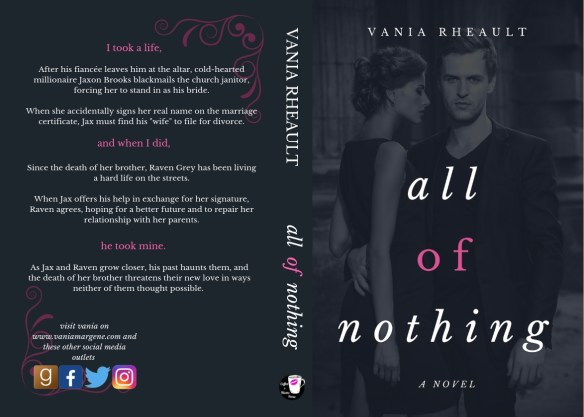
Here’s the lovely cover:

All of Nothing Paperback Cover

I did the entire cover in Canva, and I bought the photo on Canstockphoto for seven dollars. It’s not very fancy, but I do take pride in the fact that I did it myself. and it printed just as nicely as it looks online. It’s in KU, and I’m running a free promotion on it November 9th. It will be included in the Freebooksy newsletter that day. Because  I tried a Bargain Booksy on Wherever He Goes that didn’t do too well, I’m also putting that book for free that day to see if I can’t piggyback some downloads from All of Nothing‘s promotion.

As an early birthday present, a dear friend of mine gifted me a Mac and the formatting software Vellum. I was very excited in that since I had been doing all my own formatting, I could replace the interiors of all my books, and that’s what I’ve spent the last three days doing for Summer Secrets, my erotica novella series, and my Tower City Romance Trilogy. Because formatting is so easy with it, I put together a box set of my trilogy, so that is finally being offered on Amazon as well.

Nothing is ever easy though, and since I was doing the covers and insides, I went ahead and moved my trilogy over from CS to KDP Print. I hadn’t done that yet, so I wanted to get it all out of the way.

The second book in my series got lost in the conversion, and it took KDP four days to find it. It was over the weekend, and they did eventually restore it, so I was grateful for that. 🙂 If you haven’t moved your books over yet, I recommend you do so. My book was still for sale on Amazon, so it didn’t completely disappear, but it’s better to get all that taken care of sooner rather than later.

But I did redo the covers for Summer Secrets, being that I’m a bit better at covers now, and I redid the box set I created, inside and out. Though someone pointed out a typo on the first line of the first paragraph, {rolling eyes hard here} I’m still very happy with they turned out:


It wasn’t a big change, but I think it’s a step in the right direction, nonetheless. I didn’t get so different with my trilogy, so I won’t post them here. But I did redo them in Canva, which gives them a higher quality than when I used to do my covers in Word. A very warm shoutout to my friend Aila Stephens who told me about Canva so long ago. She’s just starting up a blog series about covers herself, so make sure you follow her blog for indie tips and publishing tips!

Anyway, so next up for me is my May/December romance that I’m already 8,000 words into. I’m so excited for this book! I’ve been thinking about a May/December romance for a long time now, and I was delighted when a plot popped into my head. All of Nothing is over 80,000 words long, and I don’t think Matthew and Zia (my book doesn’t have a title yet) will end up being quite so long. But I’m still excited to be mulling subplots and backstory as I get into writing.


This kind of sums up the whole story, and as a contemporary romance author, you know I’ll always dish up a nice happily ever after. I just make my characters go through hell to get there first.

In other news, I’m going to submit All of Nothing into the RITAs, a contest sponsored by the Romance Writers of America. The contest is open to both trad-pubbed and indie-pubbed authors, so in reality, I know I don’t stand a chance. But if my book could move on to a second round, or if the judges have some good feedback for me, I’d consider it a success. At any rate, it something I’m going to try, and I think All of Nothing is a solid book. It’s getting good feedback already, and my betas didn’t have anything bad to say about it. So, wish me luck!

Along with entering the contest, you also have to judge books in the first round, so I’ll be needing to dig out my Kindle and settle in for some serious reading coming up. Which suits, because I’m going to have carpal and cubital tunnel surgery on my left hand/elbow in the middle of January. I’m going to try to get Matthew and Zia at least written by then, so while I recover I can do some small edits. It will do me good to rest my hands while I help in the judging of the first round. I’m very much enjoying being part of the romance writing community!

What else is going on? NaNoWriMo starts tomorrow! I won’t play, I haven’t played for a couple years now, but I may meet up with my group. Sometimes it’s nice to see people in person, talk shop. Catch up. I used to work with a couple of the members, so it will be fun to see them, too. But after the colder weather hits (I’m in MN) it gets harder to get out of the house. Even for pie and coffee at the local coffee shop.

I guess that’s all I have to report! I hope you all are doing well, and tell me what your end of the year goals are! Remember, you have 61 days! Do your best!

2019 is right around the corner! What do you have left to do in 2018_


Drop me a comment, and have a great weekend!


Whine a Little . . . Over There

There’s been lots of whining on Twitter lately. More specifically, authors whining about not seeing books sales. Even more specifically, authors not seeing their books sell.

Maybe it’s because we’re in the dog days of summer, or people aren’t looking forward to school starting, or the crap we’re all going to have to deal with when THE HOLIDAYS start in full-swing October first.Dog Days of Summer

But whatever it is, it needs to stop. Because YOU, and nobody else but you, can make sales happen for your book.

Mostly, this is on Twitter. I can say it louder for the people in the back. TWITTER ISN’T FOR SELLING BOOKS. If you’re a member of Writer Twitter, you’re a member of WRITER Twitter. There’s a reason why it’s called that. Because we’re writers. Join READER Twitter. It’s gotta be there somewhere. Maybe #amreading is wedged between #IhateTrump and #turtlesareweird. If you’re convinced Twitter is the only way to sell books, or it’s the only way you want to try, break into the #amreading crowd. Or try. I’ll leave a light on for ya.

But if you want to take stab at moving books instead of whining about it, explore these ideas. First though, you need to take a look at your book.

  • Cover needs to be decent. Needs to depict the genre, needs to fit in, but stand out (in a good way.) Join an FB cover group and get some critiques. Taking a second look at your cover and if it’s not up to snuff, fix it. It’s killing your sales before they start.
    Books to consider:

    Cover Design and YOU!: Dos, Don’ts, and Choices
    Why Does My Book Not Sell? 20 Simple Fixes (Writer’s Craft)

  • Make your blurb awesome! This is easier said than done. Bryan Cohen is great at this. He teaches webinars and he runs a business doing this. And he makes very good money doing it. But he shares his knowledge, so don’t just moan you don’t know how to do it. Read about it. You’re a writer. Research. Here’s his book. He breaks it down so you can do it, too. With his guidance, I write my blurbs in half an hour. Here’s a Book Description Critique with Bryan Cohen hosted by Reedsy. Watch it.
  • Make sure you have a decent title. No one told me this before I published, and now my very first book has a stupid title I can’t change because I don’t want to waste the money I spent on my ISBN number. If you don’t have any reviews and didn’t purchase your ISBN number, you can change your title. Changing your title and ISBN number will lose you reviews so if you only have one from your best friend Angie, she’ll probably post it again if you republish with a better title.
    Grab some ideas from Dave Chesson; he’s got some good ones.
  • Make sure your “look insides” (first sample pages) are decent. This can make or break you if all the other parts about your book are spot on. If you don’t have a solid POV, if you have typos, if your formatting is messed up, the best cover in the world won’t save you. Try to get your hook within the first few pages of your book so it’s included in the look inside. Turn that browser into a buyer!

Now that we covered that and your book is up to par, you’ll need to ask yourself what you’re doing to help your book sell. Tweeting every day isn’t going to help. So what can you do to spike sales?

  • Are you spending any money?  You have to spend money to make money. I’m not kidding. Lots of people are like, “I don’t have any money to put toward selling my book.” Then you’re not going to sell your books. No business has ever opened that didn’t need seed money. Investors. Start-up money. You buy stock for your shelves, you fork over for rental space. You pay for wages for your employees before you’ve even sold one thing. Your book isn’t any different. Nobody ever went into business for themselves because they needed money yesterday. Starting a business is a lifelong endeavor. What can you put your money toward?

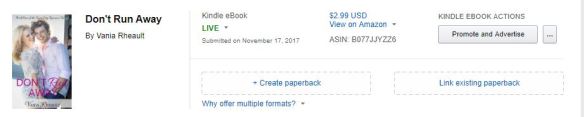
    *Pay for promos. I spent 80 dollars to give away 4,000 copies of Don’t Run Away in a free book promo for FreeBooksy. It got me some reviews, and lots of KU reads for the whole trilogy. I made my money back and then some.

    *Pay for giveaways. Goodreads did away with their free giveaways but because you have to pay, the market for giveaways isn’t so saturated. People have debated as to whether or not it’s a good thing, but I think it is. I haven’t tried them yet, but in the spirit of trying one new thing with each new release, I’ll be trying it when I publish All of Nothing this fall. Read about them here.

    *Pay for ads on Amazon. This isn’t as scary as it sounds. I’ve been blogging about my experience. It won’t break the bank to give it a try, but it’s important to do it correctly. Brian Meeks has a wonderful book about it. Amazon changed the platform a bit, so his instructions are already outdated even though his book is only a year old. But his advice is still as good as gold, and just as valuable.

    *Pay for ads on Facebook. These are trickier than Amazon ads. At least, I’ve read that they are. I haven’t tried Facebook ads, and if you don’t have the money to spare, I would suggest going with Amazon ads first. I’ve spent under five dollars experimenting with Amazon Ads. But if you want to try FB ads, again, do it correctly. Michael Cooper has a super great book about it. It’s important to try ads correctly, otherwise you’ll blow through money, claim they don’t work, and you may write off a great way to let people know about your books!

    *Pay for a blog tour. I used to hear a lot about these two years ago when I joined Twitter, but not so much anymore. You don’t have to pay someone to set up a blog tour, but if you pay a legit person they’ll know the best blogs to submit your book to. I’ve never tried one of these. They’re time-consuming. Either you have to fill out an interview sheet or compose a guest post for that blog. If you’re doing a full tour, that could consist of anywhere between 5 to 20 or even more blog sites. That’s a lot of guest blogging and interviews when maybe you should be writing your next book.

    *Reviews. If you do this in a legitimate fashion, this can be a coup for you. I have not tried it because the service I wanted to try distributes the books to readers through BookFunnel and that goes against KDP Select’s terms of service. I pulled Wherever He Goes out of Select to try this review service, and it comes out September 3rd. It wasn’t doing well in KU anyway, so I didn’t see the harm in trying. I’m going to try Happy Book Reviews. I’ve heard good things and so-so things about results. But if you have a good book with a good blurb and good cover, and the plot/genre isn’t too weird, you may get good results. Give it a shot.

  • Are you writing more books? The best marketing you can do is release new books. Lots of debate on quality versus quantity, but if you just can’t scrape up the cash to put toward your book’s promo, at least writing and releasing is free. *As free as you can get without spending money on cover, editing, etc. I’ve heard you drop off the Amazon algorithms after three months, so you want to release something every three months. Try releasing tie-in novellas. Or just dig in your heels and write the next book. I see lots of people trying to build careers on one book, and that only works if you write a non-fiction book and your career is already based on that book. Readers expect more from you. Keep them happy.
  • Offer to guest blog on other people’s websites in your genre. Ask “up.” Someone in your genre who has more followers than you. Someone whose website gets a bit more traction than yours. This is where your tweeting should come in handy–you’ve made connections, don’t be afraid to ask. Most people would love to host a guest blogger. It frees up their schedule for the week. But make sure your book is up to snuff or they’ll turn you down. And be prepared to giveaway a book. That seems counterproductive to sales, but lots of bloggers want to reward their readers for showing up.
  • Think local. Ask your town’s newspaper’s lifestyle section to do an article on you. If you have local small magazines, ask them to do a profile. Ask your indie bookstore if you can do a signing, or if they’ll sell your book. Heck, maybe get together with a couple of indies in your area and ask Barnes and Noble if they’re willing to do an Indie Night. Asking is hard. We’re introverts at heart, but even if the answer is no, at least you can say you tried.
  • Take a hard look at your book. Besides the cover, the editing, the blurb, the title, ask yourself, is this something someone would want to read? Especially if this is your first book. Indies like to experiment when they’re starting out. We’re finding our niche; we’re finding our passion. Experimenting with your hamster detective series is cool, but can you get sales? Maybe not. So take a hard look at your book before you throw money at it. It may not do any good. And that’s the sad truth. If you can be honest with yourself and say yes, my book has readers, all I have to do is fine them, then good luck!

Whining about lack of sales isn’t going to help you sell books. After a while it becomes annoying, and you end up tarnishing your reputation. If your first book isn’t working, then move on. Write something else. Write something better. We get better at our craft with every book we write.

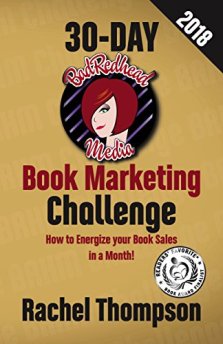
book marketing challengeRachel Thompson says we don’t get traction with our careers until we have at least 6-10 books under our belts. As the self-publishing industry gets more competitive, that number may get higher. If you’d like to read her awesome book about marketing, you can look for it here.

Book sales are subjective. What works for you may not work for someone else.

The best advice I can give you is write well, and publish often. Stay consistent. Build your brand on a genre you love to write.

Sales take time.

Have patience, and good luck!


buy image for blog


Changing Your Book Over From CreateSpace to KDP Print

This is the big bad everyone is talking about–moving your books over.

Do you want to move your books from CreateSpace to KDP print? I think, yes. Because if you’ve been following what CreateSpace has been doing (ie, cutting staff, removing services) then you know that Amazon is in the slow process of getting rid of it. Not that anyone from Amazon has admitted it.

If you’ve been avoiding it because you think it’s going to be hard, don’t worry! It will be fine. I did it just to see how it would go, and I ended up doing half my books.

Let me tell you how.

First, you go to your dashboard on KDP. The one you check when you want to see your lack of sales.

Then, what you need to do is find the corresponding book that you have on Kindle, and choose Create Paperback.

blog going from cs to kdpp5


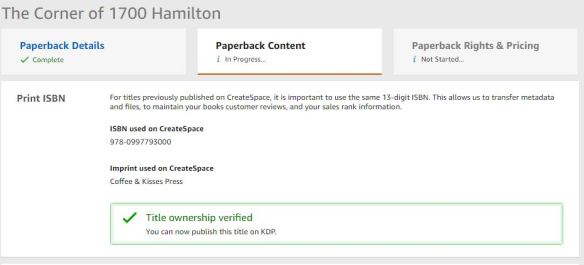
After that, there is a place for you to enter the ISBN number you used for CreateSpace. Log into your CreateSpace account and copy and paste the ISBN number from your paperback into the space.  After you type in the number, you have to hit ENTER, and the yellow button will highlight so you can click it. I don’t have a screenshot of that, but just take my word for it. They tell you in pretty green that yes, you are the owner of the title. 🙂 Thanks, KDP Print!

blog going from cs to kdpp

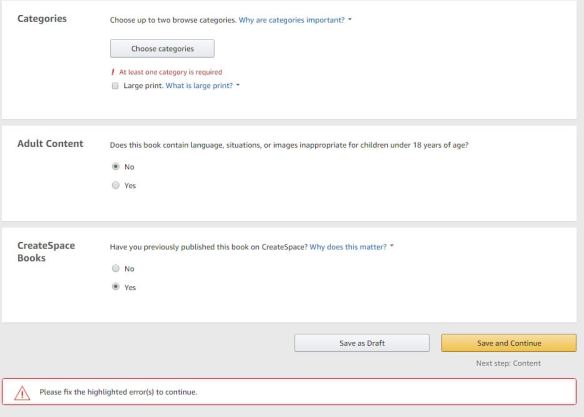
The categories don’t come with your manuscript or your cover, so you need to choose the categories over again. I didn’t, and I got the error message.

blog going from cs to kdpp4

Choose the option “you have published this book on CreateSpace.” That’s the whole point to this exercise.

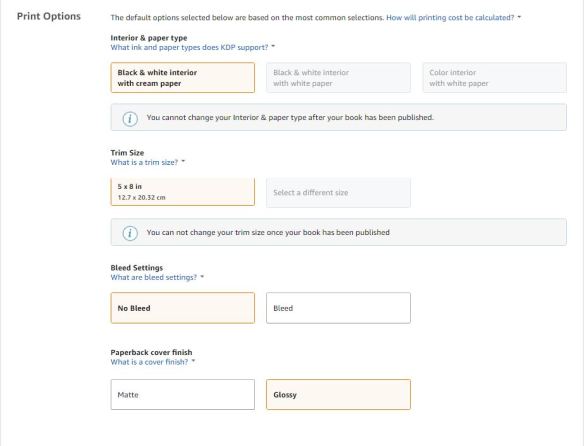
Also, another good thing to know is you can’t change your trim size and your interior since those things are attached to your ISBN number.

blog going from cs to kdpp2

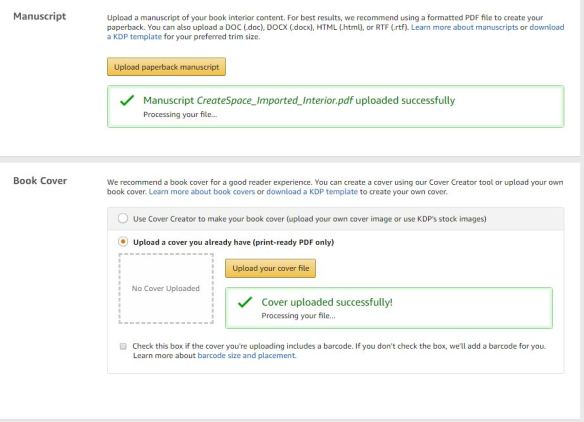
But after that, you’ll see that everything has ported over:

blog going from cs to kdpp3

After the cover and manuscript are processed, you can take a look at it through the online viewer. I open it just to be sure, because KDP Print is a lot more clear on cover and manuscript requirements.

There is one thing I found out the hard way:

If CreateSpace tweaked your cover in any way to make it passable for publication, those changes do not carry over. 

Apparently, when I did my covers for Summer Secrets, I did them wrong, and the lovely customer service people at CreateSpace fixed them for me. They didn’t bother to tell me I was doing them incorrectly. When I did a cover for one of my books in my trilogy, I called them for something completely unrelated, but the rep I spoke with pointed out that error as well. I thought since they were publishable, I wouldn’t have a problem, but I did.

I wouldn’t bring this up except for the fact that I don’t know how may covers CreateSpace helped along with no notice to the author. Is it bad? No, not at all. But if they tweaked your cover and KDP Print tells you something is wrong now, I hope you have the skills to do what CreateSpace did to fix it in the first place. Or if you hired a designer, you’ll have to ask them to make the changes.

Don’t worry if KDP Print tells you something is wrong–they get very precise when pointing out the errors. They won’t leave you guessing, and they let you know right away–in the information bar on the left-hand side of the online viewer.

It was just a surprise to me that KDP Print didn’t approve my covers when CreateSpace had published them.

You won’t know right away if they pass, even if there aren’t any errors in the online viewer–they do go into review, and you’ll get an email saying if they pass or not. And if they don’t, the email will explain why. But it is faster than the 24 hour time period that CreateSpace used to take. I got my emails back in 12 hours. The online viewer is similar to the one on CreateSpace. Sometimes it seems like it will take forever for the viewer to populate your content, but I just hit REFRESH and that seems to do the trick to get it moving.

Don’t forget to hit SAVE AND PUBLISH.

And that’s all there is to it, really. I messed with the insides of 1700, so I ordered a new proof, just to be sure.

The link to order the proof is small, and it’s on the bottom of the page, so you’ll have to keep an eye out for it if you want to order a new proof.

I didn’t mess with the insides of Summer Secrets, so I didn’t order a proof of either of those. Proofs take a lot longer to come than they did using CreateSpace, and author copies, too. Definitely plan extra time into your publishing schedule.

All in all, I was happy with the experience. It will go smoothly for you if don’t have cover issues and if you don’t change anything with the interior. Although, now is a good time to do those changes, if that’s what you were going to do at some point. All you would have to do is upload the new file and replace the ported file from CreateSpace with the file you made changes to.

Always order a proof if you make interior changes, unless you are prepared to flip through every page with the online viewer.

KDP offers instructions and offers advice, and you can read about that here.

Otherwise, there’s not much else to tell you. I plan to do the trilogy soon. Oh, and if you’re selling paperbacks like hotcakes right now, you probably don’t want to do this until your sales die down because as you switch over, your paperbacks aren’t available for purchase.

If you’re worried, try not to be. I was a new author when I did my covers, but I’m better at it now. If you used a cover designer or in any way were more experienced than me when publishing your book, you’ll be just fine.

Jump, don’t be pushed.

Good luck!


buy image for blog


How Free is Self-Publishing?

It costs absolutely nothing to publish a book. Nothing.

free

There are free word processing programs like Google Docs. You can use a library’s internet and computer. Platforms like Draft2Digital and Amazon’s KDP will provide you with some kind of book identification number so you don’t have to buy ISBNs for your books.

All you need to do is write, make a cover in Canva using their free website, use a free for commercial use picture from Pixabay, Pexels, or Unsplash, and you are a published author. All for free.

But when isn’t that a good idea?

Do you know Amazon has over 7 billion books in their Kindle store? And writers publish more every day.

So not only are you competing with everyone you know on Writer Twitter, you are competing with writers who are not on Twitter, big time indies who don’t have much time for social media. You’re competing with traditionally published authors, and those authors range from anywhere between The Big Five to tiny university presses.

You’re competing with writers from the US, Canada, (do you know how many writers I know who live in London, Ontario? A lot!) the UK, Australia, and many other countries.

Over 7 billion books.

Okay. What what is this blog post really about now that I’ve made you feel like crap?

Spending money.

Self-publishing is free.

Until it isn’t.

I do everything myself. For my trilogy, and Wherever He Goes, I wrote them, edited them. I formatted them and did the covers. The orangy hue on the third is my fault. I didn’t have the skill to fix it. It doesn’t look bad on screen, but the paperback could look better. That’s just the way it is, and I accept that.

What can you pay for when you self-publish?

  • Editing
  • Formatting
  • Cover

Those are the three big ones. But we can go further:

  • Beta Readers/Critique Partners/Book Coaches/Book Doulas
  • Blurb writing
  • Reviews/Arc review services like NetGalley
  • Advertising, ie, Facebook ads, Amazon ads, Promotions
  • ISBNs
  • Paperbacks for giveaways
  • Giveaway fees like on Goodreads

No one is saying you have to pay for all of that–or any of it.

It’s up to your discretion how much money you want to pump into your books.

See, this is the problem. No one wants to admit that they publish their books to sell them. Which leads an author not spending one dime on their books.

They are publishing for themselves. I repeat this over and over again like a broken record:

If you only publish for yourself you have no right to complain if your books do not sell.

But if you can admit you want people to pay to read your work then you have to take a hard look at your book.

Is the cover you made yourself doing the job?

Is your blurb up to snuff or is it confusing and off-putting?

Are there typos in the first few pages of the Look Inside?

If you can’t put out quality work yourself, then you’re going to need help.

It’s that simple.

And that difficult because saying you need help is a lot easier than being able to afford said help.

That being said, you can teach yourself how to do these things.

If you just shut down on me, it’s because you don’t want to take the time to learn. That’s okay. I wear clothes every day. That doesn’t mean I want to learn how to sew.

But what I’m trying to tell you is that you must find a happy medium between doing things for yourself and hiring out the help you need to make your book desirable to readers.

Because remember, readers have 7 billion choices.

Listen, my books aren’t pretty. Use the look Inside Feature for any of my books and you’ll see basic formatting. The embellishments are non-existent.

That’s fine. I taught myself enough to get by, and that’s good enough for me.

Readers aren’t going to care if you have fancy chapter headings if your story sucks.

So, being I’ve published a few things, I can suggest where you should put your money–if you have any, or where you should ask for favors from friends–if you have any. Just kidding!

  1. Editing. If you’re a newbie writer, this means a developmental edit as well as a line edit and proofing. Plot holes, flat characters. Developmental editing can be more of a job for a critique partner or someone from your writing group. Ask someone who reads your genre so they have a handle on the tropes and feel for the type of genre your book is in. Once you have a stellar story and a solid look inside sample, you need a good cover.
  2. Cover. Canva.com offers design classes. You need to train your eye and learn what makes a good cover. It can make or break your book. Plus, if you push your book in any way, ads, promos, giveaways, your cover will be the selling point. Look at your genre on Amazon. Look at templates. Try to duplicate them yourself in Canva. You may need to spring for a photo, but that’s not as expensive as you might think. I buy mine on canstockphoto.com for seven dollars apiece. Photos are even cheaper if you buy a credit package.

    A word of warning though. I write romance, and slapping some text onto a smiling couple is a lot different than making a cover for an Urban Fantasy novel. Fantasy, of any kind, requires a certain kind of cover. Negotiating a price with someone on Fiverr is a lot better than publishing a book that does not have an appropriate cover. Your sales will stop before they even start. I’m sorry, but that’s just the way it is.

    Sometimes you can find a pre-made template that’s cheap.

    Sometimes you can even find a photo on a photo site that is already doctored to how you need/want it to be. Set aside hours, days, if not weeks, to click through pictures. I’m barely 20,000 words into my next book and I’m already looking at photos.

  3. Formatting. Formatting for Kindle takes five minutes. All you need to do is set the options in Word so when you upload it into KDP it converts correctly. If you go wide and you use Draft2Digital, you don’t even have to do that. (Smashwords is a different story, and your Word file has to be formatted correctly or it won’t convert through their “meatgrinder” and they won’t publish your book.) Draft2Digital seems easier to work with, but I’m in KDP Select and haven’t used either of those services.


What is the cost of self-publishing? It can cost as much or as little as you want to put into it.

Someone opening a business always needs to invest. Paying for services is investing in your book business.

I used to think that I didn’t want to invest in my books because I may never get that money back. But that was incorrect thinking.

If my books are well-written, have a nice cover, and are formatted as to not turn anyone off from reading it, eventually, I will see that money returned to me by way of sales.

My books will be sold for years and years.  As I slowly make a name for myself, my sales will increase. It will take time, but I’m in it for the long haul, and I have patience.

I’ve put money toward my books by way of taking the time to learn how to do things for myself. I read lots of editing books. I read tons of blog posts about what makes a good cover. I’ve practiced making covers. I’ve learned to format my files. It took time. But time is money. I’ll eventually see dividends on the time I invested in my books.

time is money

It’s a personal choice.


This blog post begins a self-publishing series about how you can do most of these things by yourself if you want, and where to look if you don’t. I’ll give you the resources I used to learn and you can decide for yourself if it’s easier for you to hire out, or if you can’t afford it, where you can spend time learning things on your own.

Look for my next blog post about editing resources.

Thanks for reading!


Basic Rundown of Terms and What They Mean

It seems as if there is a lot of confusion in the way people post things online referring to who is what and what they do, and I see this mostly on Facebook. Let me clear up some confusion for any new writers who may be looking to self-publish in the near future. Here are a few basic terms and companies described.

  • CreateSpace
    CreateSpace is the paperback publishing arm of Amazon. This is where you go to create a paperback of your book, if you’re not choosing one from a myriad of other options. You can find free templates for your cover, and free formatted templates for the interior. They are free. You don’t need an account to download these. They also have a Cover Creator with templates and font/font placement. Choose a photo (available for commercial use) and the creator will create a cover in accordance with your book’s measurements. They also have a CreateSpace Community. If you have questions, they have most likely been answered 1,000 times already.
  • KDP
    KDP stands for Kindle Direct Publishing. This the Kindle arm of Amazon. Some people only publish on Kindle (or e-reader/tablet if they go wide {see definition below}.) The set up is much easier than putting together a paperback. Just format your file, upload your cover art, fill out all the fields for price, etc, and you’re done. Your ebook will be published on Amazon in 12 hours. They say to give them 3-5 days, but it has *never* taken that long.
  • KDP Select
    KDP Select is OPTIONAL. When you enroll your book into this program, you are promising Amazon you are not selling your e-book anywhere else, in three month blocks. That means you are not published on Nook, iBooks, Google Play, Kobo, or anywhere else e-books are sold, including your own website, during that time frame. This does not have anything to do with your paperback, and you don’t have to enroll in Select even if you don’t plan to publish your e-book elsewhere. It seems people use KDP and Select interchangeably, and this is not accurate. If you enroll in Select, your book will be enrolled in Kindle Unlimited, or KU. Readers with KU subscriptions can read your book as part of their subscription costs, and Amazon will still pay you for the page reads. If you want to know more about Kindle Unlimited, look here. You can unenroll any time, but KDP makes you finish out your three months, so plan ahead if you want to begin selling your books on other platforms.
  • KDP Print
    KDP Print is the paperback arm of Kindle Direct Publishing. With CreateSpace closing their online store and the creation of KDP Print, it is rumored that eventually Amazon will shut down CreateSpace. Why have two services doing the same thing? I’ve looked around KDP Print, and the submission process is similar. Even the downloadable templates are the same. The only difference is how your purchase your author copies. There was a lot of complaining at first, because KDP Print didn’t offer the same things as CreateSpace does. They are slowly changing that, though, and to me, that’s another indication that soon you won’t have a choice between the two. I only hope their customer service remains the same. I’ve had to call CreateSpace customer service on occasion, and I have always received polite and helpful service.
  • Going Wide
    Going wide means that you are not selling your e-books only on Amazon. That’s it. Lots of people don’t understand what this means, or they get confused because they don’t realize there is more than one place to sell books. There are a lot of opinions on this topic and you need to do what’s best for you and your writing and marketing plan. Currently, I’m in Select, but I feel as I add more to my backlist, I will expand. It’s never good to have all your eggs in one basket, but it may be a while before I have more than one egg.You have a couple options on how to go wide: You can upload your file to all the places yourself. Kobo recommends you upload directly to them so you can take advantage of marketing opportunities. But you can’t upload directly to iBooks unless you have a Mac and can download the necessary apps. Most people use a 3rd party aggregator such as Draft2Digital to distribute their e-books. But be aware if you do this, your royalties are lower. You pay D2D to distribute, but then you also pay the vendor for selling your book.
  • IngramSpark
    IngramSpark is the other company indies use to publish their paperbacks. They have better distribution (CreateSpace uses them to distribute) and The Alliance for Independent Authors suggests you use CreateSpace to sell your book on Amazon and use IngramSpark for other distribution. CreateSpace will give you a free ISBN number, which is why a lot of indies go that route, and CreateSpace is free (besides taking their cut of your royalties) and IngramSpark is not. Also, IngramSpark makes you purchase your ISBN through Bowker. If you decide to purchase one from Bowker, however, you can use that one for both IngramSpark and CreateSpace. That is another personal choice, and you will have to do your research and see what is best for you. If you plan to do any book signings, IngramSpark is the way to go. That way a Barnes and Noble can order your book from IngramSpark and return any that you do not sell at your signing. The cost is on you, for returned books, but bookstores do not like to deal with CreateSpace, as they view Amazon as a competitor.
  • BookBaby, Lulu
    If it all seems too much for you and you just want to upload your book and walk away, there are reputable self-publishing companies who will help you. Though I haven’t used BookBaby or Lulu, I have heard they treat you well, and don’t pressure you to buy services and products you can’t afford. Be aware that if a company offers “editing” that they do a light proofread or line edit only, and if you want developmental editing or a deeper sweep of your MS, you will need to hire that out before you submit your book to these companies. These companies are legitimate as far as I am aware. Joanna Penn even had the founder of BookBaby on as a guest on her podcast, and Joanna would never endorse a company that is not on the up-and-up. She is a member of the Alliance for Independent Authors and they are committed to helping the indie-publishing industry.These are not to be confused with other self-publishing companies run by Author Solutions. Companies such as Author House, Xlibris, and iUniverse are listed on the Writer Beware website, and you should use extreme caution when deciding with whom you will publish.

    Thanks for reading this quick guide. If you’re new to the writing and publishing scene, it may seem overwhelming, and there is never a lack of information on the internet. As always, check and double-check before you make any decisions, and always, always, be careful if you decide to pay someone for a service. It’s nice to think you can trust people you meet online, but in reality, the only person you can, and should, trust is yourself.

    Tell me what you think! And let me know how I can help.

Happy writing Vania Margene